o4&GPT-4.1快速入门实战:Mini DeepResearch
课程说明:
- 体验课内容节选自《2025大模型Agent智能体开发实战》(春季班) 完整版付费课程
体验课时间有限,若想深度学习大模型技术,欢迎大家报名由我主讲的《2025大模型Agent智能体开发实战》(春季班)

《2025大模型Agent智能体开发实战》(春季班) 为【100+小时】体系大课,总共20大模块精讲精析,零基础直达大模型企业级应用!

重磅新增DeepSeek+QwQ+OpenAI responses API+MCP技术应用与智能体开发相关实战内容:

此外,若是对大模型底层原理感兴趣,也欢迎报名由我和菜菜老师共同主讲的《2025大模型原理与实战课程》(3月班)
两门大模型课程春季班目前上新特惠中,立减2000起,合购还有更多优惠哦~详细信息扫码添加助教,回复“大模型”,即可领取课程大纲&查看课程详情👇

《2025大模型Agent智能体开发实战》体验课
GPT-4.1&o4快速入门 从零手搓Mini DeepResearch
一、GPT-4.1和o3模型入门介绍
1.GPT-4.1模型介绍
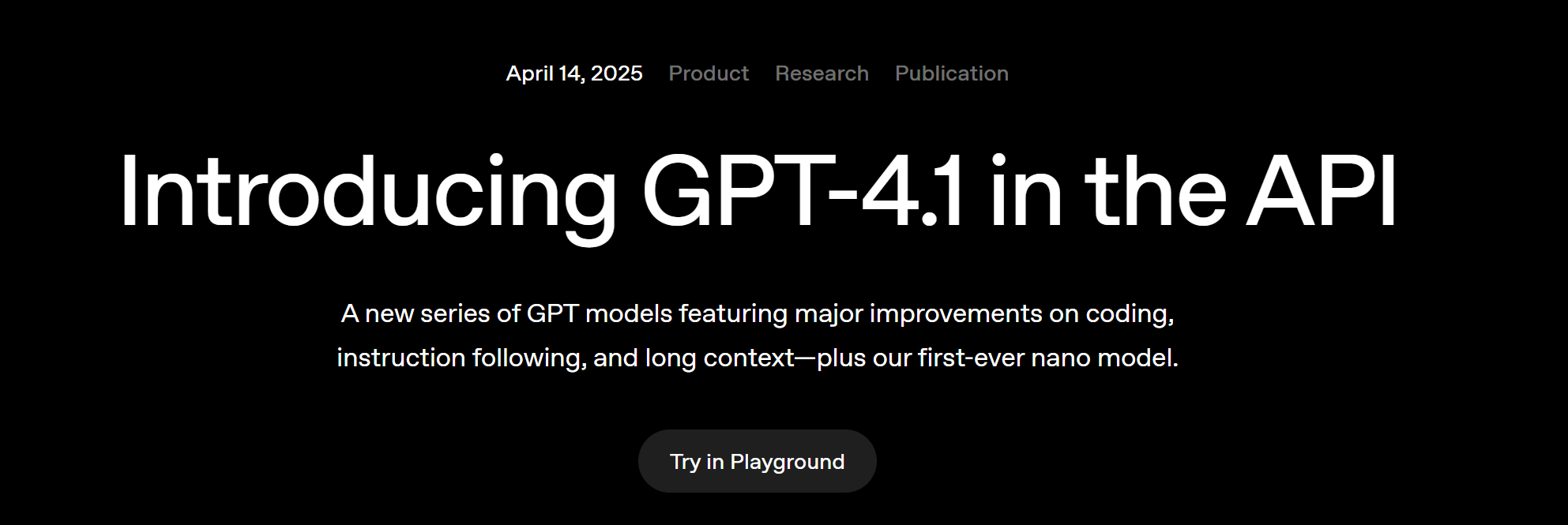
- GPT-4.1 API官网地址:https://openai.com/index/gpt-4-1/
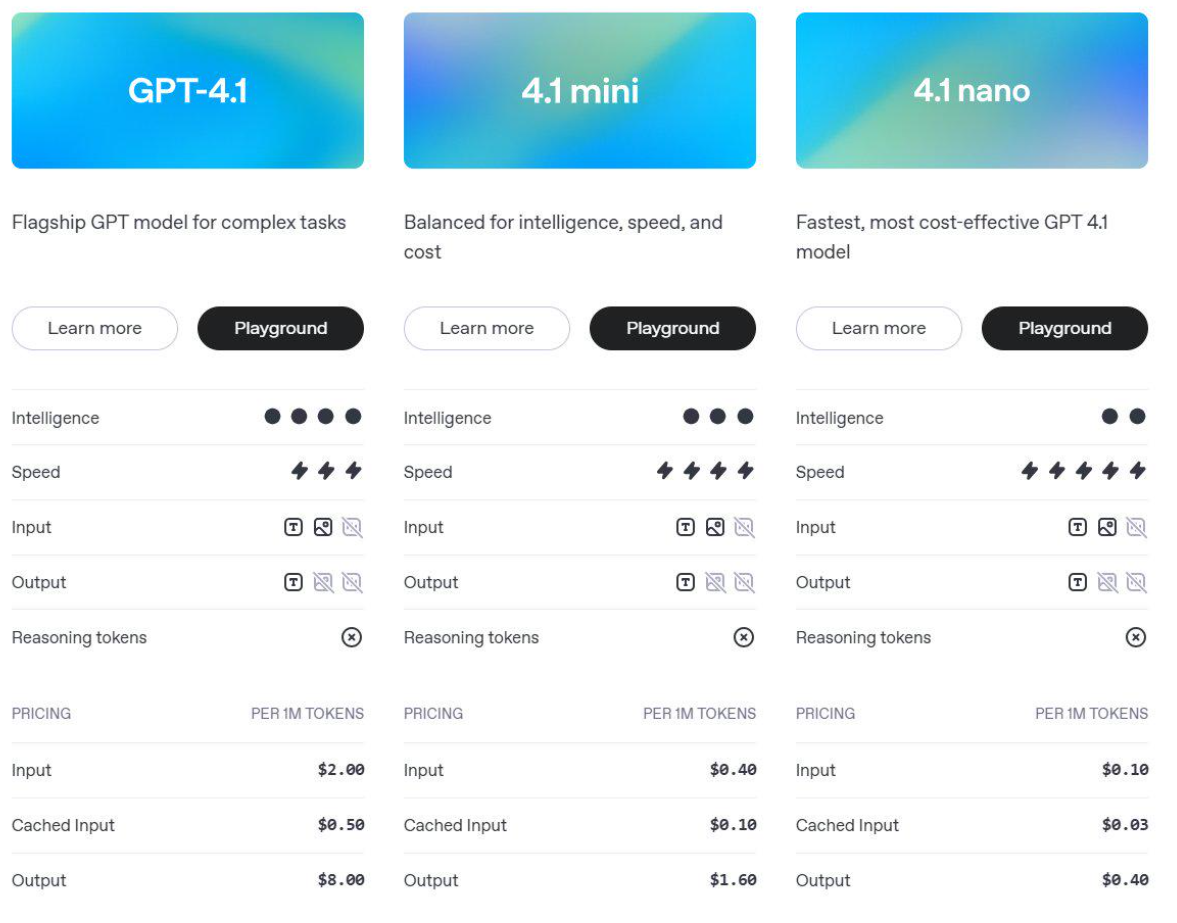
GPT-4.1是一个全新的 GPT 模型系列,在代码能力、指令理解和长上下文处理方面有了重大提升 —— 并且首次推出了 nano 级别的小型模型。OpenAI在 API 中发布了三个新模型:GPT-4.1、GPT-4.1 mini 和 GPT-4.1 nano。这些模型在各方面的表现都优于 GPT-4o 和 GPT-4o mini,尤其在代码生成和指令遵循能力上取得了显著提升。
GPT-4.1上下文窗口更大 —— 支持最多 100万个tokens 的上下文 —— 同时具备更强的长上下文理解能力,能更有效地利用这么长的上下文信息。这些模型的知识截止日期更新到了 2024年6月,也就是说它们掌握的信息比之前的模型更新。
-
编程能力:在 SWE-bench Verified(一个代码修复/编程能力评测基准)上,GPT‑4.1 取得了 54.6% 的分数,相较 GPT-4o 提升了 21.4 个百分点(绝对值提升),相较 GPT-4.5 提升了 26.6 个百分点——使它成为当前领先的编程能力模型之一。
-
指令遵循能力:在 Scale 公司推出的 MultiChallenge 基准测试(用于衡量模型跟随人类指令的能力)中,GPT‑4.1 得分 38.3%,比 GPT‑4o 提升了 10.5 个百分点。
-
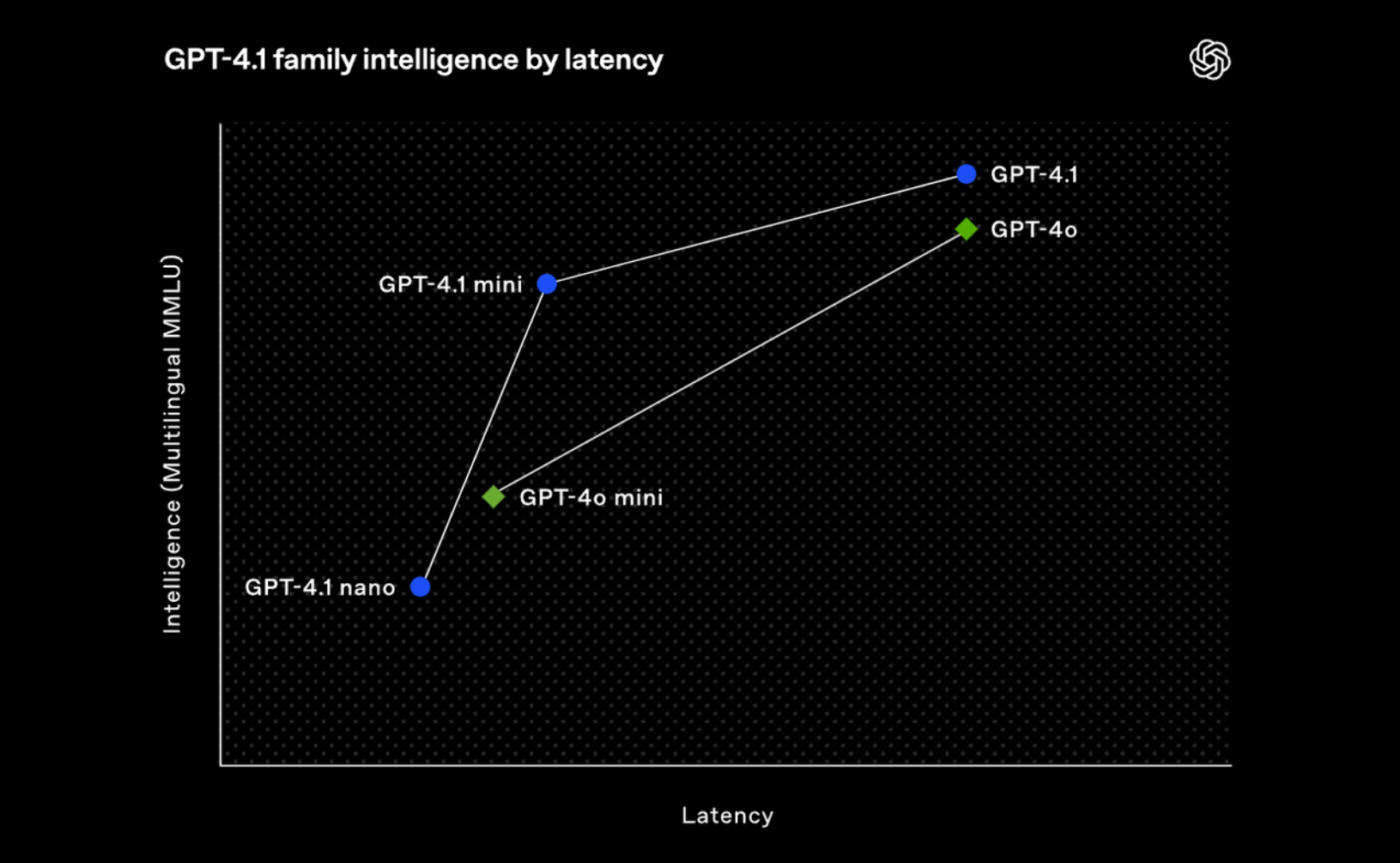
长上下文理解能力:在 Video-MME 基准测试中(该测试用于评估多模态长上下文理解能力),GPT-4.1 在“长视频无字幕”这个类别上取得了 72.0% 的得分,比 GPT-4o 提升了 6.7 个百分点,创下了新的 SOTA(state-of-the-art,最先进水平)。 尽管这些基准测试提供了有价值的参考信息,我们训练这些模型的重点仍然是 实际应用的效用。通过与开发者社区的紧密合作与共创,我们对模型进行了优化,重点提升那些对开发者应用最关键的任务表现。为实现这一目标,GPT‑4.1 系列模型在更低成本下提供了卓越性能。这些模型在延迟—性能权衡曲线上的每一个点都带来了性能的突破。
此外,GPT‑4.1、GPT‑4.1 mini 和 GPT‑4.1 nano 都能处理最多 100 万个 tokens 的上下文长度 —— 相比之前的 GPT‑4o 模型最多只能处理 128,000 tokens,这是一次大幅提升。100 万个 tokens 超过了 8 份完整 React 代码库的长度,因此长上下文特别适用于处理大型代码库或大量长文档的场景。
OpenAI对 GPT‑4.1 进行了训练,使其能在完整的 100 万 token 长度范围内稳定地聚焦关键信息。此外,我们还训练它在识别相关文本、忽略干扰内容方面比 GPT‑4o 更加可靠,无论是处理长上下文还是短上下文。长上下文理解能力对于法律、编程、客户支持等众多领域的应用至关重要。
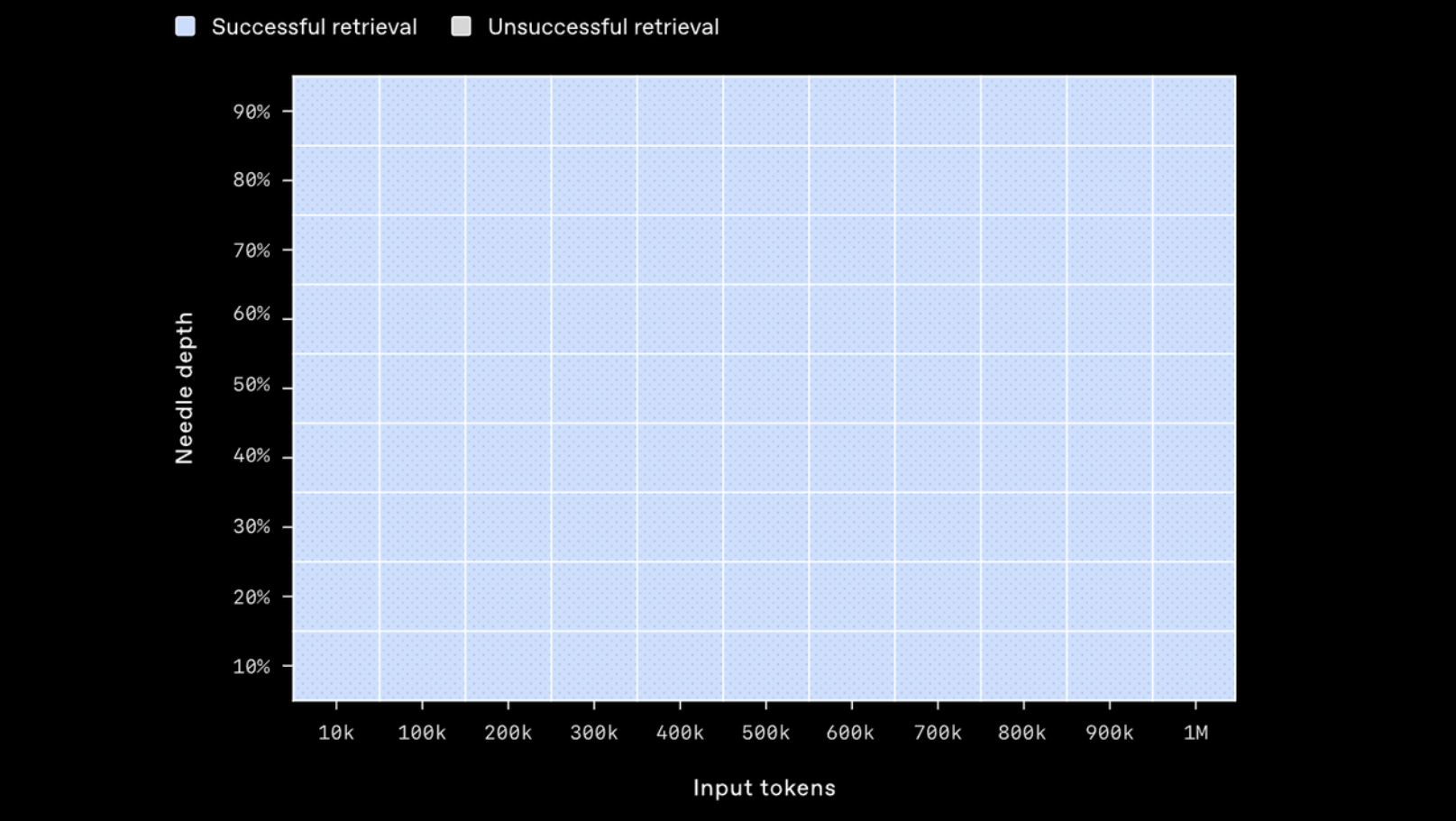
下面是 GPT‑4.1 在长上下文中检索一段小而隐藏的信息(“针”)的能力测试结果。我们将这段信息放置在上下文窗口的不同位置,GPT‑4.1 在所有位置、所有上下文长度下都能准确检索到“针”,即使是在接近 100 万 tokens 的上下文长度中也毫无问题。这说明它可以在输入中无论信息位置如何,都能成功提取出对当前任务有用的关键细节。
2.OpenAI o3与o4-mini模型介绍
-
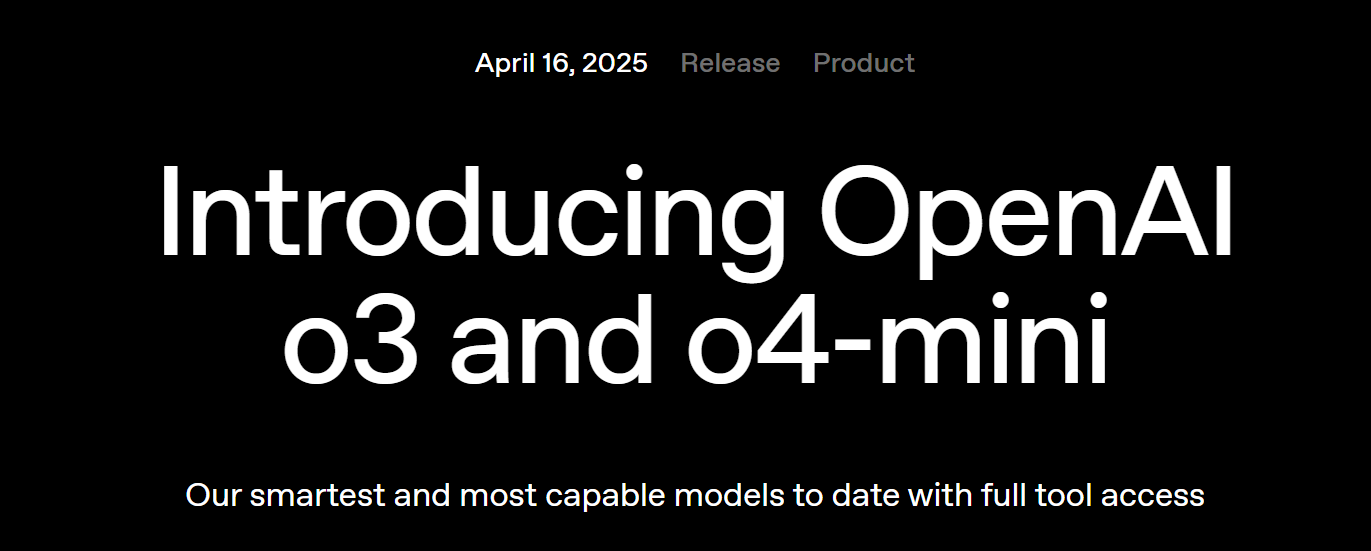
o3 模型:最强推理系统
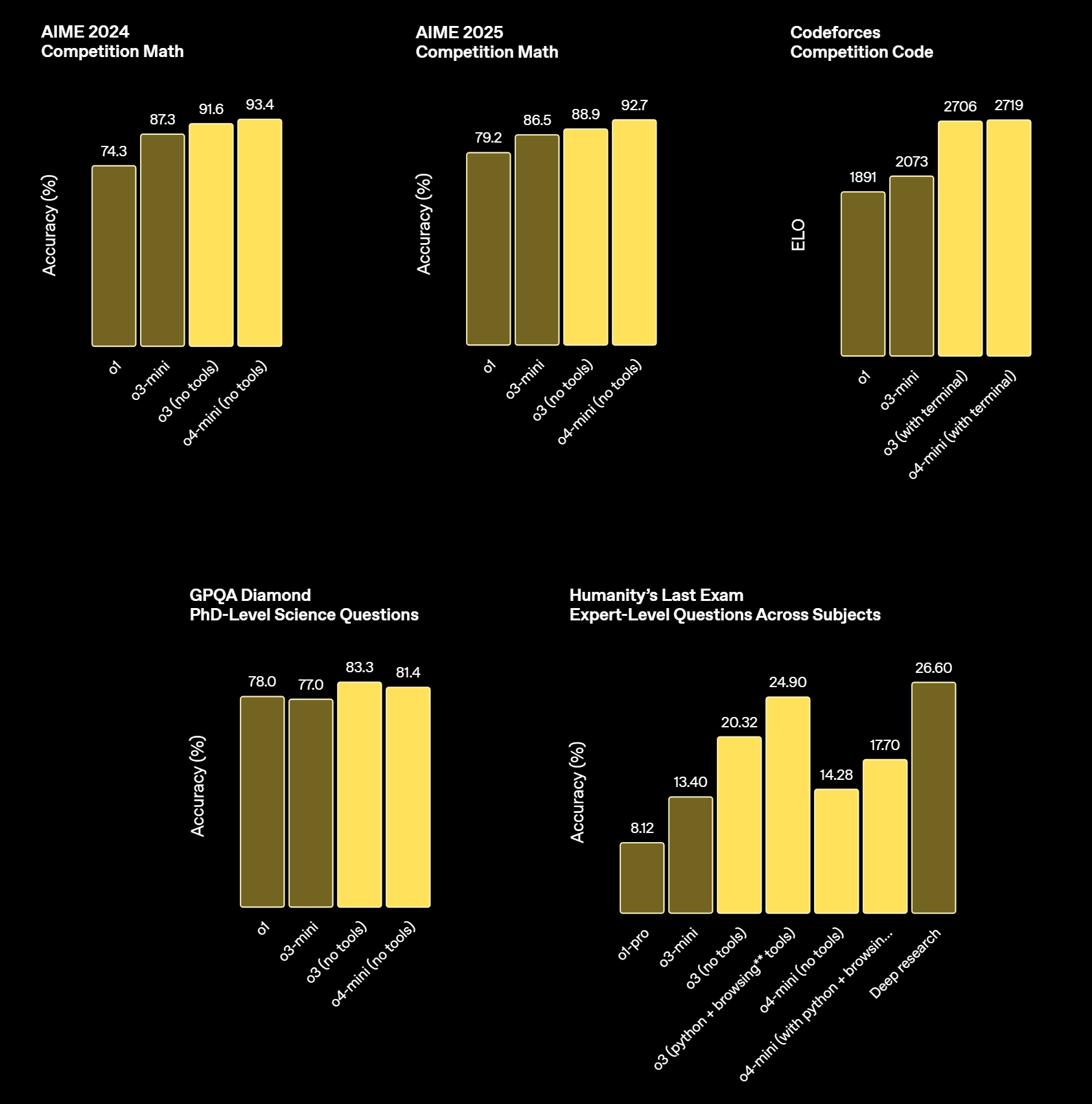
o3 被 OpenAI 称为其最强大的推理模型,专为处理复杂的数学、编程、科学和视觉任务而设计,它在多个基准测试中表现出色,例如在 Codeforces 上达到了 2727 的 Elo 分数,远超前代模型 o1 的 1891 分。o3 采用了“链式思维”(Chain-of-Thought)机制,能够在生成答案之前进行多步骤的推理,提升了准确性和深度此外,o3 还支持图像输入,能够分析图表、草图等视觉信息,增强了其在多模态任务中的表现。
- o4-mini 模型:高效且经济实惠
o4-mini 是一款小型化的推理模型,旨在提供快速、成本效益高的推理能力,特别适用于数学、编程和视觉任它在 AIME 2024 和 2025 基准测试中表现优异,超越了其前代模型 o3-mini 。o4-mini 支持文本和图像输入,能够在推理过程中分析白板草图等视觉信息,提升了其在多模态任务中的适用性。此外,o4-mini 还支持函数调用、结构化输出和长上下文处理(最多支持 20 万个 token),适合开发人员构建智能代理和复杂应用
此外,o3 和 o4-mini 均支持多种工具集成,括:
- Web 浏览器:实时获取最新息。
- Python:执行代码和数据析。
- 图像和文件分析:处理上传的图像和件。
- 图像生成:生成和编辑图像容。
- 画布(Canvas):进行图形化创作和辑。
- 自动化:执行预定任务和作。
- 文件搜索:查找和提取文件中的息。
- 记忆:记住用户的偏好和历史信息
这些工具的集成使得 o3 和 o4-mini 能够在处理复杂任务时提供更高的灵活性和率。
二、GPT-4.1、o3模型和Agent SDK快速调用测试
from openai import OpenAI
import os
from dotenv import load_dotenv
load_dotenv(override=True)
from IPython.display import display, Code, Markdown, Image
import nest_asyncio
nest_asyncio.apply()  # 允许事件循环嵌套
from agents import function_tool
import asyncio
- 实例化客户端
# 读取模型API-KEY
API_KEY = os.getenv("API_KEY")
BASE_URL = os.getenv("BASE_URL")
# 实例化客户端
client = OpenAI(api_key=API_KEY,
                base_url=BASE_URL)
models_list = client.models.list()
models_list.data
- 测试调用GPT-4.1模型
response = client.chat.completions.create(
    model="gpt-4.1",
    messages=[
        {"role": "user", "content": "你好,好久不见!"}
    ]
)
# 输出生成的响应内容
print(response.choices[0].message.content)
- 测试调用o4-mini模型
response = client.chat.completions.create(
    model="o4-mini",
    messages=[
        {"role": "user", "content": "你好,好久不见!"}
    ]
)
# 输出生成的响应内容
print(response.choices[0].message.content)
response

- Agents SDK功能测试
OpenAI 于 2025 年 3 月发布了全新的 Agents SDK,这是一个轻量级且功能强大的 Python 开源框架,旨在简化多智能体(Multi-Agent)系统的构建与管理。该 SDK 使开发者能够高效地设计、协调和调试复杂的 AI 工作流,广泛适用于客服、自动化办公、编程助手等场景。
Agents SDK 的设计理念是提供足够的功能以满足实际需求,同时保持简洁易用,降低开发门槛其核心组成包括
-
Agent(智能体配置了指令、工具、输入输出验证(Guardrails)和任务委托(Handoffs)的语言模型
-
Handoffs(任务委托允许智能体将任务委托给其他专门的智能体,适用于多智能体协作
-
Guardrails(安全验证对输入和输出进行验证,确保交互符合预定标准
-
Tracing(执行追踪内置的执行追踪功能,帮助开发者可视化、调试和优化智能体工作流 这些功能使得 SDK 能够支持多种工作流模式,包括确定性流程、迭代循环等,适应不同的应用需求。
from openai import AsyncOpenAI
from agents import OpenAIChatCompletionsModel,Agent,Runner,set_default_openai_client, set_tracing_disabled
from agents.model_settings import ModelSettings
from pydantic import BaseModel
from agents import Agent, WebSearchTool
from agents.model_settings import ModelSettings
external_client = AsyncOpenAI(
    base_url = BASE_URL,
    api_key = API_KEY,
)
set_default_openai_client(external_client)
set_tracing_disabled(True)
agent = Agent(name="Assistant", instructions="你是一名助人为乐的助手。")
result = await Runner.run(agent, "请写一首关于编程中递归的俳句。")
俳(pái)句。
print(result.final_output)
三、从零到一快速搭建Mini DeepResearch
OpenAI 于 2025 年初推出了 ChatGPT 的全新功能——Deep Research(深度研究),这是一项革命性的 AI 代理能力,旨在帮助用户高效完成复杂的研究任务。通过自动化的信息搜集、分析和报告生成,Deep Research 能在短时间内完成原本需要数小时甚至数天的工作,极大地提升了知识工作的效率和质量。 Deep Research 的核心优势包括:
-
多步骤推理与信息整合利用最新的 OpenAI o3 模型,Deep Research 能够从多个来源收集信息,进行深入分析,并整合成结构化的报告
-
自动化研究流程用户只需提出研究主题,AI 会自动规划研究步骤,执行信息搜集与分析,最终生成详尽的报告
-
引用来源明确生成的报告中包含清晰的引用来源,便于用户进行验证和进一步阅读
-
支持文件上传用户可以上传相关文档或数据表格,AI 将结合这些信息进行更精准的分析
-
适用多种领域无论是市场调研、政策分析、科学研究,还是个人决策支持,Deep Research 都能提供有力的支持
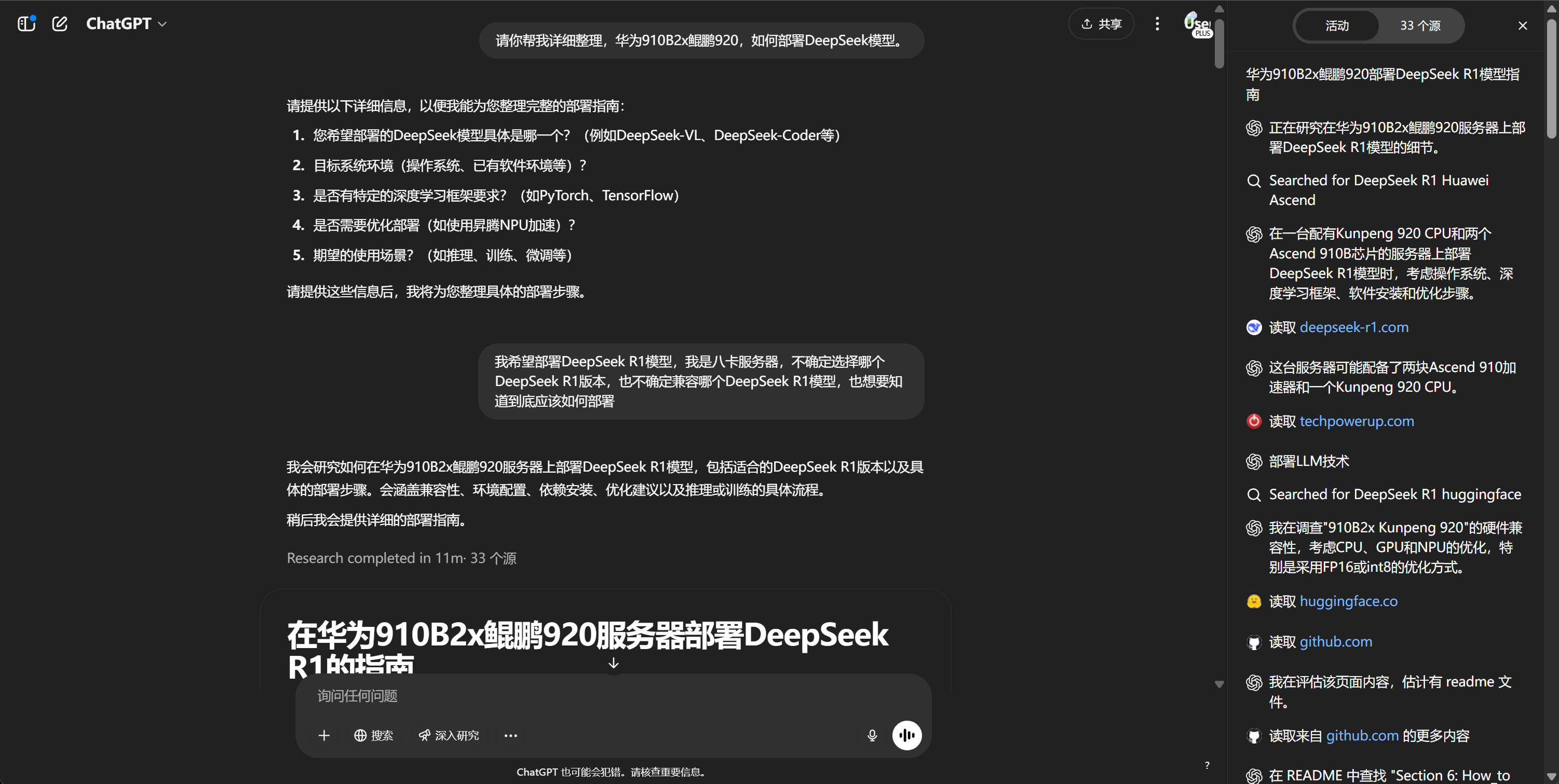
- Mini DeepResearch视频演示
from IPython.display import Video
Video("https://ml2022.oss-cn-hangzhou.aliyuncs.com/%E6%BC%94%E7%A4%BA%E8%A7%86%E9%A2%91.mp4", width=800, height=400)
- 项目规划
目标:构建一个“研究型助手”,可以:
- 接收一个研究主题(如“AI 对教育的影响”)
- 自动规划应该搜索的子问题/关键词
- 每个关键词在网上搜索信息、摘要
- 把多个摘要汇总成一份完整的研究报告
也就是说,这是一个「具备规划能力 + 工具调用 + 总结归纳」能力的系统。
- 项目架构
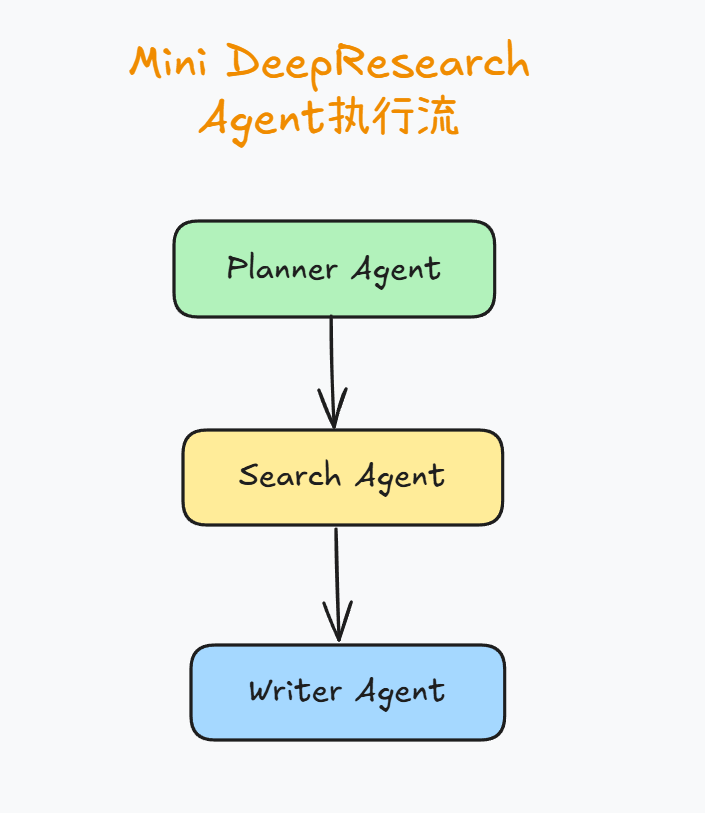
三个核心 Agent 简介
| Agent 名 | 职责 |
|---|---|
planner_agent | 生成研究关键词和搜索策略 |
search_agent | 负责执行网络搜索 + 总结内容(使用工具) |
writer_agent | 汇总所有搜索结果,编写报告 |
- Planner Agent执行流程
PROMPT = (
    "You are a helpful research assistant. Given a query, come up with a set of web searches "
    "to perform to best answer the query. Output between 10 and 20 terms to query for."
)


class WebSearchItem(BaseModel):
    reason: str
    "Your reasoning for why this search is important to the query."

    query: str
    "The search term to use for the web search."


class WebSearchPlan(BaseModel):
    searches: list[WebSearchItem]
    """A list of web searches to perform to best answer the query."""


planner_agent = Agent(
    name="PlannerAgent",
    instructions=PROMPT,
    model="o4-mini",
    output_type=WebSearchPlan,
)
planner_agent_res = await Runner.run(planner_agent, "我想深入了解下MCP(Model Context Protocol)这项技术。")
planner_agent_res.final_output
planner_agent_res = await Runner.run(planner_agent, "我想深入了解下MCP(Model Context Protocol)这项技术。")
planner_agent_res.final_output
planner_agent_res.final_output.searches[0]
query='MCP Model Context Protocol overview'
query
需要注意的是,Planner Agent 的职责是:接收一个研究主题,生成一份“搜索计划(WebSearchPlan)”,告诉系统应该搜索哪些子问题/关键词以及搜索这些关键词的理由。 具体代码解释如下:
FENCE0 导入 Pydantic,用于定义结构化数据模型。它是整个 Agents SDK 中用于类型校验 + 数据结构定义的核心库。
FENCE1
导入 SDK 的核心类 Agent,我们后面会实例化一个具体的 Agent 实体 planner_agent。
FENCE2 定义这个 Agent 的提示词(Prompt),告诉 LLM:
- 你是一个研究助手;
- 收到一个主题后,请生成 20 到 30 条搜索建议;
- 每条建议应当包括 搜索关键词 + 搜索原因。
接下来是两个重要的数据结构定义:
FENCE3
这是一个“单个搜索建议”的结构,包含两个字段:
| 字段 | 说明 |
|---|---|
reason | 你为什么要搜索这个关键词?(用于解释搜索动机) |
query | 你要搜索的关键词本身 |
FENCE4
这是“搜索计划”的整体结构,包含一个列表 searches,每项是上面的 WebSearchItem。
其中模型输出结构化的关键在这:
FENCE5
它告诉 planner_agent **“你必须输出一份结构化的 WebSearchPlan 对象,里面包含多个 WebSearchItem。”**这样可以约束模型输出格式,也便于下一步自动解析内容。
- search_agent
from agents import Agent, WebSearchTool
from agents.model_settings import ModelSettings
INSTRUCTIONS = (
    "You are a research assistant. Given a search term, you search the web for that term and "
    "produce a concise summary of the results. The summary must 2-3 paragraphs and less than 300 "
    "words. Capture the main points. Write succinctly, no need to have complete sentences or good "
    "grammar. This will be consumed by someone synthesizing a report, so its vital you capture the "
    "essence and ignore any fluff. Do not include any additional commentary other than the summary "
    "itself."
)

search_agent = Agent(
    name="Search agent",
    instructions=INSTRUCTIONS,
    tools=[WebSearchTool()],
    model_settings=ModelSettings(tool_choice="required"),
)
search_agent_res = await Runner.run(search_agent, query)
search_agent_res.final_output
search_agent 的作用是接收一个搜索关键词,调用 Web 搜索工具,然后根据搜索结果生成一份简洁的摘要(2-3 段,<300词),不带评论,只保留信息本身。也就是说,这是整个系统中真正“去网上查资料”的角色。具体代码解释如下:
FENCE0 其中:
Agent:导入 SDK 的智能体基类;WebSearchTool:一个由 Agents SDK 内置的网页搜索工具,调用它可以模拟 “上网搜索” 的效果;ModelSettings:可以配置一些模型使用时的行为,比如是否必须使用工具。
然后是重点提示词 INSTRUCTIONS
FENCE1
这是模型的行为提示,翻译一下这段内容的精髓:
| 指令含义 | 说明 |
|---|---|
| 你是一个研究助手 | 模拟一个能查资料的人 |
| 给你关键词后上网搜索 | 关键词来自 planner_agent |
| 写出 2-3 段简洁总结 | 每次搜索结果必须压缩成 300 字以内的摘要 |
| 用要点式语言、可以语法不完整 | 不要求像论文,重点是信息密度高 |
| 不要添加自己的评论 | 不能主观判断,只提取信息 |
| 最终目的是为后续写报告的人准备素材 | 所以格式自由,内容集中就行 |
接下来创建创建 Agent 对象
FENCE2
其中name="Search agent"是Agent 名称,用于日志和上下文显示。而instructions=INSTRUCTIONS告诉大语言模型它要怎么完成任务。tools=[WebSearchTool()]设置它可以使用的工具。在这个 case 中,它只能用 WebSearchTool,这是 SDK 内置的网页搜索工具。而model_settings=ModelSettings(tool_choice="required")则表示:强制要求模型一定要调用工具(WebSearchTool)来完成任务。不允许模型“凭空回答”或“胡编搜索内容”,这有助于提升真实性。
总结流程如下:
FENCE3
# Agent used to synthesize a final report from the individual summaries.
from pydantic import BaseModel

from agents import Agent
PROMPT = (
    "You are a senior researcher tasked with writing a cohesive report for a research query. "
    "You will be provided with the original query, and some initial research done by a research "
    "assistant.\n"
    "You should first come up with an outline for the report that describes the structure and "
    "flow of the report. Then, generate the report and return that as your final output.\n"
    "The final output should be in markdown format, and it should be lengthy and detailed. Aim "
    "for 5-10 pages of content, at least 1000 words."
)


class ReportData(BaseModel):
    short_summary: str
    """A short 2-3 sentence summary of the findings."""

    markdown_report: str
    """The final report"""

    follow_up_questions: list[str]
    """Suggested topics to research further"""


writer_agent = Agent(
    name="WriterAgent",
    instructions=PROMPT,
    model="o3-mini",
    output_type=ReportData,
)
- Writer Agent
PROMPT_TEMP = (
    "You are a senior researcher tasked with writing a cohesive report for a research query. "
    "You will be provided with the original query, and some initial research done by a research "
    "assistant.\n"
    "You should first come up with an outline for the report that describes the structure and "
    "flow of the report. Then, generate the report and return that as your final output.\n"
    "The final output should be in markdown format, and it should be lengthy and detailed. Aim "
    "for 10-20 pages of content, at least 1500 words."
    "最终结果请用中文输出。"
)


class ReportData(BaseModel):
    short_summary: str
    """A short 2-3 sentence summary of the findings."""

    markdown_report: str
    """The final report"""

    follow_up_questions: list[str]
    """Suggested topics to research further"""


writer_agent = Agent(
    name="WriterAgent",
    instructions=PROMPT_TEMP,
    model="o4-mini",
    output_type=ReportData,
)
writer_agent_res = await Runner.run(writer_agent_temp, search_agent_res.final_output)
writer_agent_res.final_output
Writer Agent这是 整个研究系统的“输出终结者”,负责把之前所有搜索到的信息,综合成一份完整、结构化、可阅读的长篇报告。该 Agent 的任务是:
- 收到研究主题和之前的所有搜索摘要;
- 先写一个大纲(outline);
- 然后根据大纲写出一份 详细的 Markdown 格式报告;
- 同时生成一个简短总结和一些后续可以研究的问题。
具体代码解释如下:
FENCE0
- 和前两个 Agent 一样,我们导入了:
BaseModel:用于定义结构化输出;Agent:Agent SDK 中的核心类。
然后是提示词定义(Prompt)
FENCE1
提示词要点:
| 行为 | 说明 |
|---|---|
| 角色设定 | 你是一个资深研究员(senior researcher) |
| 输入 | 会拿到:研究主题 + 搜索摘要 |
| 第一步 | 写出报告结构(outline) |
| 第二步 | 写出 Markdown 报告正文 |
| 要求 | 长、详细、有逻辑(10-20页,3000+词) |
| 输出格式 | Markdown 格式(如 # 一级标题, - 列表 等) |
| 语言风格 | 精炼、学术、结构清晰 |
这个 prompt 是整个系统中最“生成型”的一个 prompt。
紧接着是输出数据结构定义,定义一个 ReportData 类,用来约束模型的输出结构:
FENCE2
具体含义如下:
| 字段名 | 类型 | 说明 |
|---|---|---|
short_summary | str | 对研究结果的简要总结(2~3 句话) |
markdown_report | str | 报告正文,Markdown 格式,内容详实 |
follow_up_questions | list[str] | 建议后续可以进一步研究的问题列表 |
注意:这个结构就是通过 output_type=ReportData 来告诉 SDK 要求模型输出这个结构,否则 SDK 会报错或解析失败。
紧接着创建 Agent 实例
FENCE3
| 参数 | 含义 |
|---|---|
name | Agent 名 |
instructions | 提示词指令 |
model | 使用的模型(这里是 "o3-mini",可以替换为 gpt-4o 等) |
output_type | 指定输出为 ReportData 类型,支持结构化结果 |
整体流程总结如下:
FENCE4
最终返回的是一个完整结构化的 ReportData 对象。
- ResearchManager主类编写
from rich.markdown import Markdown

class ResearchManager:
    def __init__(self):
        print("初始化已完成,欢迎使用。使用前请确认相关模型能够被顺利调用。")

    async def run(self, query: str) -> None:
        # Indicate that the research process is starting
        print("Starting research...")

        # Step 1: Generate search plan using planner_agent
        search_plan = await self._plan_searches(query)
        # Step 2: Perform the searches using search_agent
        search_results = await self._perform_searches(search_plan)
        # Step 3: Write the final report using writer_agent
        report = await self._write_report(query, search_results)

        # Final printed report
        print("\n\n=====REPORT=====\n\n")
        display(Markdown(report.markdown_report))
        print("\n\n=====FOLLOW UP QUESTIONS=====\n\n")
        follow_up_questions = "\n".join(report.follow_up_questions)
        display(Markdown(follow_up_questions))

        # 保存为 Markdown 文件
        self.save_report_as_md(query, report.markdown_report)

    async def _plan_searches(self, query: str) -> WebSearchPlan:
        print("Planning searches...")
        result = await Runner.run(
            planner_agent,
            f"Query: {query}",
        )
        return result.final_output_as(WebSearchPlan)

    async def _perform_searches(self, search_plan: WebSearchPlan) -> list[str]:
        print("Starting searching...")
        num_completed = 0
        tasks = [asyncio.create_task(self._search(item)) for item in search_plan.searches]
        results = []
        for task in asyncio.as_completed(tasks):
            result = await task
            if result is not None:
                results.append(result)
            num_completed += 1
            print(f"Searching... {num_completed}/{len(tasks)} completed")
        return results

    async def _search(self, item: WebSearchItem) -> str | None:
        print(f"Search term: {item.query}\nReason for searching: {item.reason}")
        try:
            result = await Runner.run(
                search_agent,
                input=f"Search term: {item.query}\nReason for searching: {item.reason}"
            )
            return str(result.final_output)
        except Exception:
            return None

    async def _write_report(self, query: str, search_results: list[str]) -> ReportData:
        print("Thinking about report...")
        print(f"Original query: {query}\nSummarized search results: {search_results}")

        # Use run instead of run_streamed to avoid async context issues
        result = await Runner.run(
            writer_agent,
            input=f"Original query: {query}\nSummarized search results: {search_results}",
        )

        update_messages = [
            "Thinking about report...",
            "Planning report structure...",
            "Writing outline...",
            "Creating sections...",
            "Cleaning up formatting...",
            "Finalizing report...",
            "Finishing report...",
        ]

        last_update = time.time()
        next_message = 0
        for _ in result.new_items:
            if time.time() - last_update > 5 and next_message < len(update_messages):
                print(update_messages[next_message])
                next_message += 1
                last_update = time.time()

        return result.final_output_as(ReportData)

    def save_report_as_md(self, query: str, markdown_content: str) -> None:
        """
        保存生成的报告为 Markdown 文件
        """
        # 创建文件夹(如果不存在)
        folder_name = "research_reports"
        if not os.path.exists(folder_name):
            os.makedirs(folder_name)

        # 使用用户的查询作为文件名
        sanitized_query = query.replace(" ", "_").replace(":", "").replace("?", "")
        file_name = f"{folder_name}/关于{sanitized_query}调研报告.md"

        # 写入 Markdown 文件
        with open(file_name, "w", encoding="utf-8") as file:
            file.write(markdown_content)

        print(f"Report saved as: {file_name}")
manager = ResearchManager()
test_query = "AI在教育中的应用"
await manager.run(test_query)