Qwen3高效微调(下) (v2)
课程说明:
- 体验课内容节选自《2025大模型Agent智能体开发实战》(5月班) 完整版付费课程
体验课时间有限,若想深度学习大模型技术,欢迎大家报名由我主讲的《2025大模型Agent智能体开发实战》(5月班)

《2025大模型Agent智能体开发实战》(5月班) 为【100+小时】体系大课,总共20大模块精讲精析,零基础直达大模型企业级应用!

同时,5月班重磅新增DeepSeek+Agents SDK+谷歌ADK+MCP技术应用与智能体开发相关实战内容,并计划新增Qwen-3模型实战教学:

部分项目成果演示
from IPython.display import Video
- MateGen项目演示
Video("https://ml2022.oss-cn-hangzhou.aliyuncs.com/4.MateGen%20Pro%20%E9%A1%B9%E7%9B%AE%E5%8A%9F%E8%83%BD%E6%BC%94%E7%A4%BA.mp4", width=800, height=400)
- 智能客服项目演示
Video("https://ml2022.oss-cn-hangzhou.aliyuncs.com/%E6%99%BA%E8%83%BD%E5%AE%A2%E6%9C%8D%E6%A1%88%E4%BE%8B%E6%BC%94%E7%A4%BA.mp4", width=800, height=400)
- Dify项目演示
Video("https://ml2022.oss-cn-hangzhou.aliyuncs.com/2f1b47f42c65fd59e8d3a83e6cb9f13b_raw.mp4", width=800, height=400)
- LangChain&LangGraph搭建Multi-Agnet
Video("https://ml2022.oss-cn-hangzhou.aliyuncs.com/%E5%8F%AF%E8%A7%86%E5%8C%96%E6%95%B0%E6%8D%AE%E5%88%86%E6%9E%90Multi-Agent%E6%95%88%E6%9E%9C%E6%BC%94%E7%A4%BA%E6%95%88%E6%9E%9C.mp4", width=800, height=400)
此外,若是对大模型底层原理感兴趣,也欢迎报名由我和菜菜老师共同主讲的《2025大模型原理与实战课程》(5月班)
两门大模型课程5月班目前上新特惠中,立减2000起,合购还有更多优惠哦~详细信息扫码添加助教,回复“大模型”,即可领取课程大纲&查看课程详情👇

Qwen3高效微调实战(下)
在进行了充足的准备工作后,接下来正式开始进行微调。
四、Unsloth基本使用方法介绍
Unsloth是一个集模型调用和高效微调为一体的框架,在开始进行模型微调前,我们可以先尝试借助Unsloth进行模型调用。需要注意的是,Unsloth的使用难度远比一般的微调框架简单,在Jupyter中即可完成模型微调,且微调结束后还可以直接进行模型调用,并支持在Jupyter中进行模型权重合并与导出,非常便捷。
import os
os.environ["CUDA_VISIBLE_DEVICES"] = "1"
由于当前实验环境是多卡环境,而动态量化模型只支持单卡运行,因此这里先设置接下来运行的GPU编号。
1.模型导入与调用流程
首先进行模型导入:
from unsloth import FastLanguageModel
import torch
max_seq_length = 8192
dtype = None
load_in_4bit = True
model, tokenizer = FastLanguageModel.from_pretrained(
    model_name = "./Qwen3-32B-unsloth-bnb-4bit",
    max_seq_length = max_seq_length,
    dtype = dtype,
    load_in_4bit = load_in_4bit,
)
导入完成后即可查看模型基本情况,包括模型结构和分词器信息等:
model
需要注意,此时模型还没有LoRA层。
tokenizer
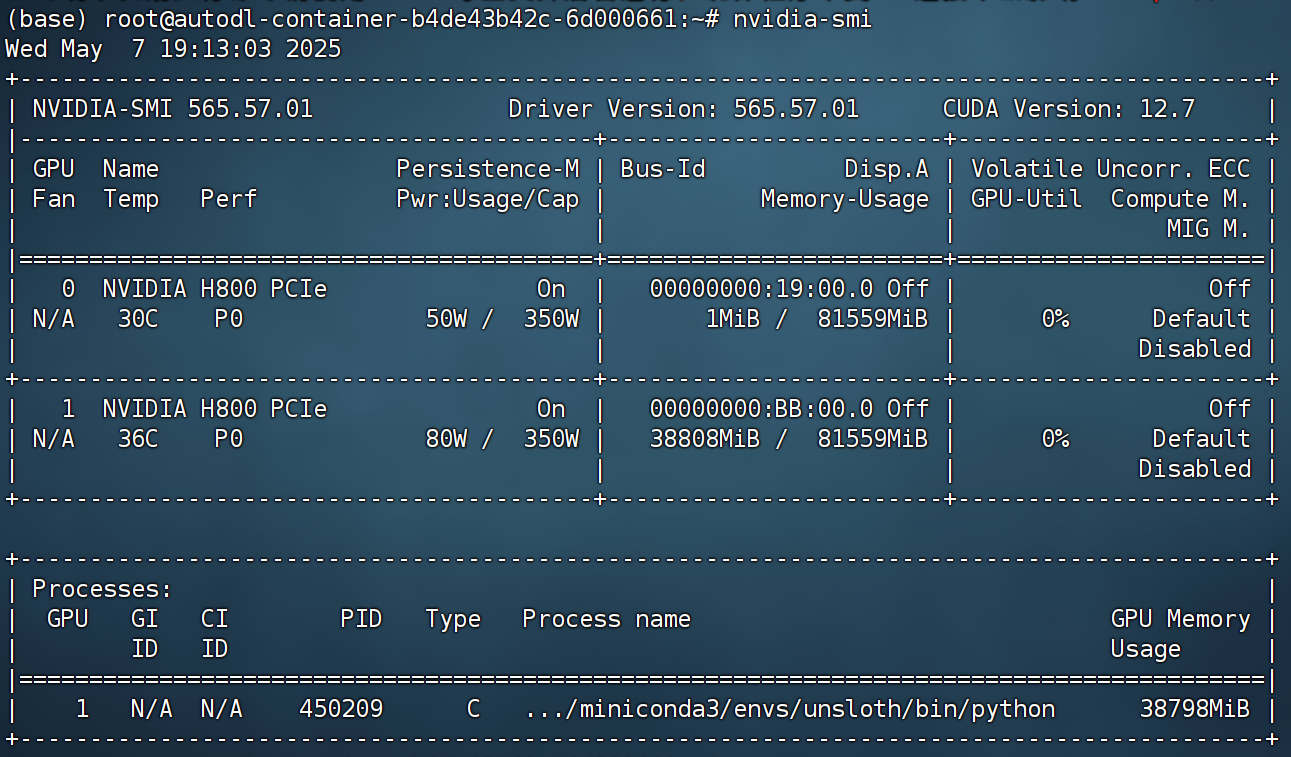
- 显存占用
此时模型约占用显存38G:
gpu_stats = torch.cuda.get_device_properties(0)
start_gpu_memory = round(torch.cuda.max_memory_reserved() / 1024 / 1024 / 1024, 3)
max_memory = round(gpu_stats.total_memory / 1024 / 1024 / 1024, 3)
print(f"GPU = {gpu_stats.name}. Max memory = {max_memory} GB.")
print(f"{start_gpu_memory} GB of memory reserved.")
- 开启对话
然后即可尝试进行对话。借助Unsloth进行模型调用总共需要两个步骤,其一是借助apply_chat_template进行分词同时输入对话相关参数,其二则是借助generate进行文本创建。一次基本对话流程如下所示:
messages = [
    {"role" : "user", "content" : "你好,好久不见!"}
]
text = tokenizer.apply_chat_template(
    messages,
    tokenize = False,
    add_generation_prompt = True,
    enable_thinking = False, # 设置不思考
)
此时text就是加载了Qwen3内置提示词模板之后的字符串。据此也能看出Qwen3内置提示词模板的特殊字符:
text
然后进行分词:
inputs = tokenizer(text, return_tensors="pt").to("cuda")
并进行推理:
outputs = model.generate(
    input_ids=inputs.input_ids,
    attention_mask=inputs.attention_mask,
    max_new_tokens=max_seq_length,
    use_cache=True,
)
最终获得模型输出结果:
outputs
response = tokenizer.batch_decode(outputs)
response
response[0]
需要注意的是,这其实是一种非常底层的打印模型输入和输出信息的方法,这种字符格式(同时包含模型输入和输出)也是Unsloth在进行高效微调过程中需要用到的数据集基本格式。
此外也可通过如下方式生成带有思考过程的结果:
text = tokenizer.apply_chat_template(
    messages,
    tokenize = False,
    add_generation_prompt = True,
    enable_thinking = True, # 设置思考
)

inputs = tokenizer(text, return_tensors="pt").to("cuda")

outputs = model.generate(
    input_ids=inputs.input_ids,
    attention_mask=inputs.attention_mask,
    max_new_tokens=max_seq_length,
    use_cache=True,
)

response = tokenizer.batch_decode(outputs)
response[0]
同时如果存在系统提示词,则实际对话效果如下:
messages = [
    {"role" : "system", "content" : "你是一名助人为乐的助手,名叫小明。"},
    {"role" : "user", "content" : "你好,好久不见!请问你叫什么名字?"}
]
text = tokenizer.apply_chat_template(
    messages,
    tokenize = False,
    add_generation_prompt = True,
    enable_thinking = True, # 设置思考
)

inputs = tokenizer(text, return_tensors="pt").to("cuda")

outputs = model.generate(
    input_ids=inputs.input_ids,
    attention_mask=inputs.attention_mask,
    max_new_tokens=max_seq_length,
    use_cache=True,
)

response = tokenizer.batch_decode(outputs)
response[0]
能够看到,此时问答数据中就包含了系统消息。同样该格式的数据也可以直接用于Unsloth的指令微调。也就是说,如果我们希望提高模型多轮对话或者指令跟随能力,就可以创建大量类似这种数据集进行微调。在实际微调过程中,模型会主动学习最后一个assistant之后的内容,从而学会指令跟随和多轮对话能力。
最后,我们尝试让模型调用外部函数,即创建一条function call message。
import requests, json
def get_weather(loc):
    """
    查询即时天气函数
    :param loc: 必要参数,字符串类型,用于表示查询天气的具体城市名称,\
    注意,中国的城市需要用对应城市的英文名称代替,例如如果需要查询北京市天气,则loc参数需要输入'Beijing';
    :return:OpenWeather API查询即时天气的结果,具体URL请求地址为:https://api.openweathermap.org/data/2.5/weather\
    返回结果对象类型为解析之后的JSON格式对象,并用字符串形式进行表示,其中包含了全部重要的天气信息
    """
    # Step 1.构建请求
    url = "https://api.openweathermap.org/data/2.5/weather"

    # Step 2.设置查询参数
    params = {
        "q": loc,
        "appid": "YOUR_API_KEY",    # 输入API key
        "units": "metric",            # 使用摄氏度而不是华氏度
        "lang":"zh_cn"                # 输出语言为简体中文
    }

    # Step 3.发送GET请求
    response = requests.get(url, params=params)

    # Step 4.解析响应
    data = response.json()
    return json.dumps(data)
tools = [
    {
        "type": "function",
        "function":{
            'name': 'get_weather',
            'description': '查询即时天气函数,根据输入的城市名称,查询对应城市的实时天气,一次只能输入一个城市名称',
            'parameters': {
                'type': 'object',
                'properties': {
                    'loc': {
                        'description': "城市名称,注意,中国的城市需要用对应城市的英文名称代替,例如如果需要查询北京市天气,则loc参数需要输入'Beijing'",
                        'type': 'string'
                    }
                },
                'required': ['loc']
            }
        }
    }
]
messages = [
    {"role" : "system", "content" : "你是一名助人为乐的天气查询助手,当用户询问天气信息时,请调用get_weather函数进行天气查询。"},
    {"role" : "user", "content" : "你好,请帮我查询下北京今天天气如何?"}
]
text = tokenizer.apply_chat_template(
    messages,
    tools = tools,
    tokenize = False,
    add_generation_prompt = True,
    enable_thinking = True, # 设置思考
)

inputs = tokenizer(text, return_tensors="pt").to("cuda")

outputs = model.generate(
    input_ids=inputs.input_ids,
    attention_mask=inputs.attention_mask,
    max_new_tokens=max_seq_length,
    use_cache=True,
)

response = tokenizer.batch_decode(outputs)
response[0]
能够看到,此时模型就会创建一条同时带有指令、思考、外部函数的function call message。
而更进一步的,我们也可以测试模型的多个外部函数并联调用效果:
messages = [
    {"role" : "system", "content" : "你是一名助人为乐的天气查询助手,当用户询问天气信息时,请调用get_weather函数进行天气查询。"},
    {"role" : "user", "content" : "你好,请帮我查询下北京和杭州今天天气如何?"}
]
text = tokenizer.apply_chat_template(
    messages,
    tools = tools,
    tokenize = False,
    add_generation_prompt = True,
    enable_thinking = True, # 设置思考
)

inputs = tokenizer(text, return_tensors="pt").to("cuda")

outputs = model.generate(
    input_ids=inputs.input_ids,
    attention_mask=inputs.attention_mask,
    max_new_tokens=max_seq_length,
    use_cache=True,
)

response = tokenizer.batch_decode(outputs)
response[0]
能发现,此时模型同时发起了两条Function call message。
然后继续测试当模型接收到外部函数返回消息时候,模型返回内容。
messages
messages.append({
    "role": "assistant",
    "content": "<think>\n我将调用 get_weather 函数来查询天气。\n</think>\n",
    "tool_calls": [
        {
            "name": "get_weather",
            "arguments": {
                "location": "北京"
            }
        },
        {
            "name": "get_weather",
            "arguments": {
                "location": "杭州"
            }
        }
    ]
})
messages.append({
    "role": "tool",
    "content": json.dumps({
        "location": "北京",
        "weather": "晴,最高气温26℃"
    })
})
messages.append({
    "role": "tool",
    "content": json.dumps({
        "location": "杭州",
        "weather": "多云转小雨,最高气温23℃"
    })
})
messages
text = tokenizer.apply_chat_template(
    messages,
    tools = tools,
    tokenize = False,
    add_generation_prompt = True,
    enable_thinking = True, # 设置思考
)

inputs = tokenizer(text, return_tensors="pt").to("cuda")

outputs = model.generate(
    input_ids=inputs.input_ids,
    attention_mask=inputs.attention_mask,
    max_new_tokens=max_seq_length,
    use_cache=True,
)

response = tokenizer.batch_decode(outputs)
response[0]
而这就是一条能够进行工具并联微调训练的数据集。
不过需要注意的是,Function calling能力微调其实是非常复杂的事情,除了上述系统提示词+思考链+工具并联调用外,还可能出现比如工具串联调用、工具不存在时返回结果、以及多次调用工具无法成功后返回结果等数据,此外,在真实的Function calling能力训练数据集中,还需要包含至少几十种或者上百种API工具调用,才能让大模型本身识别外部工具的能力得到泛化。相关内容已超出公开课讲解范畴,感兴趣的同学可以考虑报名欢迎报名《2025大模型Agent智能体开发实战》(5月班) :https://ix9mq.xetslk.com/s/3u765N 参与学习。
2. Unsloth高层对话API
当然,除了使用上述底层API进行对话外,Unsloth还提供了更加便捷的流式输出模型对话信息的函数,基本对话效果如下:
from transformers import TextStreamer
messages = [
    {"role" : "user", "content" : "你好,好久不见!"}
]
text = tokenizer.apply_chat_template(
    messages,
    tokenize = False,
    add_generation_prompt = True,
    enable_thinking = False,
)

_ = model.generate(
    **tokenizer(text, return_tensors = "pt").to("cuda"),
    max_new_tokens = 256, # Increase for longer outputs!
    temperature = 0.7, top_p = 0.8, top_k = 20, # For non thinking
    streamer = TextStreamer(tokenizer, skip_prompt = True),
)
text = tokenizer.apply_chat_template(
    messages,
    tokenize = False,
    add_generation_prompt = True,
    enable_thinking = True,
)

from transformers import TextStreamer
_ = model.generate(
    **tokenizer(text, return_tensors = "pt").to("cuda"),
    max_new_tokens = 2048, # Increase for longer outputs!
    temperature = 0.6, top_p = 0.95, top_k = 20, # For thinking
    streamer = TextStreamer(tokenizer, skip_prompt = True),
)
在基本掌握Unsloth的模型导入和对话方法后,接下来正式进入到Qwen3大模型高效微调流程中。
五、Qwen3高效微调数据集创建
1. HuggingFace与ModelScope平台数据集介绍
若要选择公开数据集进行高效微调,则首先可以考虑HuggingFace和ModelScope平台上的数据集。其中HuggingFace上不仅保管了最大规模数量的数据集,而且HuggingFace的dataset工具,也是目前主流微调核心库如trl库默认支持的数据集格式。此外,ModelScope则是国内版的“HuggingFace”,拥有最大规模的中文数据集。
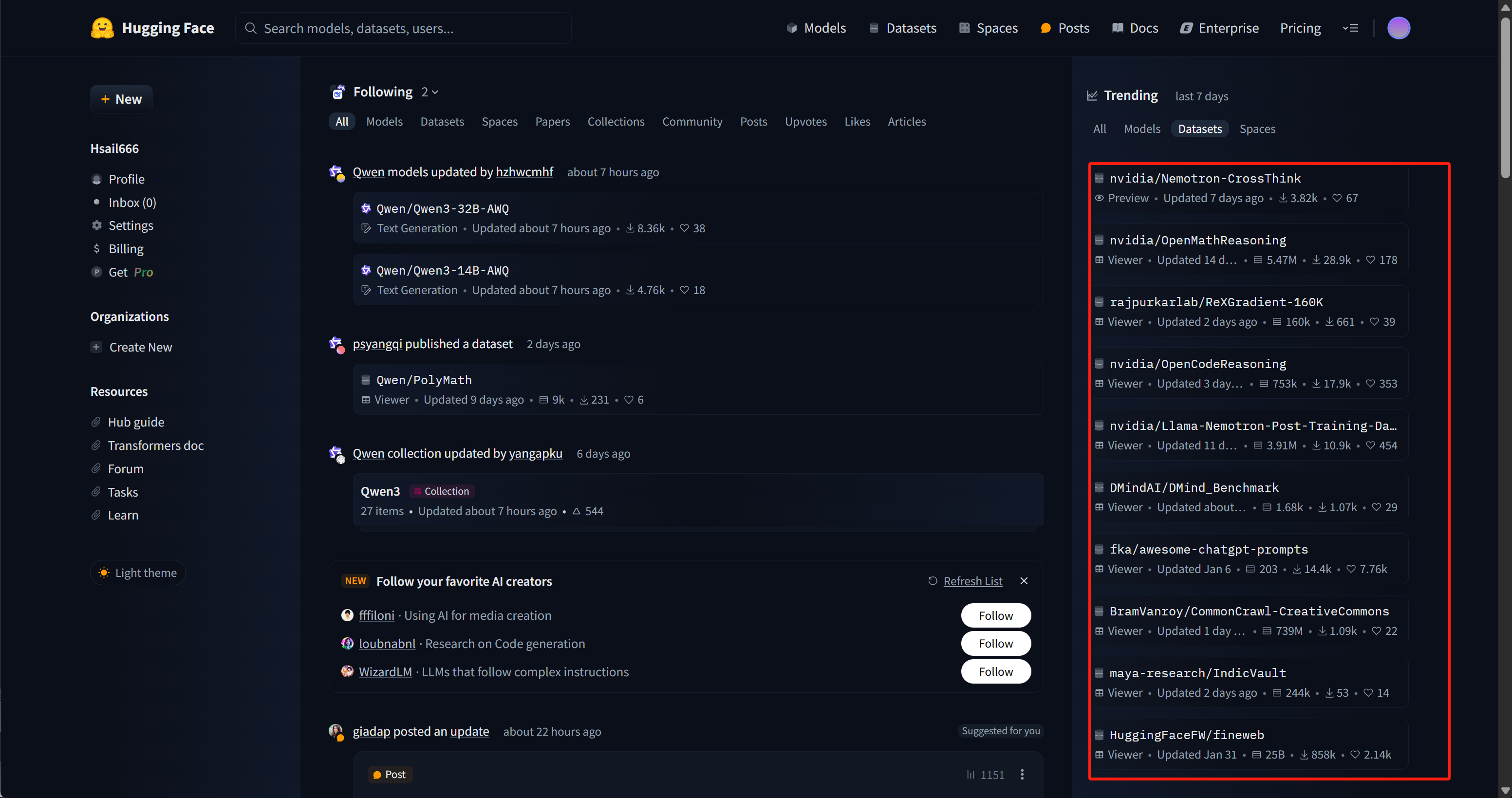
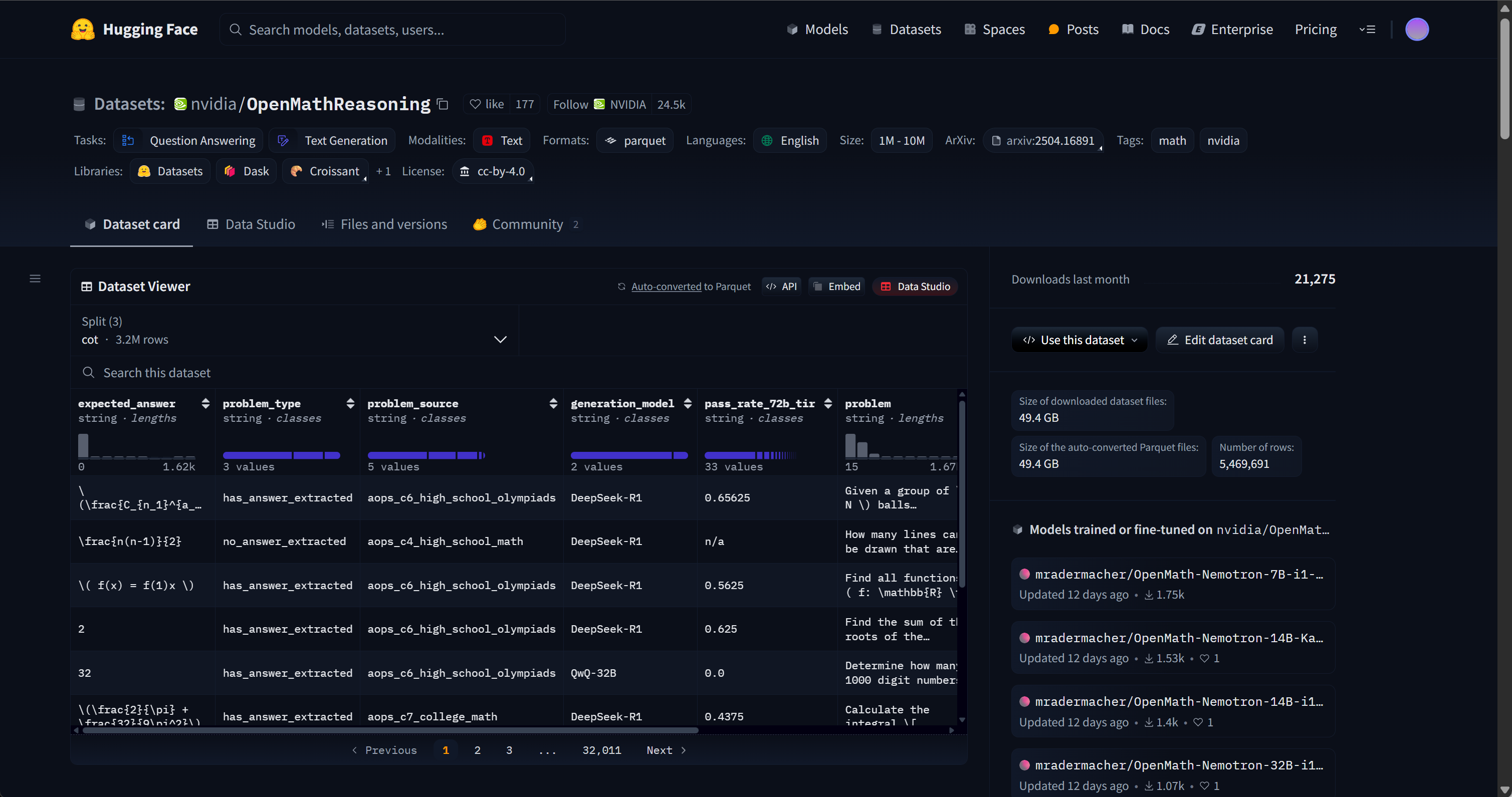
其中右侧都是目前最流行的数据集,目前排名第一的是英伟达的Nemotron-CrossThink数据集,该数据集用于训练英伟达最新开源的号称最强开源推理模型的Llama-Nemotron,涵盖物理、法律、社会科学、经济学等多个领域的问答对,采用多项选择题和开放式问答格式,旨在提升模型的通用推理能力。而排名第二的OpenMath数据集,则是我们接下来用于微调Qwen3模型的数据集。
- 魔搭社区数据集主页:https://www.modelscope.cn/datasets
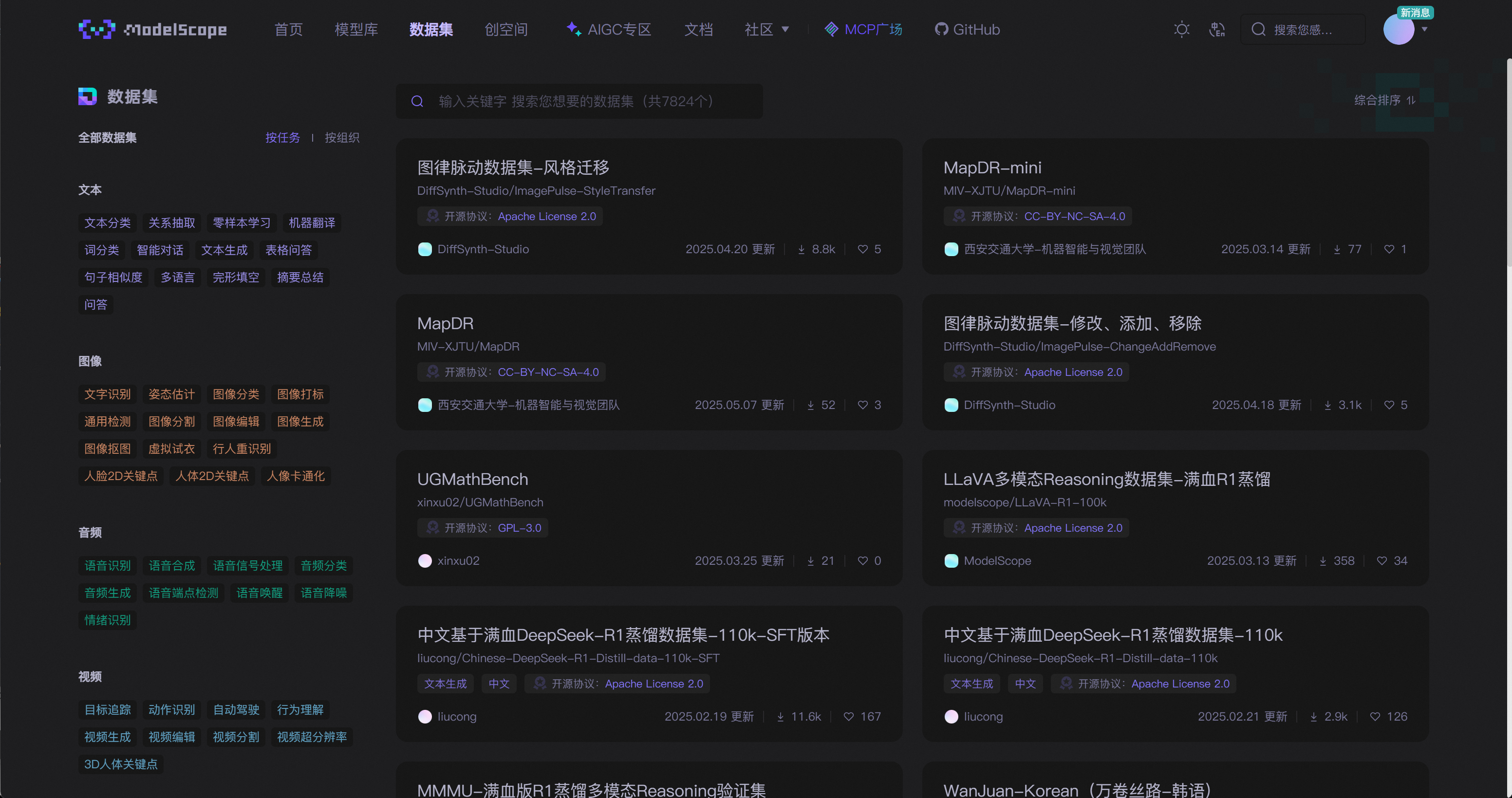
其中关于中文满血DeepSeek-R1模型蒸馏数据集,是非常高质量的可以用于训练模型中文推理能力或者模型蒸馏的数据集。
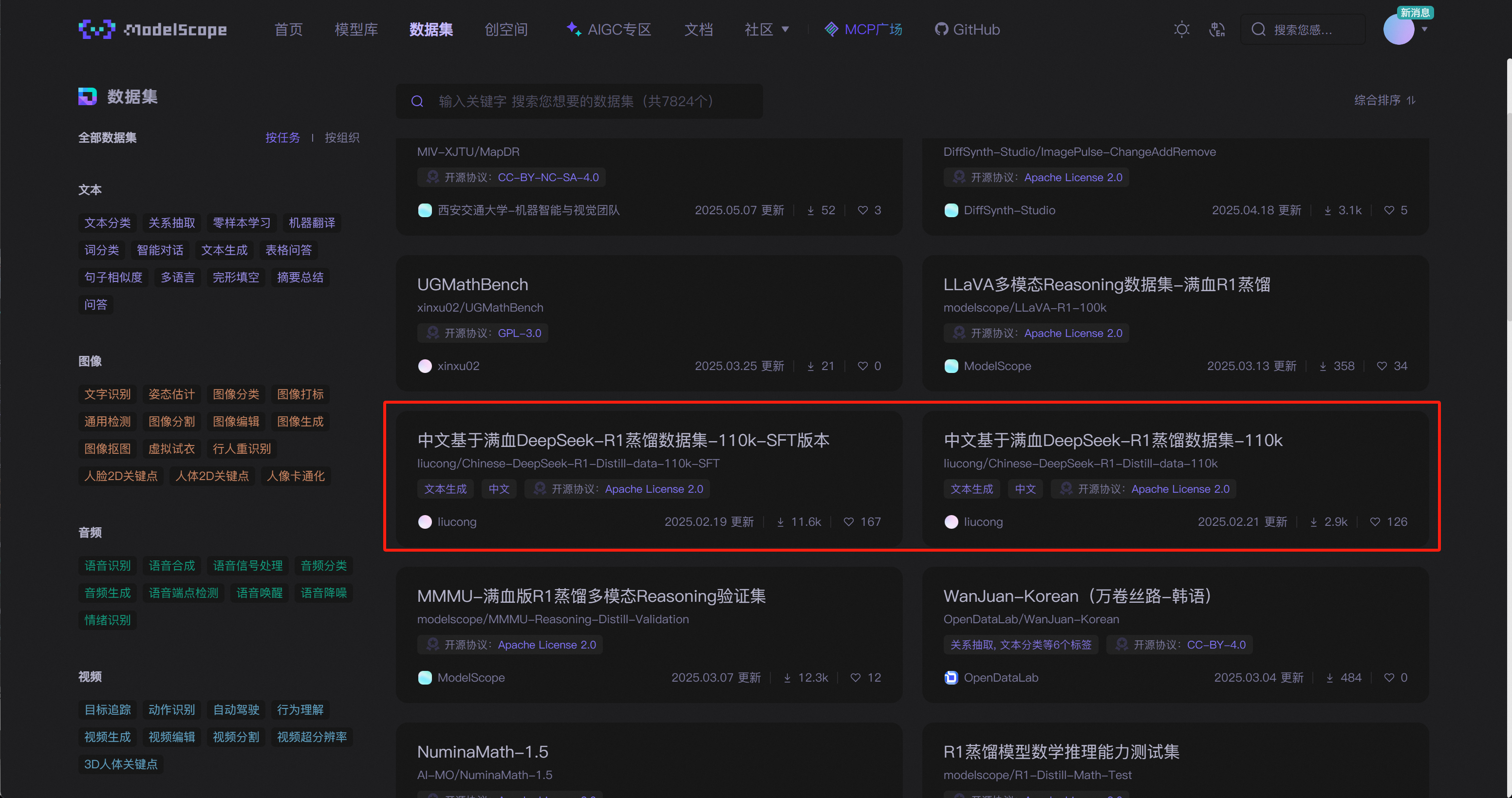
在Part 3中我们已经详细探讨了Qwen3模型在进行数学能力微调时的数据集构造思路,并介绍了用于进行微调的数据集基本情况。接下来我们尝试下载OpenMathReasoning-mini和FineTome-100k数据集,并进行微调数据集的拼装。
2. 数据集下载流程
Qwen3 具备推理模式和非推理模式。因此,我们应当使用两个数据集:
- 我们使用 Open Math Reasoning 数据集,该数据集曾被用于赢得 AIMO(AI 数学奥林匹克 - 第二届进步奖)挑战!我们从中抽取了 10% 可验证的推理轨迹,这些轨迹是基于 DeepSeek R1 模型生成的,并且准确率超过 95%。数据集地址:https://huggingface.co/datasets/unsloth/OpenMathReasoning-mini
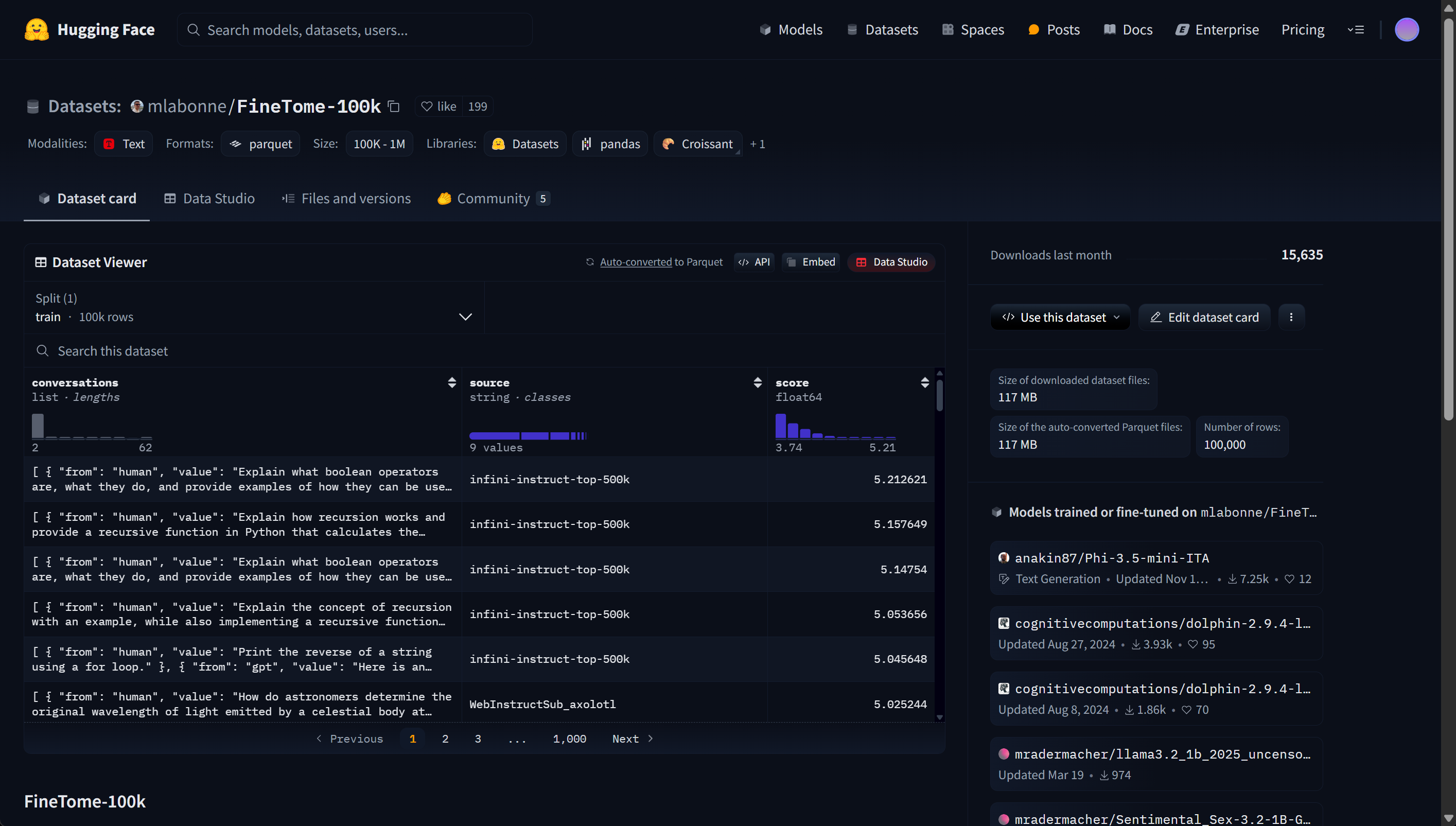
- 我们还利用了 Maxime Labonne 的 FineTome-100k 数据集,该数据集风格类似 ShareGPT。但我们需要将其转换为 HuggingFace 通用的多轮对话格式。数据集地址:https://huggingface.co/datasets/mlabonne/FineTome-100k
在实际微调过程中,大多都会使用huggingface的datasets库进行数据集下载和管理,实际下载流程如下:
!pip install --upgrade datasets huggingface_hub
# 设置 HTTP 和 HTTPS 代理
os.environ["HTTP_PROXY"] = "http://127.0.0.1:10080"
os.environ["HTTPS_PROXY"] = "http://127.0.0.1:10080"
此外如果是使用AutoDL服务器,也可开启学术加速功能以更加稳定的连接huggingface。
datasets 是 Hugging Face 提供的一个高效数据处理库,专为机器学习和大语言模型(LLM)训练而设计。它支持加载、处理、转换和保存各种格式的数据(如 JSON、CSV、Parquet 等),并能与 transformers 模型无缝集成。通过 datasets,开发者可以快速完成数据清洗、切分、tokenization 等常见任务,大大提升训练效率,特别适合用于指令微调、对话生成、Function Calling 等任务的数据预处理。
from datasets import load_dataset
然后分别下载并导入这两个库:
reasoning_dataset = load_dataset("unsloth/OpenMathReasoning-mini", split = "cot")
只下载包含cot的数据集
non_reasoning_dataset = load_dataset("mlabonne/FineTome-100k", split = "train")
只下载train部分数据
然后输入数据集名称,即可查看数据集基本信息:
reasoning_dataset
加上索引则可以直接查看对应数据集信息:
reasoning_dataset[0]
能够看出这是一个基于DeepSeek R1回答的数学数据集,其中problem是问题,generated_solution是数学推导过程(即思考过程),而expected_answer则是最终的答案。该数据集总共接近2万条数据:
len(reasoning_dataset)
而对话数据集如下:
non_reasoning_dataset
non_reasoning_dataset[0]
其中每一条数据都是一个对话,包含一组或者多组ChatGPT的聊天信息,其中from代表是用户消息还是大模型回复消息,而value则是对应的文本。该对话数据集总共包含10万条数据:
len(non_reasoning_dataset)
能够看出dataset是一种类似json的数据格式,每条数据都以字段格式进行存储,在实际微调过程中,我们需要先将数据集的目标字段进行提取和拼接,然后加载到Qwen3模型的提示词模板中,并最终带入Unsloth进行微调。
2. 微调数据集清洗
接下来尝试对上述两个格式各异的数据集进行数据清洗,主要是围绕数据集进行数据格式的调整,便于后续带入Qwen3提示词模板。对于dataset格式的数据对象来说,可以先创建满足格式调整的函数,然后使用map方法对数据集格式进行调整。这里先创建generate_conversation函数,用于对reasoning_dataset中的每一条数据进行格式调整,即通过新创建一个新的特征conversations,来以对话形式保存历史问答数据:
def generate_conversation(examples):
    problems  = examples["problem"]
    solutions = examples["generated_solution"]
    conversations = []
    for problem, solution in zip(problems, solutions):
        conversations.append([
            {"role" : "user",      "content" : problem},
            {"role" : "assistant", "content" : solution},
        ])
    return { "conversations": conversations, }
reasoning_dataset[0]
reasoning_data = reasoning_dataset.map(generate_conversation, batched = True)
此时历史问答数据如下:
reasoning_data["conversations"]
reasoning_data["conversations"][0]
接下来将其带入Qwen3的提示词模板中进行转化:
reasoning_conversations = tokenizer.apply_chat_template(
    reasoning_data["conversations"],
    tokenize = False,
)
最后创建的数据就是一个包含多个对话信息的list:
reasoning_conversations[0]
len(reasoning_conversations)
之后即可带入这些数据进行微调。能看出每条数据的格式都和Unsloth底层对话API创建的数据格式类似,之后我们或许可以借助Unsloth底层对话API来创建微调数据集。
然后继续处理non_reasoning_conversations数据集,由于该数据集采用了sharegpt对话格式,因此可以直接借助Unsloth的standardize_sharegpt库进行数据集的格式转化,转化效果如下所示:
from unsloth.chat_templates import standardize_sharegpt
dataset = standardize_sharegpt(non_reasoning_dataset)
dataset["conversations"][0]
接下来即可直接带入Qwen3对话模板中进行格式调整:
non_reasoning_conversations = tokenizer.apply_chat_template(
    dataset["conversations"],
    tokenize = False,
)
最终每一条数据格式如下:
non_reasoning_conversations[0]
print(len(reasoning_conversations))
print(len(non_reasoning_conversations))
自此即完成了每个数据集的格式调整工作,不过这两个数据集并不均衡,能看得出非推理类数据集的长度更长。我们假设希望模型保留一定的推理能力,但又特别希望它作为一个聊天模型来使用。因此,我们需要定义一个 仅聊天数据的比例。目标是从两个数据集中构建一个混合训练集。这里我们可以设定一个 25% 推理数据、75% 聊天数据的比例:也就是说,从推理数据集中抽取 25%(或者说,抽取占比为 100% - 聊天数据占比 的部分),最后将这两个数据集合并起来即可。这里我们需要先将上述list格式的数据转化为pd.Series数据,然后进行采样,并最终将其转化为dataset类型对象。(此外也可以先转化为dataset对象类型,然后再进行采样)
chat_percentage = 0.75
import pandas as pd
non_reasoning_subset = pd.Series(non_reasoning_conversations)
non_reasoning_subset = non_reasoning_subset.sample(
    int(len(reasoning_conversations) * (1.0 - chat_percentage)),
    random_state = 2407,
)
然后进行拼接和转化:
data = pd.concat([
    pd.Series(reasoning_conversations),
    pd.Series(non_reasoning_subset)
])
data.name = "text"

from datasets import Dataset
combined_dataset = Dataset.from_pandas(pd.DataFrame(data))
combined_dataset = combined_dataset.shuffle(seed = 3407)
转化后数据集如下所示:
len(combined_dataset)
type(combined_dataset)
combined_dataset
对话类数据集
combined_dataset[0]
推理类数据集
combined_dataset[2]
其中text字段就是后续带入微调的字段。
- 数据集保存
最后即可将清洗好的数据集进行本地保存:
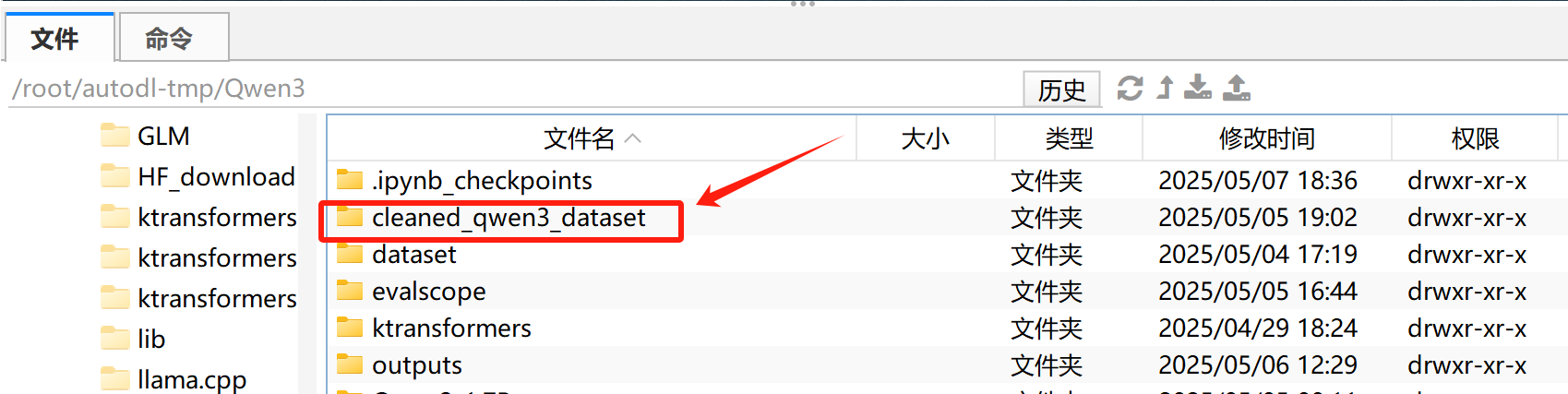
combined_dataset.save_to_disk("cleaned_qwen3_dataset")
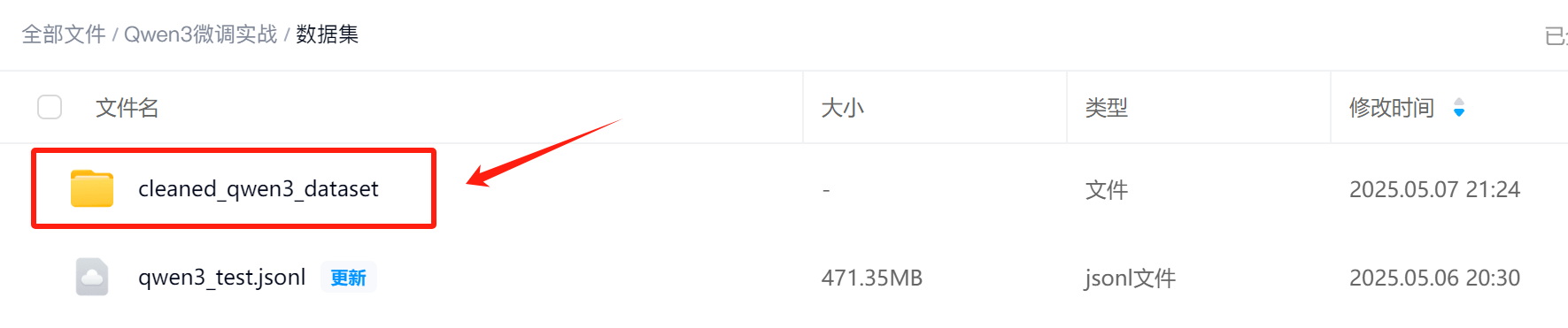
扫码添加助教老师即可领取:
后续使用时即可使用如下代码进行读取:
from datasets import load_from_disk
combined_dataset = load_from_disk("cleaned_qwen3_dataset")
type(combined_dataset)
六、Qwen3推理能力高效微调流程
准备完数据之后,即可开始进行微调。这里我们先进行少量数据微调测试,程序能够基本跑通后,我们再进行大规模数据集微调。
1. Unsloth微调流程实践
Step 1. 进行LoRA参数注入
model = FastLanguageModel.get_peft_model(
    model,
    r = 32,           # Choose any number > 0! Suggested 8, 16, 32, 64, 128
    target_modules = ["q_proj", "k_proj", "v_proj", "o_proj",
                      "gate_proj", "up_proj", "down_proj",],
    lora_alpha = 32,  # Best to choose alpha = rank or rank*2
    lora_dropout = 0, # Supports any, but = 0 is optimized
    bias = "none",    # Supports any, but = "none" is optimized
    # [NEW] "unsloth" uses 30% less VRAM, fits 2x larger batch sizes!
    use_gradient_checkpointing = "unsloth", # True or "unsloth" for very long context
    random_state = 3407,
    use_rslora = False,   # We support rank stabilized LoRA
    loftq_config = None,  # And LoftQ
)
Step 2. 设置微调参数
from trl import SFTTrainer, SFTConfig
trainer = SFTTrainer(
    model = model,
    tokenizer = tokenizer,
    train_dataset = combined_dataset,
    eval_dataset = None, # Can set up evaluation!
    args = SFTConfig(
        dataset_text_field = "text",
        per_device_train_batch_size = 2,
        gradient_accumulation_steps = 4, # Use GA to mimic batch size!
        warmup_steps = 5,
        # num_train_epochs = 1, # Set this for 1 full training run.
        max_steps = 30,
        learning_rate = 2e-4, # Reduce to 2e-5 for long training runs
        logging_steps = 1,
        optim = "adamw_8bit",
        weight_decay = 0.01,
        lr_scheduler_type = "linear",
        seed = 3407,
        report_to = "wandb", # Use this for WandB etc
    ),
)
其中SFTTrainer:一个专门为指令微调设计的训练器,封装了 Hugging Face 的 Trainer,而SFTConfig:配置训练参数的专用类,功能类似 TrainingArguments。而SFTConfig核心参数解释如下:
| 参数名 | 含义 |
|---|---|
dataset_text_field="text" | 数据集中用于训练的字段名称,如 text 或 prompt |
per_device_train_batch_size=2 | 每张 GPU 上的 batch size 是 2 |
gradient_accumulation_steps=4 | 梯度累计 4 次后才进行一次反向传播(等效于总 batch size = 2 × 4 = 8) |
warmup_steps=5 | 前 5 步进行 warmup(缓慢提升学习率) |
max_steps=30 | 最多训练 30 步(适合调试或快速实验) |
learning_rate=2e-4 | 初始学习率(短训练可用较高值) |
logging_steps=1 | 每训练 1 步就打印一次日志 |
optim="adamw_8bit" | 使用 8-bit AdamW 优化器(节省内存,Unsloth 支持) |
weight_decay=0.01 | 权重衰减,用于防止过拟合 |
lr_scheduler_type="linear" | 线性学习率调度器(从高到低线性下降) |
seed=3407 | 固定随机种子,确保结果可复现 |
report_to="none" | 不使用 WandB 或 TensorBoard 等日志平台(可改为 "wandb") |
此时基本训练过程为:
- 从
combined_dataset中取出一批样本(2 条) - 重复上面过程 4 次(
gradient_accumulation_steps=4) - 将累计的梯度用于更新模型一次参数(等效于一次大 batch 更新)
- 重复上述过程,直到
max_steps=30停止
此时显存占用如下:
# @title Show current memory stats
gpu_stats = torch.cuda.get_device_properties(0)
start_gpu_memory = round(torch.cuda.max_memory_reserved() / 1024 / 1024 / 1024, 3)
max_memory = round(gpu_stats.total_memory / 1024 / 1024 / 1024, 3)
print(f"GPU = {gpu_stats.name}. Max memory = {max_memory} GB.")
print(f"{start_gpu_memory} GB of memory reserved.")
Step 3. 【可选】设置wandb
接下来可继续设置wandb用于进行模型训练过程关键信息记录。
import wandb
os.environ["WANDB_NOTEBOOK_NAME"] = "Qwen3高效微调(下).ipynb"
wandb.login(key="4b62572b8426ff59ce46fec93a00eb1feecc026a")
run = wandb.init(project='Fine-tune-Qwen-32B-4bit on Combined Dataset', )
Step 4. 微调执行流程
一切准备就绪后,接下来即可开始进行微调。由于本次微调总共只运行30个step,整个过程并不会很长,实际执行过程如下:
trainer_stats = trainer.train()
- 微调期间显存占用检测
# @title Show final memory and time stats
used_memory = round(torch.cuda.max_memory_reserved() / 1024 / 1024 / 1024, 3)
used_memory_for_lora = round(used_memory - start_gpu_memory, 3)
used_percentage = round(used_memory / max_memory * 100, 3)
lora_percentage = round(used_memory_for_lora / max_memory * 100, 3)
print(f"{trainer_stats.metrics['train_runtime']} seconds used for training.")
print(
    f"{round(trainer_stats.metrics['train_runtime']/60, 2)} minutes used for training."
)
print(f"Peak reserved memory = {used_memory} GB.")
print(f"Peak reserved memory for training = {used_memory_for_lora} GB.")
print(f"Peak reserved memory % of max memory = {used_percentage} %.")
print(f"Peak reserved memory for training % of max memory = {lora_percentage} %.")
- 查看wandb记录结果
同时,如果开启了wandb,则可以在对应的网页看到模型训练记录结果:
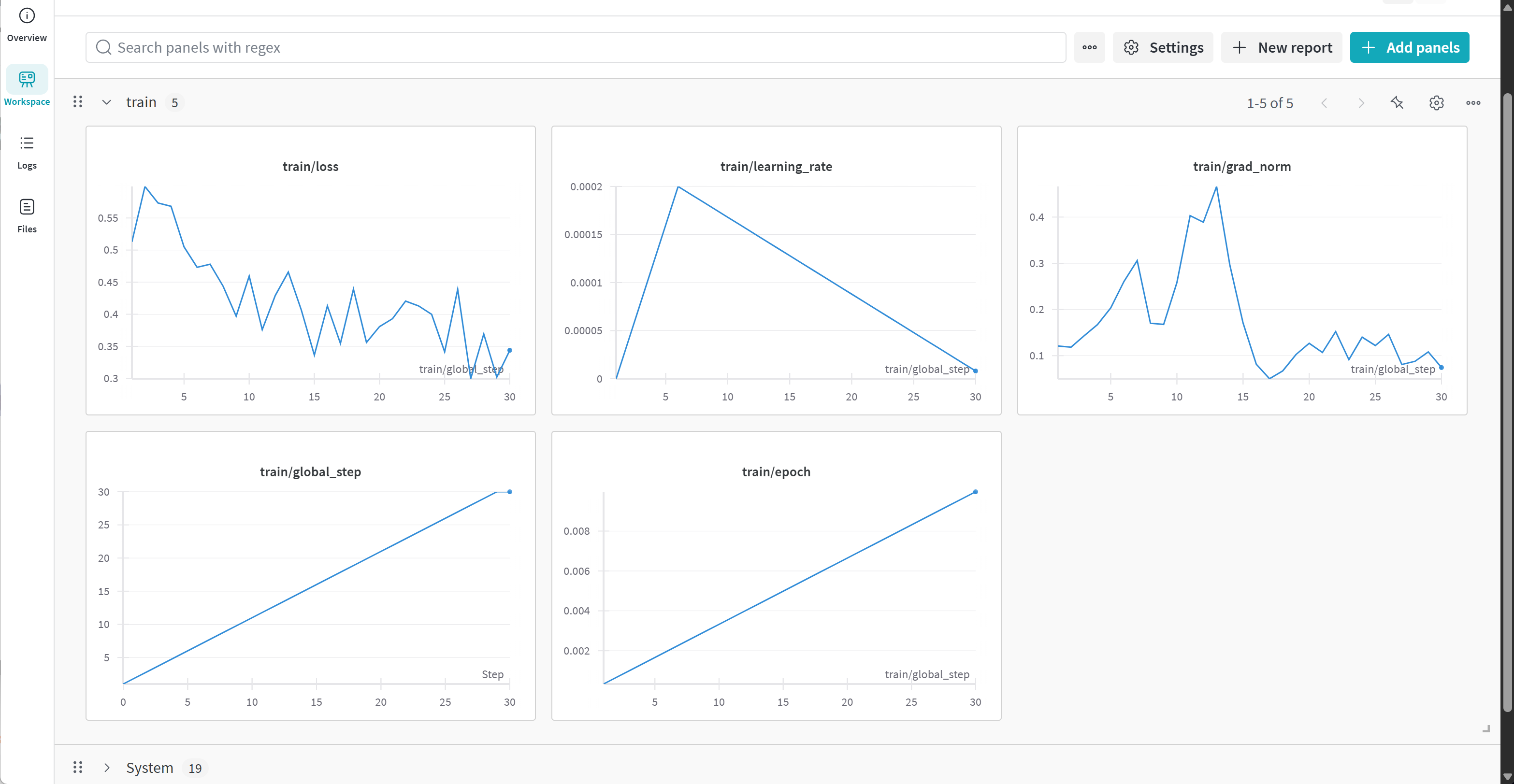
能够看到loss波动下降,整个训练过程属于正常情况。
Step 5. 模型对话测试
model
而当我们完成训练后,即可尝试进行模型对话:
messages = [
    {"role" : "user", "content" : "Solve (x + 2)^2 = 0."}
]
text = tokenizer.apply_chat_template(
    messages,
    tokenize = False,
    add_generation_prompt = True, # Must add for generation
    enable_thinking = False, # Disable thinking
)

from transformers import TextStreamer
_ = model.generate(
    **tokenizer(text, return_tensors = "pt").to("cuda"),
    max_new_tokens = 256, # Increase for longer outputs!
    temperature = 0.7, top_p = 0.8, top_k = 20, # For non thinking
    streamer = TextStreamer(tokenizer, skip_prompt = True),
)
messages = [
    {"role" : "user", "content" : "Solve (x + 2)^2 = 0."}
]
text = tokenizer.apply_chat_template(
    messages,
    tokenize = False,
    add_generation_prompt = True, # Must add for generation
    enable_thinking = True, # Disable thinking
)

from transformers import TextStreamer
_ = model.generate(
    **tokenizer(text, return_tensors = "pt").to("cuda"),
    max_new_tokens = 20488, # Increase for longer outputs!
    temperature = 0.6, top_p = 0.95, top_k = 20, # For thinking
    streamer = TextStreamer(tokenizer, skip_prompt = True),
)
messages = [
    {"role" : "user", "content" : "Determine the surface area of the portion of the plane $2x + 3y + 6z = 9$ that lies in the first octant."}
]
text = tokenizer.apply_chat_template(
    messages,
    tokenize = False,
    add_generation_prompt = True, # Must add for generation
    enable_thinking = True, # Disable thinking
)

from transformers import TextStreamer
_ = model.generate(
    **tokenizer(text, return_tensors = "pt").to("cuda"),
    max_new_tokens = 20488, # Increase for longer outputs!
    temperature = 0.6, top_p = 0.95, top_k = 20, # For thinking
    streamer = TextStreamer(tokenizer, skip_prompt = True),
)
Step 6. 模型大规模微调
接下来继续深入进行训练,此处考虑训练完一整个epoch,总共约8小时左右,训练流程如下所示:
from trl import SFTTrainer, SFTConfig
trainer = SFTTrainer(
    model = model,
    tokenizer = tokenizer,
    train_dataset = combined_dataset,
    eval_dataset = None, # Can set up evaluation!
    args = SFTConfig(
        dataset_text_field = "text",
        per_device_train_batch_size = 4,
        gradient_accumulation_steps = 2, # Use GA to mimic batch size!
        warmup_steps = 5,
        num_train_epochs = 1, # Set this for 1 full training run.
        learning_rate = 2e-4, # Reduce to 2e-5 for long training runs
        logging_steps = 1,
        optim = "adamw_8bit",
        weight_decay = 0.01,
        lr_scheduler_type = "linear",
        seed = 3407,
        report_to = "none", # Use this for WandB etc
    ),
)
trainer_stats = trainer.train()
此时训练完成后再进行对话,能明显看出模型当前数学性能有所提升,具体问答效果如下:
messages = [
    {"role" : "user", "content" : "Determine the surface area of the portion of the plane $2x + 3y + 6z = 9$ that lies in the first octant."}
]
text = tokenizer.apply_chat_template(
    messages,
    tokenize = False,
    add_generation_prompt = True, # Must add for generation
    enable_thinking = True, # Disable thinking
)

from transformers import TextStreamer
_ = model.generate(
    **tokenizer(text, return_tensors = "pt").to("cuda"),
    max_new_tokens = 20488, # Increase for longer outputs!
    temperature = 0.6, top_p = 0.95, top_k = 20, # For thinking
    streamer = TextStreamer(tokenizer, skip_prompt = True),
)
Step 7.模型保存
微调结束后即可进行模型保存,由于我们训练的LoRA本身是FP16精度,因此模型需要保存为fp16精度格式,才能完整保留模型当前性能:
model.save_pretrained_merged(save_directory = "Qwen3-32B-finetuned-fp16",
                             tokenizer = tokenizer,
                             save_method = "merged_16bit")
- 正在将原始 4bit 权重与微调产生的 LoRA adapter 合并,并转换为 16bit(FP16)精度,用于部署
- 会尽量使用不超过 703.3 MB(最大上限是你设备的 70~75% 内存)来进行保存操作,避免崩溃或卡死
- 开始保存模型,会进行合并+格式转换,时间取决于模型大小(比如 Qwen3-32B 预计要几分钟)
- 如果模型太大而内存不足,Unsloth 会自动启用“磁盘保存模式”,避免占用过多内存
- tokenizer 保存完毕
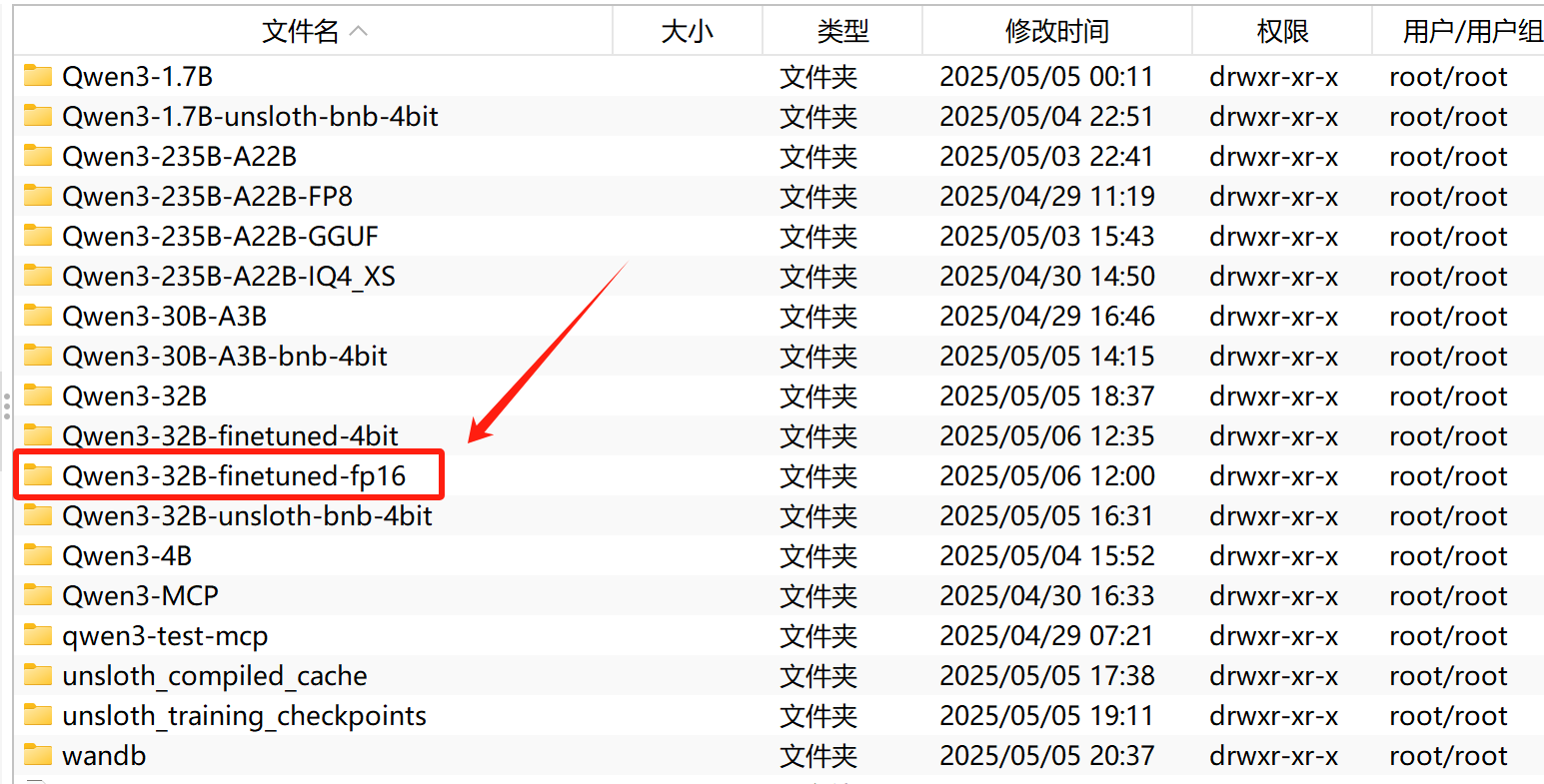
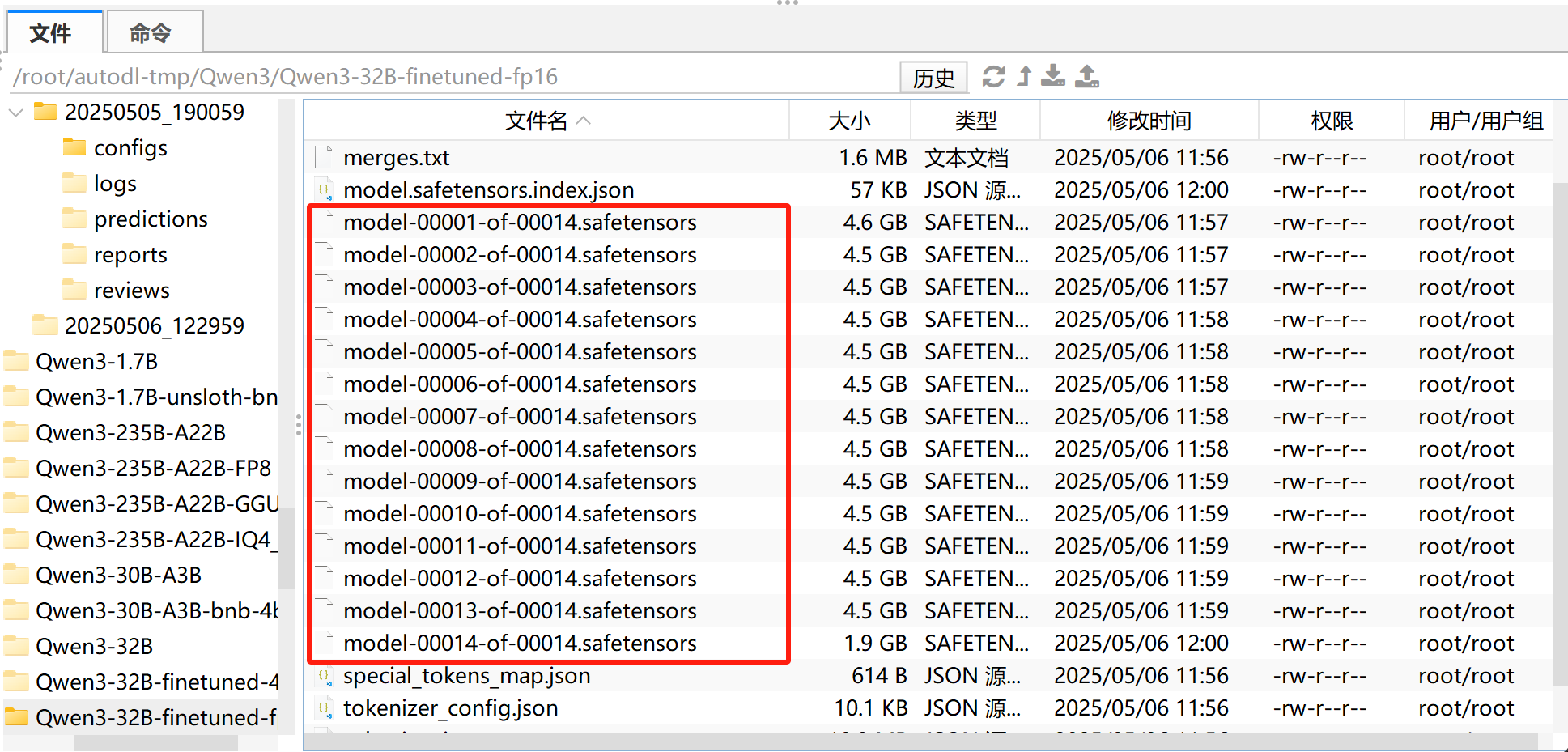
完整模型权重已上传至百度网盘:
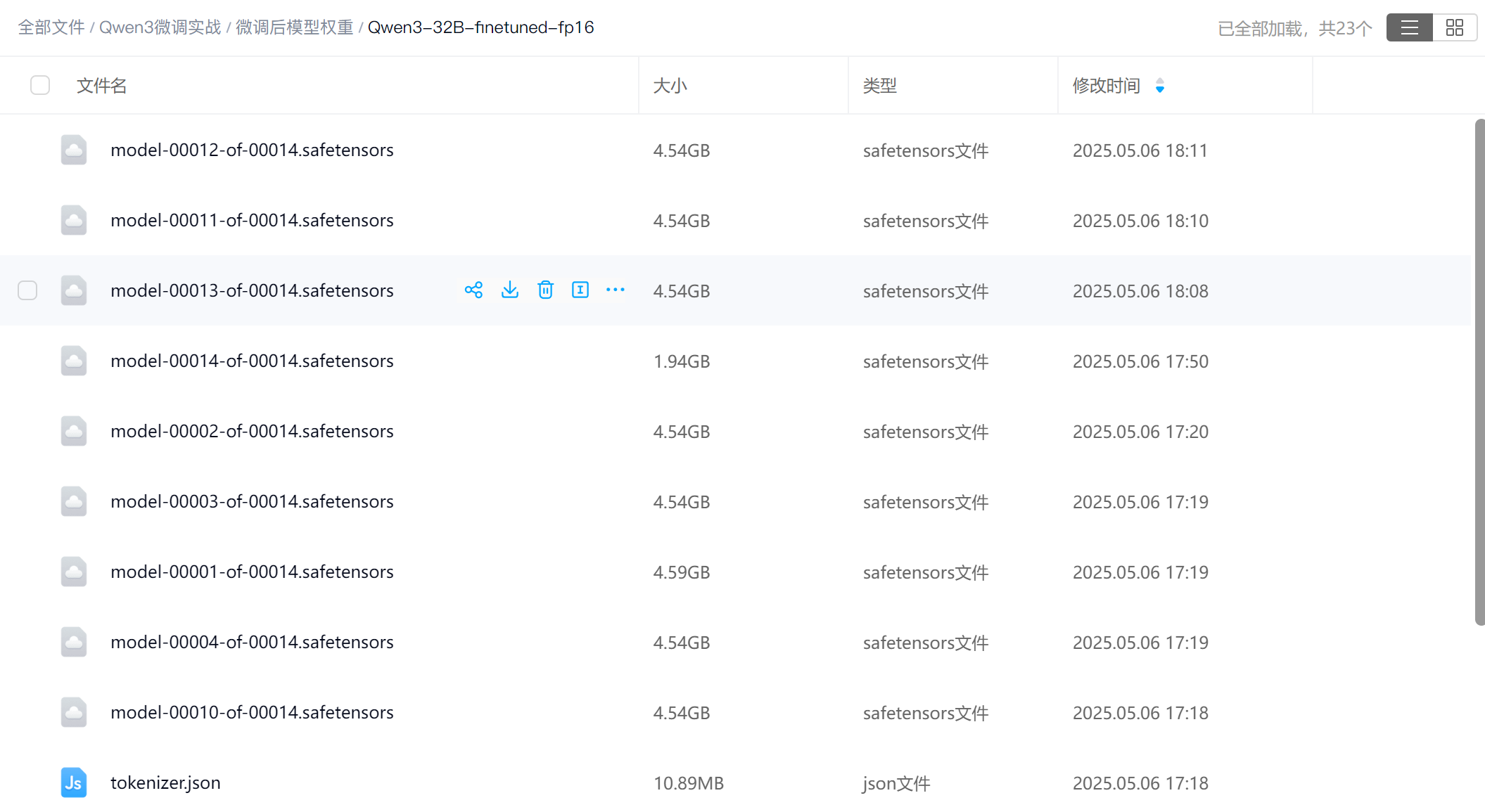
下图扫码即可领取:
Step 8.模型性能测试
接下来即可使用vllm对其进行调用,并借助EvalScope进行测试。需要借助vLLM调用导出后的模型,然后借助evalscope进行测试。
FENCE0
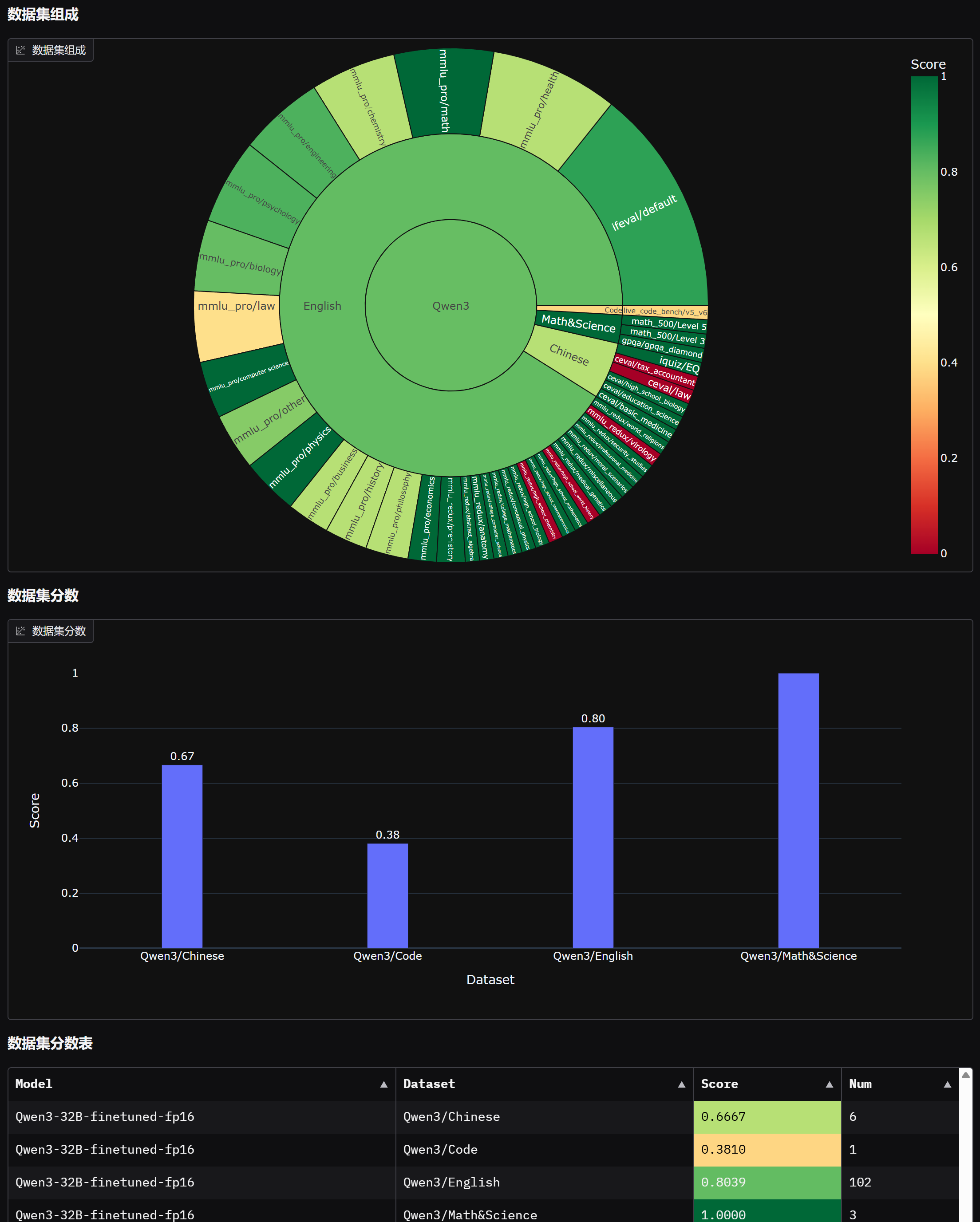
测试后即可在前端中观察测评报告: FENCE0
首先微调后模型性能如图所示:
最终微调前后模型对比如下:
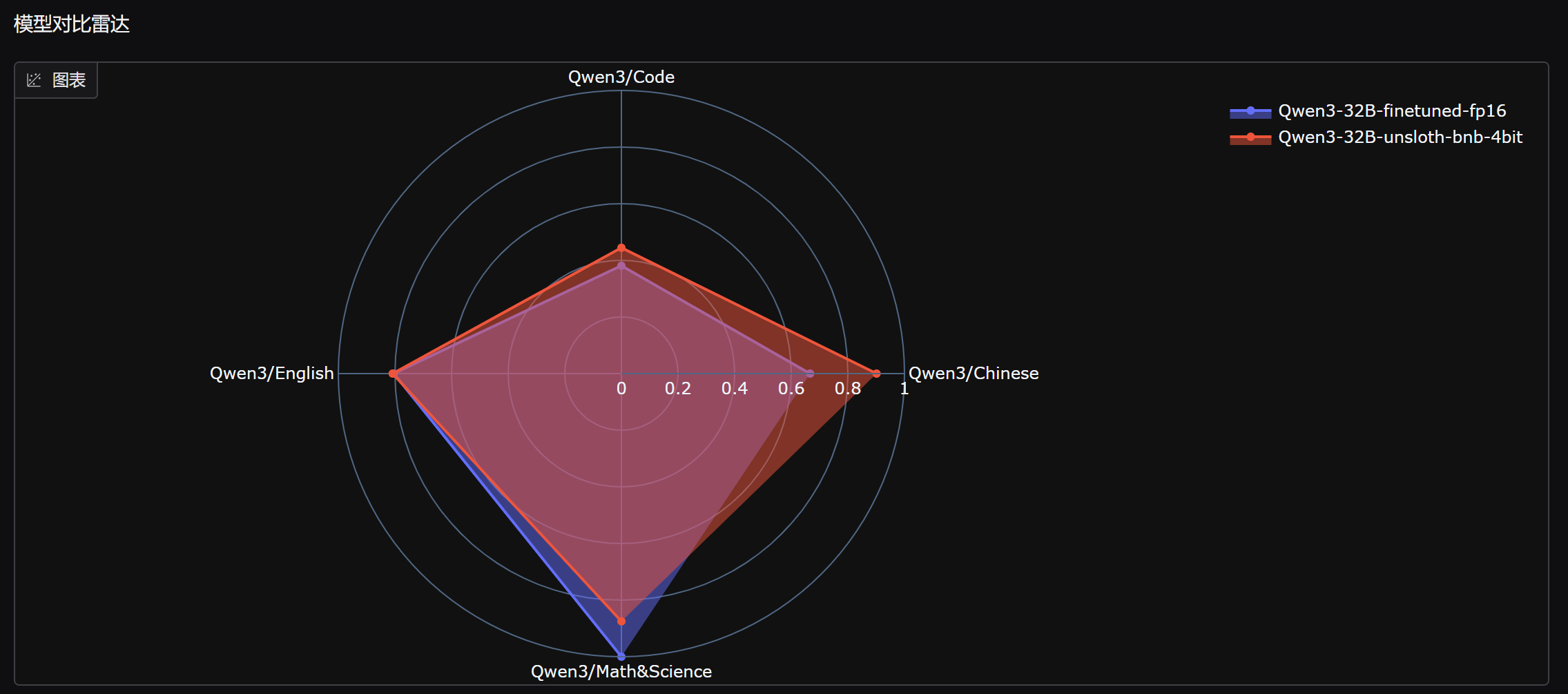
能够发现,微调后模型数学能力明显提升,但中文能力和代码能力略有下降。
七、拓展案例:Qwen3中文法律高效微调实战
注,开始本小节前,需要重启Jupyter Kernel。
1. 案例介绍与数据集介绍
接下来我们继续尝试使用自己创建的法律数据集,当前数据集完全依照刑法、民法、劳动法等多种法典以及法律裁决文书等创建而来,经过多重筛选与过滤创造出的高质量数据集。本小节内容完全节选自我们的《2025大模型Agent智能体开发实战》(5月班) :https://ix9mq.xetslk.com/s/3u765N 中借助微调打造垂域大模型部分内容,其中数据集完全原创,正式课程中共包含100w条原始数据,本次数据使用其中1k条作为微调使用。本次数据集质量较高,对于刑事案件分析会依据主观客观的方式对案件进行解答,同时本数据内会包含一部分SFT数据,保证模型微调的多样性。
详细信息扫码添加助教,回复“大模型”,即可领取课程大纲&查看课程详情👇

- 数据集样例:
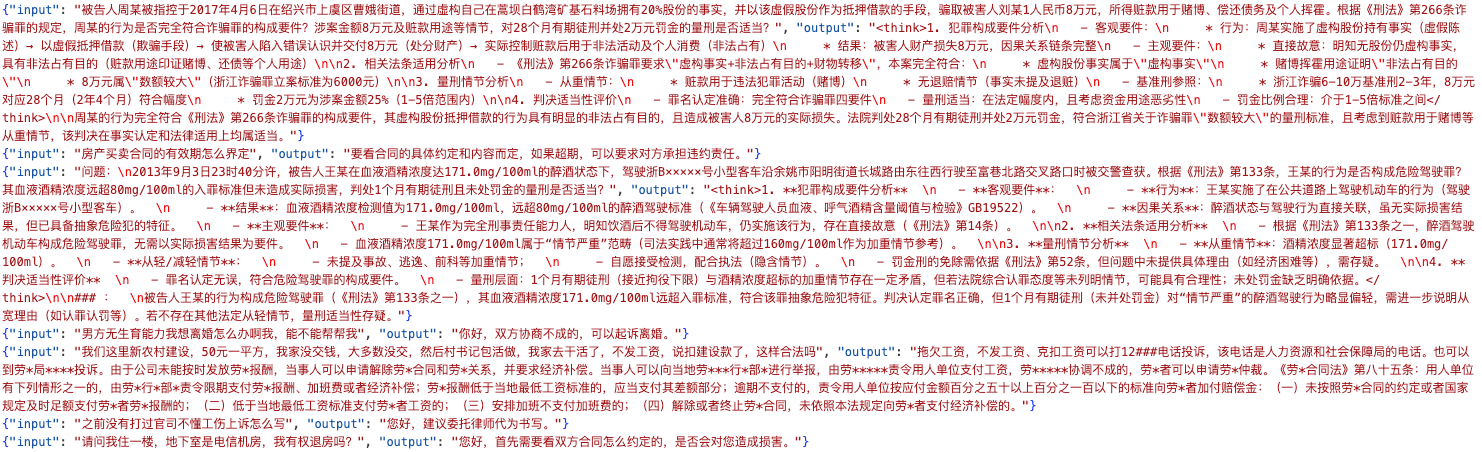
{"input": "法律问题 \n2016年4月20日下午,吸毒人员陈某某1电话联系被告人李某购买甲基苯丙胺,李某随后与陈某某2共同驾车至宁远县禾亭镇陈家村,由李某直接向陈某某1交付4.3克甲基苯丙胺并收取500元毒资,后又将剩余毒品转交至第三方“李2某”处。公安机关根据举报抓获李某,并从陈某某1处查获含袋重4.3克的甲基苯丙胺。根据《刑法》第347条,李某的行为是否构成走私、贩卖、运输、制造毒品罪?其被判处6个月有期徒刑及3000元罚金的量刑是否适当?", "output": "
** \n1. 犯罪构成要件分析 \n - 客观要件: \n - 行为:李某直接参与毒品交易(接收订单、送货、收款),并协助转移剩余毒品,符合“贩卖”和“运输”行为特征。 \n - 结果:实际交付4.3克甲基苯丙胺,毒品已流入社会。 \n - 因果关系:李某的行为直接促成毒品交易完成。 \n - 主观要件:李某明知甲基苯丙胺为毒品仍主动参与交易,具有贩卖毒品的直接故意。 \n\n2. 相关法条适用分析 \n - 根据《刑法》第347条,贩卖甲基苯丙胺无论数量多少均应追究刑事责任。本案毒品数量为4.3克(含包装),属“少量毒品”,但法条未设定入罪数量下限。 \n\n3. 量刑情节分析 \n - 从轻情节: \n - 涉案毒品数量较少(4.3克); \n - 无证据表明李某系主犯或组织者(行为表现为协助实施)。 \n - 从重情节: \n - 毒品已实际交付,社会危害性成立; \n - 存在毒品流转的连续性(向“李2某”转移剩余毒品)。 \n\n4. 判决适当性评价 \n - 量刑符合《刑法》第347条及司法解释对“少量毒品”的标准,6个月有期徒刑处于“三年以下有期徒刑、拘役或管制”的法定刑幅度内; \n - 罚金3000元与毒品价值(500元交易额)比例适当,体现罪责刑相适应原则。 \n\n** \n\n---\n\n**\n** \n\n李某的行为构成贩卖、运输毒品罪,罪名认定正确。判决量刑适当,理由如下: \n1. 其行为完全符合贩卖、运输毒品罪的构成要件; \n2. 6个月有期徒刑及3000元罚金与涉案毒品数量、犯罪情节及社会危害性相匹配,符合《刑法》第347条对“少量毒品”的处罚标准。"}
{"input": "问题: \n被告人龚某某于2012年11月7日在常德市武陵区战备桥“常德市邮政东区投递部”前,以购买被害人张某甲出售的白色神龙富康牌小车(车牌湘JB2898)为名,谎称试车后趁机将车辆骗走。经鉴定,车辆价值人民币5100元。案发后,龚某某如实供述犯罪事实,赔偿被害人4800元并取得谅解。根据《刑法》第266条,龚某某的行为是否构成诈骗罪?其被判处2个月有期徒刑并处罚金2000元的量刑是否适当?", "output": "
** \n1. 犯罪构成要件分析 \n - 客观要件: \n - 行为:龚某某虚构“买车”意图,以试车为名非法占有车辆(欺骗手段+转移财产控制)。 \n - 结果:被害人实际丧失车辆所有权(价值5100元)。 \n - 因果关系:欺骗行为直接导致被害人基于错误认识交付车辆。 \n - 主观要件:龚某某具有非法占有的直接故意(明知无购买意愿仍骗取车辆)。 \n\n2. 相关法条适用分析 \n - 《刑法》第266条诈骗罪要求“以非法占有为目的,用虚构事实或隐瞒真相的方法骗取数额较大的公私财物”。本案中: \n - 欺骗手段(假意买车+试车)符合“虚构事实”。 \n - 涉案金额5100元,超过诈骗罪“数额较大”标准(司法解释中通常为3000元以上)。 \n\n3. 量刑情节分析 \n - 从轻情节: \n - 如实供述(可认定为坦白,依法从轻)。 \n - 赔偿损失并取得谅解(酌定从轻)。 \n - 无从重情节:无证据显示暴力、多次犯罪等加重情节。 \n\n4. 判决适当性评价 \n - 基准刑参考:诈骗5100元,法定刑为“3年以下有期徒刑、拘役或管制,并处或单处罚金”。 \n - 从轻幅度:坦白+赔偿谅解可减少基准刑30%以下。 \n - 实际量刑:2个月有期徒刑(接近拘役下限)+罚金2000元,符合从轻后的合理范围,且罚金与犯罪金额比例适当。 \n\n** \n\n**\n** \n\n龚某某的行为构成诈骗罪,其以虚假购车名义骗取他人财物,涉案金额达到“数额较大”标准,符合《刑法》第266条的犯罪构成。法院判处2个月有期徒刑并处罚金2000元适当,理由包括:犯罪金额较低、坦白情节、全额赔偿及取得谅解等从轻因素,量刑在法律框架内且体现宽严相济原则。"}
数据主要包含两个部分:input、output,其中output包含
- 数据集下载:
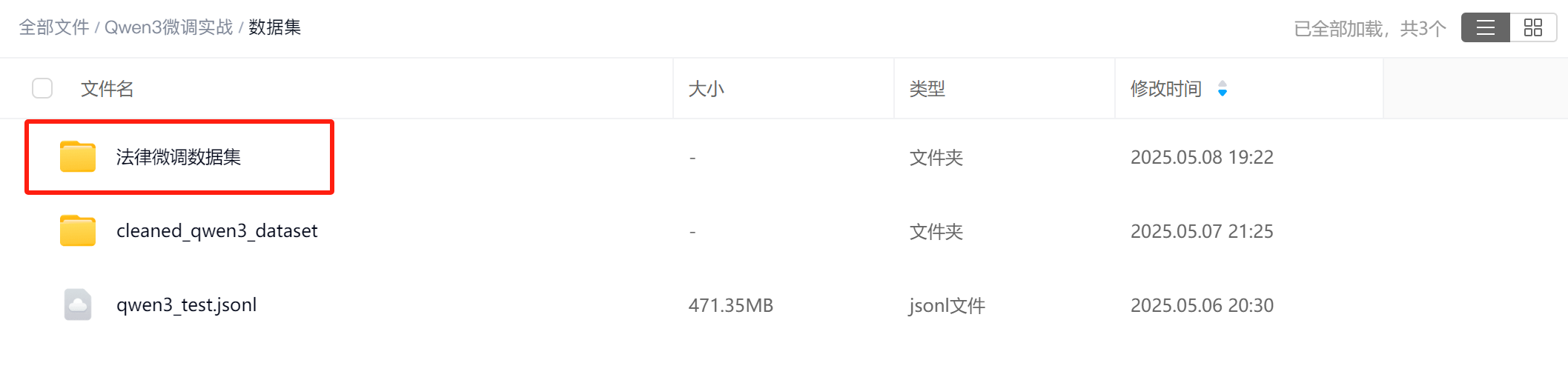
接下来我们尝试围绕该数据集进行模型法律能力微调,并由此实操大模型问答风格与知识灌注能力微调。
import os
os.environ["CUDA_VISIBLE_DEVICES"] = "1"
由于当前实验环境是多卡环境,而动态量化模型只支持单卡运行,因此这里先设置接下来运行的GPU编号。
Step 1.模型导入
首先进行模型导入:
from unsloth import FastLanguageModel
import torch
max_seq_length = 8192
dtype = None
load_in_4bit = True
model, tokenizer = FastLanguageModel.from_pretrained(
    model_name = "./Qwen3-8B-unsloth-bnb-4bit",
    max_seq_length = max_seq_length,
    dtype = dtype,
    load_in_4bit = load_in_4bit,
)
此时8B模型所占显存如下:
# @title Show current memory stats
gpu_stats = torch.cuda.get_device_properties(0)
start_gpu_memory = round(torch.cuda.max_memory_reserved() / 1024 / 1024 / 1024, 3)
max_memory = round(gpu_stats.total_memory / 1024 / 1024 / 1024, 3)
print(f"GPU = {gpu_stats.name}. Max memory = {max_memory} GB.")
print(f"{start_gpu_memory} GB of memory reserved.")
然后进行问答测试:
question_1 = "问题:某分裂组织在边境地区策划武装割据,并与境外势力秘密勾结,其首要分子甲在实施过程中被抓获。请问甲的行为构成何罪?应当如何量刑?"
question_2 = "2015年9月4日14时50分许,被告人曹某某在景德镇市珠山区XX涵洞路口醉酒(血液酒精含量未明确数值)、无证驾驶无牌二轮摩托车,搭载李某林左转时未让直行车辆,与超速行驶的朱某良驾驶的出租车相撞,致李某林受伤(具体伤情等级未说明)。事故后曹某某赔偿李某林并获得谅解。公诉机关以危险驾驶罪指控,提供现场勘查记录、酒精检测等9项证据。本案中:1. 曹某某同时存在醉酒、无证、无牌三项违法情节,但缺乏具体酒精浓度数据;2. 事故系双方过错(曹某某未让行与朱某良超速)共同导致;3. 被害人已谅解。在此情况下:(1)危险驾驶罪的构成要件是否全部满足?(2)量刑时如何平衡\"无证+无牌+醉驾\"的从重情节与\"赔偿谅解\"的从轻情节?(3)最终判处3个月有期徒刑并处罚金1000元是否适当?"
messages = [
    {"role" : "user", "content" : question_1}
]
text = tokenizer.apply_chat_template(
    messages,
    tokenize = False,
    add_generation_prompt = True, # Must add for generation
    enable_thinking = True, # Disable thinking
)

from transformers import TextStreamer
_ = model.generate(
    **tokenizer(text, return_tensors = "pt").to("cuda"),
    max_new_tokens = 20488, # Increase for longer outputs!
    temperature = 0.6, top_p = 0.95, top_k = 20, # For thinking
    streamer = TextStreamer(tokenizer, skip_prompt = True),
)
messages = [
    {"role" : "user", "content" : question_2}
]
text = tokenizer.apply_chat_template(
    messages,
    tokenize = False,
    add_generation_prompt = True, # Must add for generation
    enable_thinking = True, # Disable thinking
)

from transformers import TextStreamer
_ = model.generate(
    **tokenizer(text, return_tensors = "pt").to("cuda"),
    max_new_tokens = 20488, # Increase for longer outputs!
    temperature = 0.6, top_p = 0.95, top_k = 20, # For thinking
    streamer = TextStreamer(tokenizer, skip_prompt = True),
)
Step 2.数据集准备
接下来进行数据集读取与导入。这里除了要导入既定的高质量的法律问答数据集,同时也需要准备普通对话数据集。
from datasets import Dataset
import json
def load_jsonl_dataset(file_path):
    """从JSONL文件加载数据集"""
    data = {"input": [], "output": []}

    print(f"开始加载数据集: {file_path}")
    count = 0
    error_count = 0

    with open(file_path, 'r', encoding='utf-8') as f:
        for line in f:
            try:
                item = json.loads(line.strip())
                # 根据数据集结构提取字段
                input_text = item.get("input", "")
                output = item.get("output", "")

                data["input"].append(input_text)
                data["output"].append(output)
                count += 1
            except Exception as e:
                print(f"解析行时出错: {e}")
                error_count += 1
                continue

    print(f"数据集加载完成: 成功加载{count}个样本, 跳过{error_count}个错误样本")
    return Dataset.from_dict(data)
data_path = "./train_1k.jsonl"
# 加载自定义数据集
dataset = load_jsonl_dataset(data_path)

# 显示数据集信息
print(f"\n数据集统计:")
print(f"- 样本数量: {len(dataset)}")
print(f"- 字段: {dataset.column_names}")

print(dataset[0])
def formatting_prompts_func(examples):
    """根据提示模板格式化数据"""
    inputs = examples["input"]
    outputs = examples["output"]

    texts = []
    for  input_text, output in zip(inputs, outputs):
        texts.append([
            {"role" : "user",      "content" : input_text},
            {"role" : "assistant", "content" : output},
        ])

    return {"text": texts}
# 应用格式化
print("开始格式化数据集...")
reasoning_conversations = tokenizer.apply_chat_template(
    dataset.map(formatting_prompts_func, batched = True)["text"],
    tokenize = False,
)
print("数据集格式化完成")
reasoning_conversations[0]
from datasets import load_dataset
non_reasoning_dataset = load_dataset("mlabonne/FineTome-100k", split = "train")
from unsloth.chat_templates import standardize_sharegpt
dataset = standardize_sharegpt(non_reasoning_dataset)

non_reasoning_conversations = tokenizer.apply_chat_template(
    dataset["conversations"],
    tokenize = False,
)
print(len(reasoning_conversations))
print(len(non_reasoning_conversations))
import pandas as pd
non_reasoning_subset = pd.Series(non_reasoning_conversations)
non_reasoning_subset = non_reasoning_subset.sample(
    1000,
    random_state = 2407,
)
print(len(reasoning_conversations))
print(len(non_reasoning_subset))
data = pd.concat([
    pd.Series(reasoning_conversations),
    pd.Series(non_reasoning_subset)
])
data.name = "text"
from datasets import Dataset
combined_dataset = Dataset.from_pandas(pd.DataFrame(data))
combined_dataset = combined_dataset.shuffle(seed = 3407)
len(combined_dataset)
combined_dataset[3]
combined_dataset[10]
Step 3.执行微调流程
- 进行LoRA参数注入
model = FastLanguageModel.get_peft_model(
    model,
    r = 32,           # Choose any number > 0! Suggested 8, 16, 32, 64, 128
    target_modules = ["q_proj", "k_proj", "v_proj", "o_proj",
                      "gate_proj", "up_proj", "down_proj",],
    lora_alpha = 32,  # Best to choose alpha = rank or rank*2
    lora_dropout = 0, # Supports any, but = 0 is optimized
    bias = "none",    # Supports any, but = "none" is optimized
    # [NEW] "unsloth" uses 30% less VRAM, fits 2x larger batch sizes!
    use_gradient_checkpointing = "unsloth", # True or "unsloth" for very long context
    random_state = 3407,
    use_rslora = False,   # We support rank stabilized LoRA
    loftq_config = None,  # And LoftQ
)
- 设置微调参数
from trl import SFTTrainer, SFTConfig
trainer = SFTTrainer(
    model = model,
    tokenizer = tokenizer,
    train_dataset = combined_dataset,
    eval_dataset = None, # Can set up evaluation!
    args = SFTConfig(
        dataset_text_field = "text",
        per_device_train_batch_size = 2,
        gradient_accumulation_steps = 4, # Use GA to mimic batch size!
        warmup_steps = 5,
        num_train_epochs = 1, # Set this for 1 full training run.
        learning_rate = 2e-4, # Reduce to 2e-5 for long training runs
        logging_steps = 1,
        optim = "adamw_8bit",
        weight_decay = 0.01,
        lr_scheduler_type = "linear",
        seed = 3407,
        report_to = None, # Use this for WandB etc
    ),
)
此时显存占用如下:
# @title Show current memory stats
gpu_stats = torch.cuda.get_device_properties(0)
start_gpu_memory = round(torch.cuda.max_memory_reserved() / 1024 / 1024 / 1024, 3)
max_memory = round(gpu_stats.total_memory / 1024 / 1024 / 1024, 3)
print(f"GPU = {gpu_stats.name}. Max memory = {max_memory} GB.")
print(f"{start_gpu_memory} GB of memory reserved.")
- 微调执行流程
trainer_stats = trainer.train()
- 微调期间显存占用检测
# @title Show final memory and time stats
used_memory = round(torch.cuda.max_memory_reserved() / 1024 / 1024 / 1024, 3)
used_memory_for_lora = round(used_memory - start_gpu_memory, 3)
used_percentage = round(used_memory / max_memory * 100, 3)
lora_percentage = round(used_memory_for_lora / max_memory * 100, 3)
print(f"{trainer_stats.metrics['train_runtime']} seconds used for training.")
print(
    f"{round(trainer_stats.metrics['train_runtime']/60, 2)} minutes used for training."
)
print(f"Peak reserved memory = {used_memory} GB.")
print(f"Peak reserved memory for training = {used_memory_for_lora} GB.")
print(f"Peak reserved memory % of max memory = {used_percentage} %.")
print(f"Peak reserved memory for training % of max memory = {lora_percentage} %.")
最后是问答效果测试:
question_1 = "问题:某分裂组织在边境地区策划武装割据,并与境外势力秘密勾结,其首要分子甲在实施过程中被抓获。请问甲的行为构成何罪?应当如何量刑?"
question_2 = "2015年9月4日14时50分许,被告人曹某某在景德镇市珠山区XX涵洞路口醉酒(血液酒精含量未明确数值)、无证驾驶无牌二轮摩托车,搭载李某林左转时未让直行车辆,与超速行驶的朱某良驾驶的出租车相撞,致李某林受伤(具体伤情等级未说明)。事故后曹某某赔偿李某林并获得谅解。公诉机关以危险驾驶罪指控,提供现场勘查记录、酒精检测等9项证据。本案中:1. 曹某某同时存在醉酒、无证、无牌三项违法情节,但缺乏具体酒精浓度数据;2. 事故系双方过错(曹某某未让行与朱某良超速)共同导致;3. 被害人已谅解。在此情况下:(1)危险驾驶罪的构成要件是否全部满足?(2)量刑时如何平衡\"无证+无牌+醉驾\"的从重情节与\"赔偿谅解\"的从轻情节?(3)最终判处3个月有期徒刑并处罚金1000元是否适当?"
messages = [
    {"role" : "user", "content" : question_1}
]
text = tokenizer.apply_chat_template(
    messages,
    tokenize = False,
    add_generation_prompt = True, # Must add for generation
    enable_thinking = True, # Disable thinking
)

from transformers import TextStreamer
_ = model.generate(
    **tokenizer(text, return_tensors = "pt").to("cuda"),
    max_new_tokens = 20488, # Increase for longer outputs!
    temperature = 0.6, top_p = 0.95, top_k = 20, # For thinking
    streamer = TextStreamer(tokenizer, skip_prompt = True),
)
messages = [
    {"role" : "user", "content" : question_2}
]
text = tokenizer.apply_chat_template(
    messages,
    tokenize = False,
    add_generation_prompt = True, # Must add for generation
    enable_thinking = True, # Disable thinking
)

from transformers import TextStreamer
_ = model.generate(
    **tokenizer(text, return_tensors = "pt").to("cuda"),
    max_new_tokens = 20488, # Increase for longer outputs!
    temperature = 0.6, top_p = 0.95, top_k = 20, # For thinking
    streamer = TextStreamer(tokenizer, skip_prompt = True),
)
能够看出问答语气风格有明显优化,表述更加完整,答案也更加专业。