课程说明:
- 体验课内容节选自《2025大模型Agent智能体开发实战》(3月DeepSeek强化班) 完整版付费课程
体验课时间有限,若想深度学习大模型技术,欢迎大家报名由我主讲的《2025大模型Agent智能体开发实战》(3月DeepSeek强化班) :

《2025大模型Agent智能体开发实战》(3月DeepSeek强化班) 为【100+小时】体系大课,总共20大模块精讲精析,零基础直达大模型企业级应用!
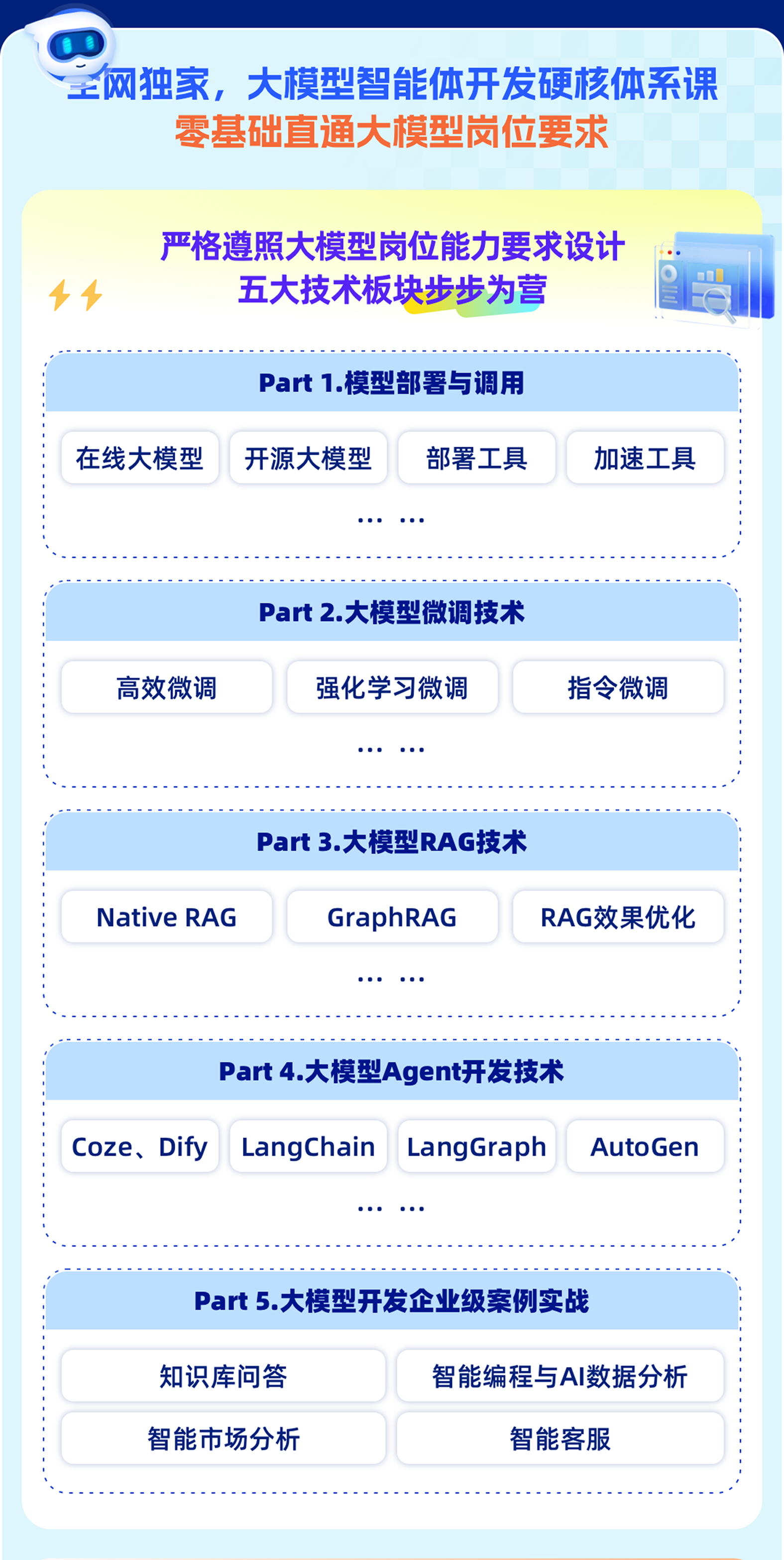
重磅新增DeepSeek技术应用与智能体开发相关实战内容:

此外,若是对大模型底层原理感兴趣,也欢迎报名由我和菜菜老师共同主讲的《2025大模型原理与实战课程》(3月班)

两门大模型课程2月班目前上新特惠中,立减2000起,合购还有更多优惠哦~详细信息扫码添加助教,回复“大模型”,即可领取课程大纲&查看课程详情👇

《2025大模型Agent智能体开发实战》体验课
QwQ-32B高效微调入门实战
一、QwQ-32B 4bit动态量化模型下载与调用
1.QwQ-32B 4bit动态量化模型下载流程
import subprocess
import os

result = subprocess.run('bash -c "source /etc/network_turbo && env | grep proxy"', shell=True, capture_output=True, text=True)
output = result.stdout
for line in output.splitlines():
    if '=' in line:
        var, value = line.split('=', 1)
        os.environ[var] = value
from huggingface_hub import snapshot_download
snapshot_download(
    repo_id = "unsloth/QwQ-32B-unsloth-bnb-4bit",
    local_dir = "QwQ-32B-unsloth-bnb-4bit",
)
2.使用transformers调用QwQ-32B 4bit动态量化模型
# !pip install modelscope
from modelscope import AutoModelForCausalLM, AutoTokenizer
model_name = "./QwQ-32B-unsloth-bnb-4bit"
model = AutoModelForCausalLM.from_pretrained(
    model_name,
    torch_dtype="auto",
    device_map="auto"
)
tokenizer = AutoTokenizer.from_pretrained(model_name)
prompt = "你好,好久不见!"
messages = [
    {"role": "user", "content": prompt}
]
text = tokenizer.apply_chat_template(
    messages,
    tokenize=False,
    add_generation_prompt=True
)
model_inputs = tokenizer([text], return_tensors="pt").to(model.device)
generated_ids = model.generate(
    **model_inputs,
    max_new_tokens=32768
)
generated_ids = [
    output_ids[len(input_ids):] for input_ids, output_ids in zip(model_inputs.input_ids, generated_ids)
]
response = tokenizer.batch_decode(generated_ids, skip_special_tokens=True)[0]
print(response)
3.Ollama调用流程
from openai import OpenAI
client = OpenAI(
    base_url='http://localhost:11434/v1/',
    api_key='ollama',  # required but ignored
)
prompt = "你好,好久不见!"
messages = [
    {"role": "user", "content": prompt}
]
response = client.chat.completions.create(
    messages=messages,
    model='qwq-32b-bnb',
)

print(response.choices[0].message.content)
4.vLLM调用流程
from openai import OpenAI
openai_api_key = "EMPTY"
openai_api_base = "http://localhost:8000/v1"

client = OpenAI(
    api_key=openai_api_key,
    base_url=openai_api_base,
)
prompt = "你好,好久不见!"
messages = [
    {"role": "user", "content": prompt}
]
response = client.chat.completions.create(
    model="/root/autodl-tmp/QwQ-32B-unsloth-bnb-4bit",
    messages=messages,
)

print(response.choices[0].message.content)
二、unsloth快速使用入门与QwQ模型调用方法
1.借助unsloth进行模型读取和关键参数解释
from unsloth import FastLanguageModel
- 尝试用unsloth进行QwQ-32B-bnb-4bit模型推理
首先设置关键参数,并读取模型:
max_seq_length = 2048
dtype = None
load_in_4bit = True
注,若显存充足,则可以load_in_4bit = False,进行全精度运行。
model, tokenizer = FastLanguageModel.from_pretrained(
    model_name = "./QwQ-32B-unsloth-bnb-4bit",
    max_seq_length = max_seq_length,
    dtype = dtype,
    load_in_4bit = load_in_4bit,
)
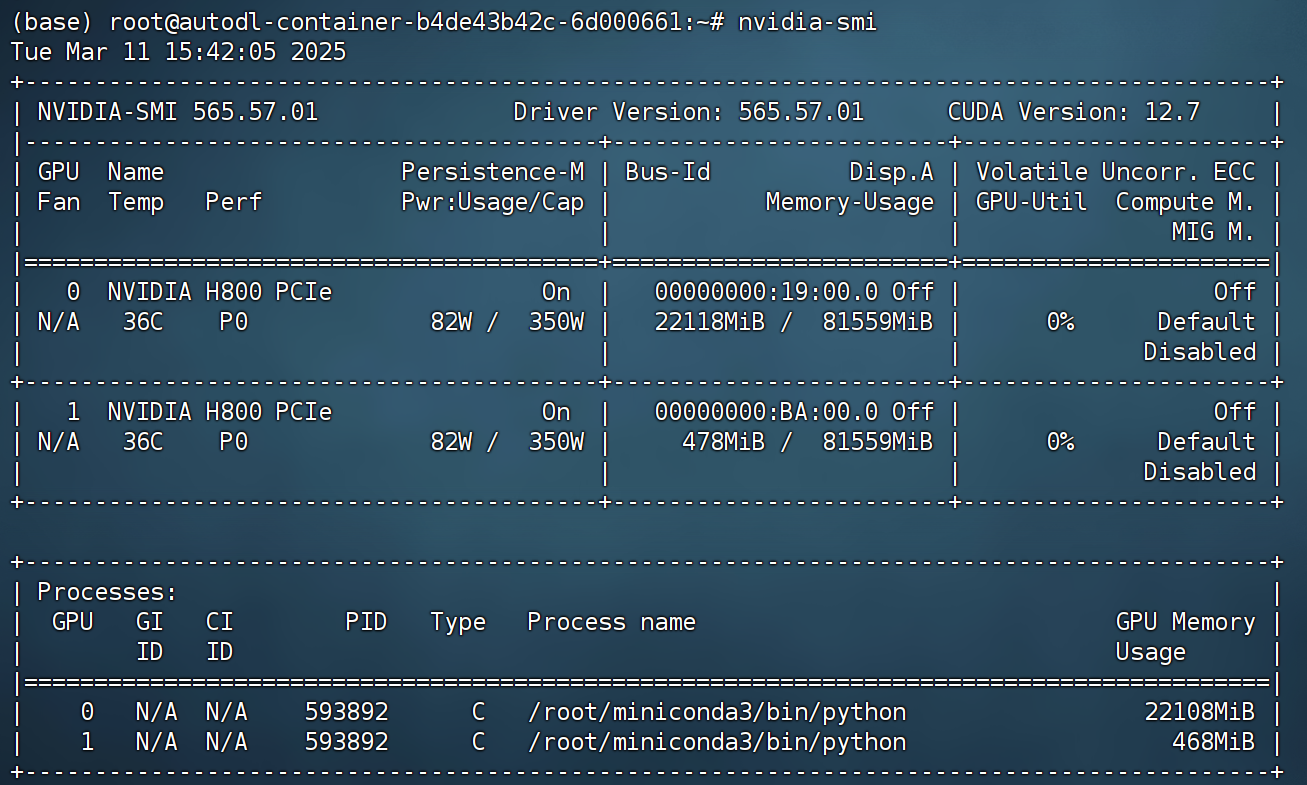
在4-bit动态量化下,QwQ-32B模型实际占用显存约为22G:
此时model就是读取进来的QwQ-32B 4bit动态量化模型:
model
而tokenizer则是分词器:
tokenizer
将模型调整为推理模式:
FastLanguageModel.for_inference(model)
2.带入问答模板进行回答
- 结构化输入方法
prompt_style_chat = """请写出一个恰当的回答来完成当前对话任务。

### Instruction:
你是一名助人为乐的助手。

### Question:
{}

### Response:
<think>{}"""
question = "你好,好久不见!"
[prompt_style_chat.format(question, "")]
inputs = tokenizer([prompt_style_chat.format(question, "")], return_tensors="pt").to("cuda")
outputs = model.generate(
    input_ids=inputs.input_ids,
    max_new_tokens=2048,
    use_cache=True,
)
response = tokenizer.batch_decode(outputs)
response
print(response[0].split("### Response:")[1])
- 复杂问题测试
question = "请证明根号2是无理数。"
inputs = tokenizer([prompt_style_chat.format(question, "")], return_tensors="pt").to("cuda")
outputs = model.generate(
    input_ids=inputs.input_ids,
    max_new_tokens=1200,
    use_cache=True,
)
response = tokenizer.batch_decode(outputs)
print(response[0].split("### Response:")[1])
3.原始模型的医疗问题问答
- 重新设置问答模板
prompt_style = """Below is an instruction that describes a task, paired with an input that provides further context.
Write a response that appropriately completes the request.
Before answering, think carefully about the question and create a step-by-step chain of thoughts to ensure a logical and accurate response.

### Instruction:
You are a medical expert with advanced knowledge in clinical reasoning, diagnostics, and treatment planning.
Please answer the following medical question.

### Question:
{}

### Response:
<think>{}"""
翻译如下:
FENCE0
接下来我们抽取部分medical-o1-reasoning-SFT数据集中问题进行提问,并查看初始状态下模型回答结果。
question_1 = "A 61-year-old woman with a long history of involuntary urine loss during activities like coughing or sneezing but no leakage at night undergoes a gynecological exam and Q-tip test. Based on these findings, what would cystometry most likely reveal about her residual volume and detrusor contractions?"
翻译:一位61岁的女性,有长期在咳嗽或打喷嚏等活动中发生不自主尿液流失的病史,但夜间没有漏尿。她接受了妇科检查和Q-tip测试。根据这些检查结果,膀胱测量(cystometry)最可能会显示她的残余尿量和逼尿肌收缩情况如何?
question_2 = "Given a patient who experiences sudden-onset chest pain radiating to the neck and left arm, with a past medical history of hypercholesterolemia and coronary artery disease, elevated troponin I levels, and tachycardia, what is the most likely coronary artery involved based on this presentation?"
翻译:面对一位突发胸痛并放射至颈部和左臂的患者,其既往病史包括高胆固醇血症和冠状动脉疾病,同时伴有升高的肌钙蛋白I水平和心动过速,根据这些临床表现,最可能受累的冠状动脉是哪一条?
- 问答测试
inputs1 = tokenizer([prompt_style.format(question_1, "")], return_tensors="pt").to("cuda")


outputs1 = model.generate(
    input_ids=inputs1.input_ids,
    max_new_tokens=1200,
    use_cache=True,
)

response1 = tokenizer.batch_decode(outputs1)
print(response1[0].split("### Response:")[1])
翻译如下:
<think>
好的,我正在尝试分析这个医学问题。我们一步步来分解。患者是一位61岁的女性,有在咳嗽或打喷嚏等活动中发生不自主尿液流失的病史,但她夜间没有漏尿。她正在接受妇科检查和Q-tip测试。问题是关于膀胱测量(cystometry)会显示她的残余尿量和逼尿肌收缩情况。
首先,我知道在像打喷嚏或咳嗽等活动中发生不自主尿液流失通常与压力性尿失禁有关。压力性尿失禁通常发生在尿道肌肉不足以在压力增大的情况下(比如咳嗽时)防止膀胱漏尿时。
接下来是Q-tip测试。根据我记得的,Q-tip是一种用于测量尿道压力曲线的尿道导管。它通常用于评估尿道功能。Q-tip测试阳性结果,即在Valsalva操作过程中尿道压力低于膀胱内压,与内源性括约肌缺陷相关,这是一种压力性尿失禁类型。
由于患者有在活动中出现不自主漏尿的病史,但夜间没有漏尿,更可能是压力性尿失禁,而不是像急迫性尿失禁那样的情况,急迫性尿失禁通常伴有夜间漏尿。因此,如果Q-tip测试阳性,提示内源性括约肌缺陷。
现在,谈到膀胱测量。膀胱测量是一种测试,旨在测量膀胱在充盈过程中的反应以及逼尿肌的收缩情况。它可以显示是否存在膀胱过度活动症(OAB),即引起急迫感和频尿的情况,或是否存在逼尿肌低活动性,导致尿潴留。
在这种情况下,患者的主要问题是压力性尿失禁,这更与无法在压力增大时保持尿液有关。膀胱测量会查看逼尿肌的收缩情况。如果逼尿肌低活动性,它将不能强有力地收缩以排空膀胱,导致残余尿量。但如果逼尿肌过度活跃,可能会收缩过度,导致急迫感。
鉴于患者有压力性尿失禁的病史和Q-tip测试阳性,提示内源性括约肌缺陷,我认为膀胱测量会显示逼尿肌的收缩是正常的。问题不在于逼尿肌收缩的能力,而是无法密封尿道以保持压力。因此,残余尿量可能是正常的,除非有明显的尿潴留,但关键发现是逼尿肌的收缩是正常的,而不是过度活跃。
等等,但会不会有残余尿量?如果患者排尿后膀胱中残留一些尿液,那就是残余尿量。但如果没有尿潴留的症状,比如膀胱饱胀或排尿困难,那么这种情况的可能性较小。主要问题是在活动中发生的尿失禁,因此逼尿肌收缩是正常的,残余尿量在正常范围内,除非有其他情况。
所以,综合来看,膀胱测量可能会显示逼尿肌的收缩正常,残余尿量正常。问题更多是在括约肌方面,而不是逼尿肌。
</think>
根据对患者病史和Q-tip测试结果的分析,膀胱测量最可能显示逼尿肌的收缩正常,残余尿量正常。主要问题似乎是由于内源性括约肌缺陷引起的压力性尿失禁,如Q-tip测试阳性所示。这种情况通常影响尿道括约肌在压力增大时防止漏尿的能力,而不是逼尿肌的收缩能力。因此,逼尿肌的收缩并未过度活跃,残余尿量在正常范围内。
标准答案:
在这种压力性尿失禁的情况下,膀胱测压检查(cystometry)最可能显示正常的排尿后残余尿量,因为压力性尿失禁通常不会影响膀胱排空功能。此外,由于压力性尿失禁主要与身体用力有关,而不是膀胱过度活动症(OAB),因此在测试过程中不太可能观察到逼尿肌的非自主收缩。
inputs2 = tokenizer([prompt_style.format(question_2, "")], return_tensors="pt").to("cuda")


outputs2 = model.generate(
    input_ids=inputs2.input_ids,
    max_new_tokens=1200,
    use_cache=True,
)

response2 = tokenizer.batch_decode(outputs2)
print(response2[0].split("### Response:")[1])
翻译如下:
<think>
好的,我有一位患者,突然出现胸痛,并放射到颈部和左臂。这让我想到了心脏病发作,因为这些症状很经典——心绞痛或心肌梗死。左臂痛、颈部痛,有时还会伴随下颌或背部的疼痛,这些都可能与冠状动脉问题相关。
从病史来看,患者有高胆固醇血症(即高胆固醇)和冠状动脉疾病,这两个因素都是动脉粥样硬化的风险因素,可能导致冠状动脉发生堵塞。肌钙蛋白I升高是一个很大的线索,因为肌钙蛋白是心肌受损时释放的心脏酶,通常表明发生了心肌梗死。另外,患者还出现了心动过速,即心跳比平常快。在心肌梗死时,心脏可能会加速跳动,以试图通过增加心脏输出量来补偿被阻塞的冠状动脉。
考虑到冠状动脉,左主冠状动脉(LMCA)为整个左侧心脏提供血液,包括左心室,而左心室是一个关键的泵血肌肉。如果这里发生堵塞,可能导致更严重的心肌梗死,因为左心室至关重要。右冠状动脉为右心室和左心室下壁提供血液,这里的堵塞也是可能的,但左主冠状动脉通常与上述症状更相关,尤其是当肌钙蛋白升高时。
所以,将所有因素综合考虑,最可能受累的冠状动脉是左主冠状动脉(LMCA)。患者的病史、肌钙蛋白升高以及典型的胸痛放射症状都指向了这一动脉作为罪魁祸首。
</think>
最可能受累的冠状动脉是左主冠状动脉(LMCA)。
解释:
- 症状: 患者突发胸痛并放射至颈部和左臂,以及肌钙蛋白升高,提示急性冠状动脉综合症,可能是心肌梗死。
- 病史: 高胆固醇血症和冠状动脉疾病病史是动脉粥样硬化的风险因素,可能导致冠状动脉堵塞。
- 心动过速: 心率增加可能是心脏为补偿心肌血流减少而产生的反应。
- 冠状动脉考虑: 左主冠状动脉供应左心室,这个肌肉对心脏功能至关重要。与右冠状动脉相比,左主冠状动脉的堵塞会导致更严重且危及生命的心肌梗死,右冠状动脉通常供应的是不那么关键的区域。
因此,症状、肌钙蛋白升高以及患者的病史强烈指向左主冠状动脉(LMCA)作为最可能的罪魁祸首。<|end▁of▁sentence|>
标准答案:
根据患者表现出的突然胸痛并放射至颈部和左臂,结合其有高胆固醇血症和冠状动脉疾病的病史,肌钙蛋白升高和心动过速,临床症状强烈提示左前降支(LAD)动脉受累。该动脉通常是引发此类症状的罪魁祸首,因为它供应了心脏的大部分区域。放射性疼痛和肌钙蛋白升高的组合表明心肌受损,这使得LAD成为最可能的致病动脉。然而,在没有进一步的诊断检查(如心电图)的情况下,最终的确诊仍需等待确认。
能够看出,在原始状态下,模型能够进行推理并给出回复,但实际上第一个回答过程并不符合医学规范,而第二个问题则直接回答错误。由此可见,在初始状态下,模型对于medical-o1-reasoning-SFT数据集问答效果并不好。
接下来尝试进行微调,并测试微调后模型问答效果。
三、最小可行性实验
接下来我们尝试进行模型微调,对于当前数据集而言,我们可以带入原始数据集的部分数据进行微调,也可以带入全部数据并遍历多次进行微调。对于大多数的微调实验,我们都可以从最小可行性实验入手进行微调,也就是先尝试带入少量数据进行微调,并观测微调效果。若微调可以顺利执行,并能够获得微调效果,再考虑带入更多的数据进行更大规模微调。
1.数据集准备
这里我们直接从huggingface上下载medical-o1-reasoning-SFT数据集。
- 设置代理环境
由于huggingface网络受限,下载数据集前需要先进行网络环境设置。若是AutoDL服务器,则可以按照如下方式开启学术加速,从而顺利连接huggingface并进行数据集下载:
import subprocess
import os

result = subprocess.run('bash -c "source /etc/network_turbo && env | grep proxy"', shell=True, capture_output=True, text=True)
output = result.stdout
for line in output.splitlines():
    if '=' in line:
        var, value = line.split('=', 1)
        os.environ[var] = value
- 下载数据集
接下来使用datasets进行数据集下载
!pip install datasets
import os
from datasets import load_dataset
再次确认提示词模板:
train_prompt_style = """Below is an instruction that describes a task, paired with an input that provides further context.
Write a response that appropriately completes the request.
Before answering, think carefully about the question and create a step-by-step chain of thoughts to ensure a logical and accurate response.

### Instruction:
You are a medical expert with advanced knowledge in clinical reasoning, diagnostics, and treatment planning.
Please answer the following medical question.

### Question:
{}

### Response:
<think>
{}
</think>
{}"""
然后提取并设置文本生成结束的标记:
EOS_TOKEN = tokenizer.eos_token
tokenizer.eos_token
然后定义函数,用于对medical-o1-reasoning-SFT数据集进行修改,Complex_CoT列和Response列进行拼接,并加上文本结束标记:
def formatting_prompts_func(examples):
    inputs = examples["Question"]
    cots = examples["Complex_CoT"]
    outputs = examples["Response"]
    texts = []
    for input, cot, output in zip(inputs, cots, outputs):
        text = train_prompt_style.format(input, cot, output) + EOS_TOKEN
        texts.append(text)
    return {
        "text": texts,
    }
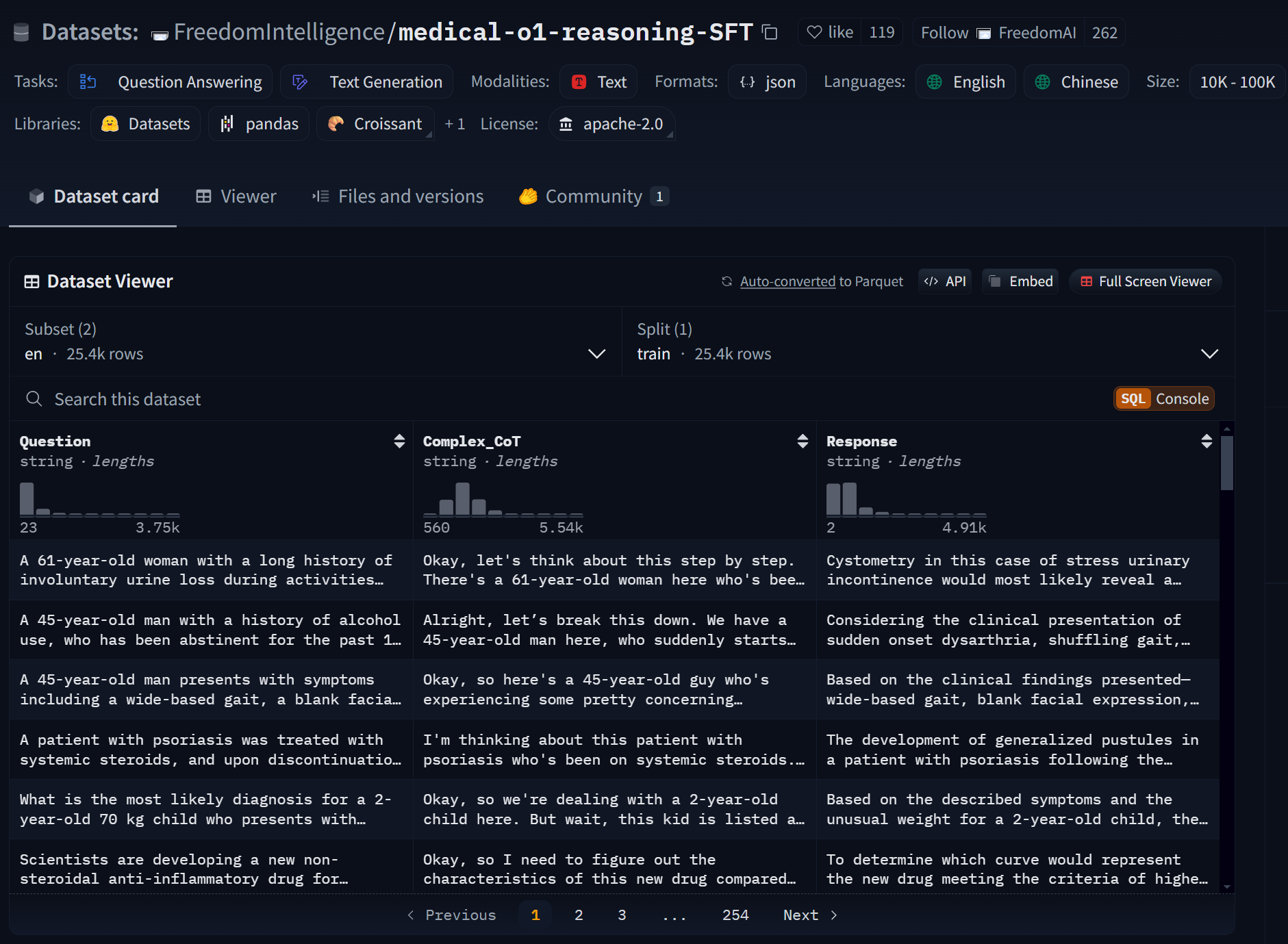
在最小可行性实验中,我们可以只下载500条数据进行微调即可看出效果:
dataset = load_dataset("FreedomIntelligence/medical-o1-reasoning-SFT","en", split = "train[0:500]",trust_remote_code=True)
dataset[0]
然后进行结构化处理:
dataset = dataset.map(formatting_prompts_func, batched = True,)
将数据集整理为如下形式:
dataset["text"][0]
- 数据集保存地址
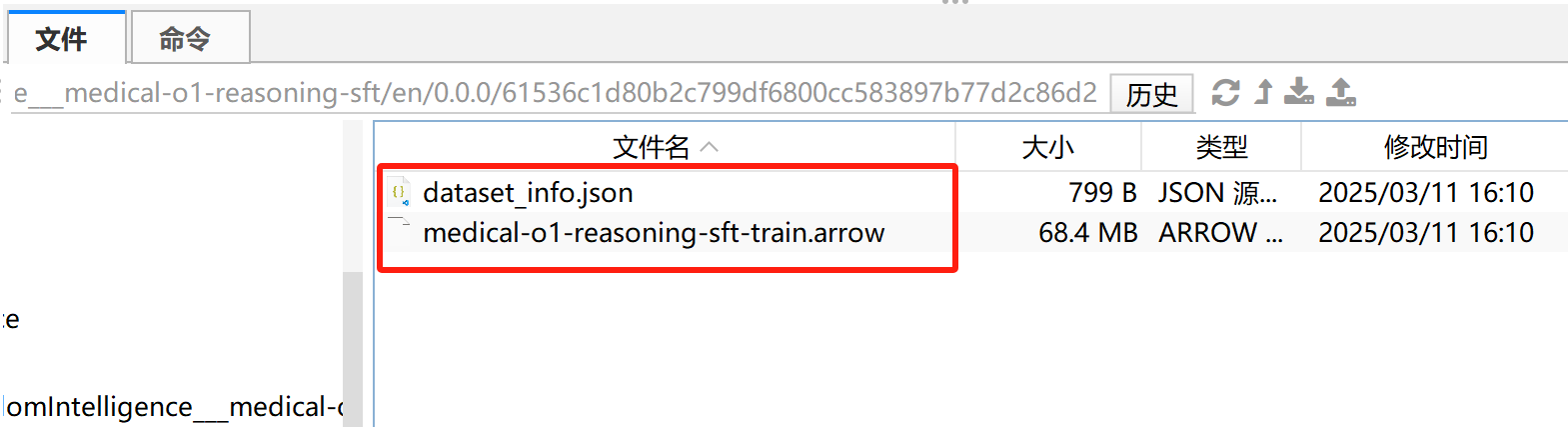
默认情况下数据集保存在主目录下.cache文件夹中,数据文件格式如下所示:
2.开启微调
然后即可把模型设置为微调模式:
model = FastLanguageModel.get_peft_model(
    model,
    r=16,
    target_modules=[
        "q_proj",
        "k_proj",
        "v_proj",
        "o_proj",
        "gate_proj",
        "up_proj",
        "down_proj",
    ],
    lora_alpha=16,
    lora_dropout=0,
    bias="none",
    use_gradient_checkpointing="unsloth",  # True or "unsloth" for very long context
    random_state=3407,
    use_rslora=False,
    loftq_config=None,
)
然后导入相关的库:
from trl import SFTTrainer
from transformers import TrainingArguments
from unsloth import is_bfloat16_supported
创建有监督微调对象:
trainer = SFTTrainer(
    model=model,
    tokenizer=tokenizer,
    train_dataset=dataset,
    dataset_text_field="text",
    max_seq_length=max_seq_length,
    dataset_num_proc=2,
    args=TrainingArguments(
        per_device_train_batch_size=2,
        gradient_accumulation_steps=4,
        # Use num_train_epochs = 1, warmup_ratio for full training runs!
        warmup_steps=5,
        max_steps=60,
        learning_rate=2e-4,
        fp16=not is_bfloat16_supported(),
        bf16=is_bfloat16_supported(),
        logging_steps=10,
        optim="adamw_8bit",
        weight_decay=0.01,
        lr_scheduler_type="linear",
        seed=3407,
        output_dir="outputs",
    ),
)
这段代码主要是用 SFTTrainer 进行 监督微调(Supervised Fine-Tuning, SFT),适用于 transformers 和 Unsloth 生态中的模型微调:
1. 导入相关库
-
SFTTrainer(来自trl库):trl(Transformer Reinforcement Learning)是 Hugging Face 旗下的trl库,提供 监督微调(SFT) 和 强化学习(RLHF) 相关的功能。SFTTrainer主要用于 有监督微调(Supervised Fine-Tuning),适用于LoRA等低秩适配微调方式。
-
TrainingArguments(来自transformers库):- 这个类用于定义 训练超参数,比如批量大小、学习率、优化器、训练步数等。
-
is_bfloat16_supported()(来自unsloth):- 这个函数检查 当前 GPU 是否支持
bfloat16(BF16),如果支持,则返回True,否则返回False。 bfloat16是一种更高效的数值格式,在 新款 NVIDIA A100/H100 等 GPU 上表现更优。
- 这个函数检查 当前 GPU 是否支持
2. 初始化 SFTTrainer 进行模型微调
参数解析
① SFTTrainer 部分
| 参数 | 作用 |
|---|---|
model=model | 指定需要进行微调的 预训练模型 |
tokenizer=tokenizer | 指定 分词器,用于处理文本数据 |
train_dataset=dataset | 传入 训练数据集 |
dataset_text_field="text" | 指定数据集中哪一列包含 训练文本(在 formatting_prompts_func 里处理) |
max_seq_length=max_seq_length | 最大序列长度,控制输入文本的最大 Token 数量 |
dataset_num_proc=2 | 数据加载的并行进程数,提高数据预处理效率 |
② TrainingArguments 部分
| 参数 | 作用 |
|---|---|
per_device_train_batch_size=2 | 每个 GPU/设备 的训练批量大小(较小值适合大模型) |
gradient_accumulation_steps=4 | 梯度累积步数(相当于 batch_size=2 × 4 = 8) |
warmup_steps=5 | 预热步数(初始阶段学习率较低,然后逐步升高) |
max_steps=60 | 最大训练步数(控制训练的总步数,此处总共约消耗60*8=480条数据) |
learning_rate=2e-4 | 学习率(2e-4 = 0.0002,控制权重更新幅度) |
fp16=not is_bfloat16_supported() | 如果 GPU 不支持 bfloat16,则使用 fp16(16位浮点数) |
bf16=is_bfloat16_supported() | 如果 GPU 支持 bfloat16,则启用 bfloat16(训练更稳定) |
logging_steps=10 | 每 10 步记录一次训练日志 |
optim="adamw_8bit" | 使用 adamw_8bit(8-bit AdamW优化器)减少显存占用 |
weight_decay=0.01 | 权重衰减(L2 正则化),防止过拟合 |
lr_scheduler_type="linear" | 学习率调度策略(线性衰减) |
seed=3407 | 随机种子(保证实验结果可复现) |
output_dir="outputs" | 训练结果的输出目录 |
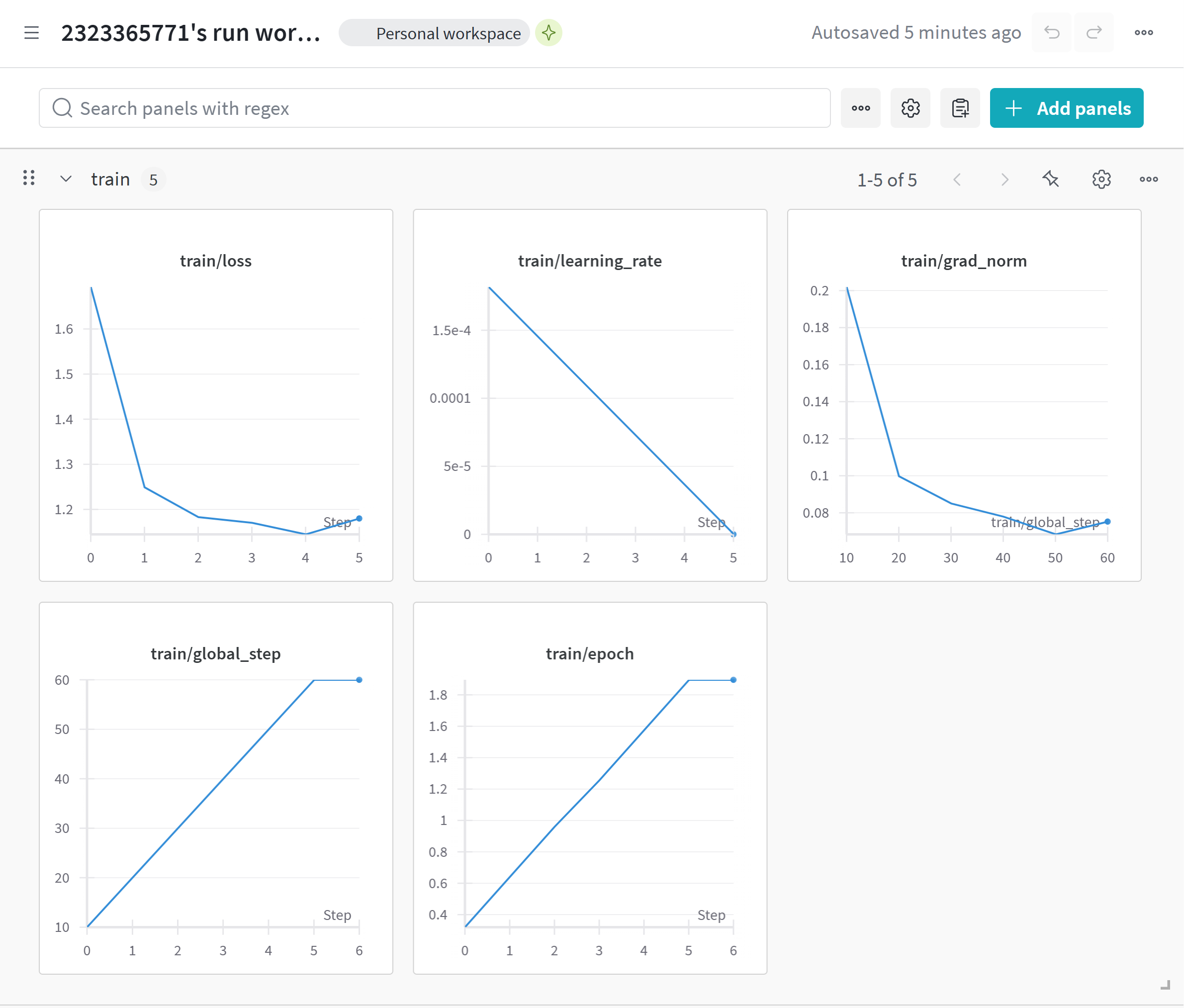
然后设置wandb(可选):
import wandb
wandb.login(key="YOUR_WANDB_API_KEY")
run = wandb.init(project='Fine-tune-QwQ-32B-4bit on Medical COT Dataset', )
然后开始微调:
trainer_stats = trainer.train()
此时wandb中显示内容如下:
trainer_stats
注意,unsloth在微调结束后,会自动更新模型权重(在缓存中),因此无需手动合并模型权重即可直接调用微调后的模型:
FastLanguageModel.for_inference(model)
inputs = tokenizer([prompt_style.format(question_1, "")], return_tensors="pt").to("cuda")

outputs = model.generate(
    input_ids=inputs.input_ids,
    attention_mask=inputs.attention_mask,
    max_new_tokens=2048,
    use_cache=True,
)
response = tokenizer.batch_decode(outputs)
print(response[0].split("### Response:")[1])
测试第二个问题问答效果:
inputs = tokenizer([prompt_style.format(question_2, "")], return_tensors="pt").to("cuda")

outputs = model.generate(
    input_ids=inputs.input_ids,
    attention_mask=inputs.attention_mask,
    max_new_tokens=2048,
    use_cache=True,
)
response = tokenizer.batch_decode(outputs)
print(response[0].split("### Response:")[1])
此时模型认为“左主冠状动脉最可能是该患者症状的罪魁祸首”,但实际上应该是“左前降支(LAD)动脉受累”导致。
能够发现,第一个问题回答更加规范,并且回答正确。但第二个问题仍然回答错误。由此可以考虑继续进行大规模微调。不过在此之前,我们可以将现在小规模微调的模型进行本地保存。
3.模型合并
此时本地保存的模型权重在outputs文件夹中:
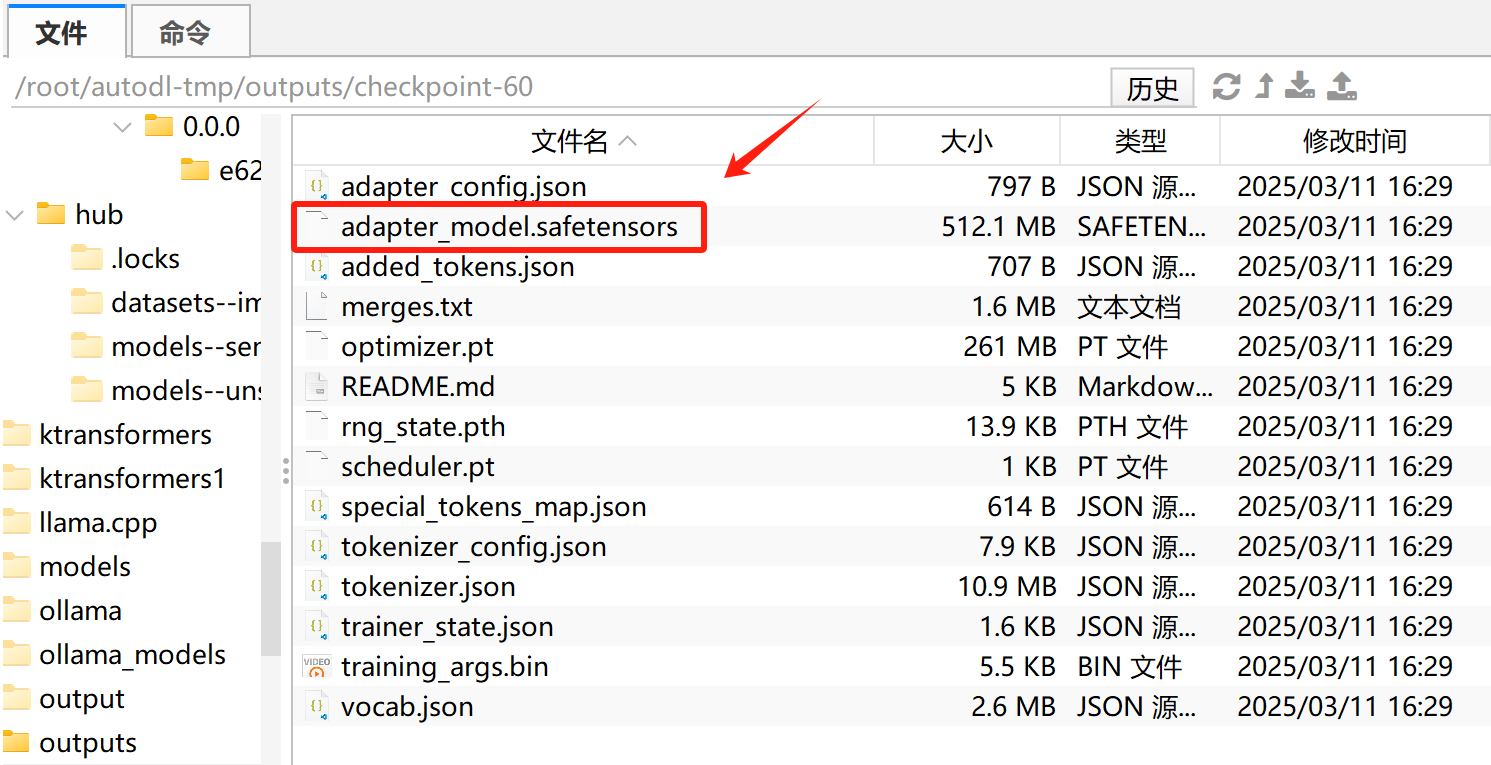
然后可使用如下代码进行模型权重合并:
model.save_pretrained_merged("QwQ-Medical-COT-Tiny", tokenizer, save_method = "merged_4bit",)
# model.save_pretrained_merged("QwQ-Medical-COT-Tiny", tokenizer, save_method = "merged_16bit",)
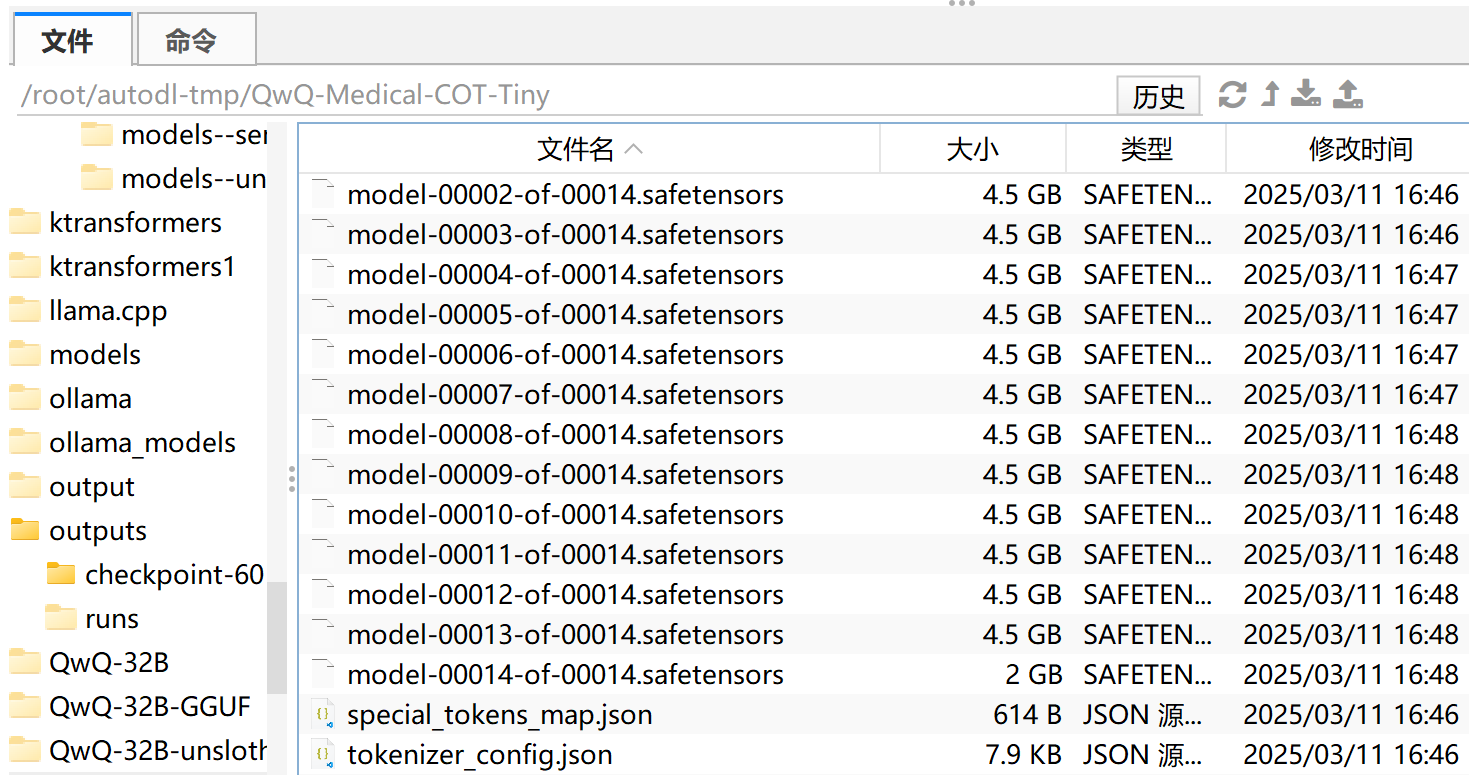
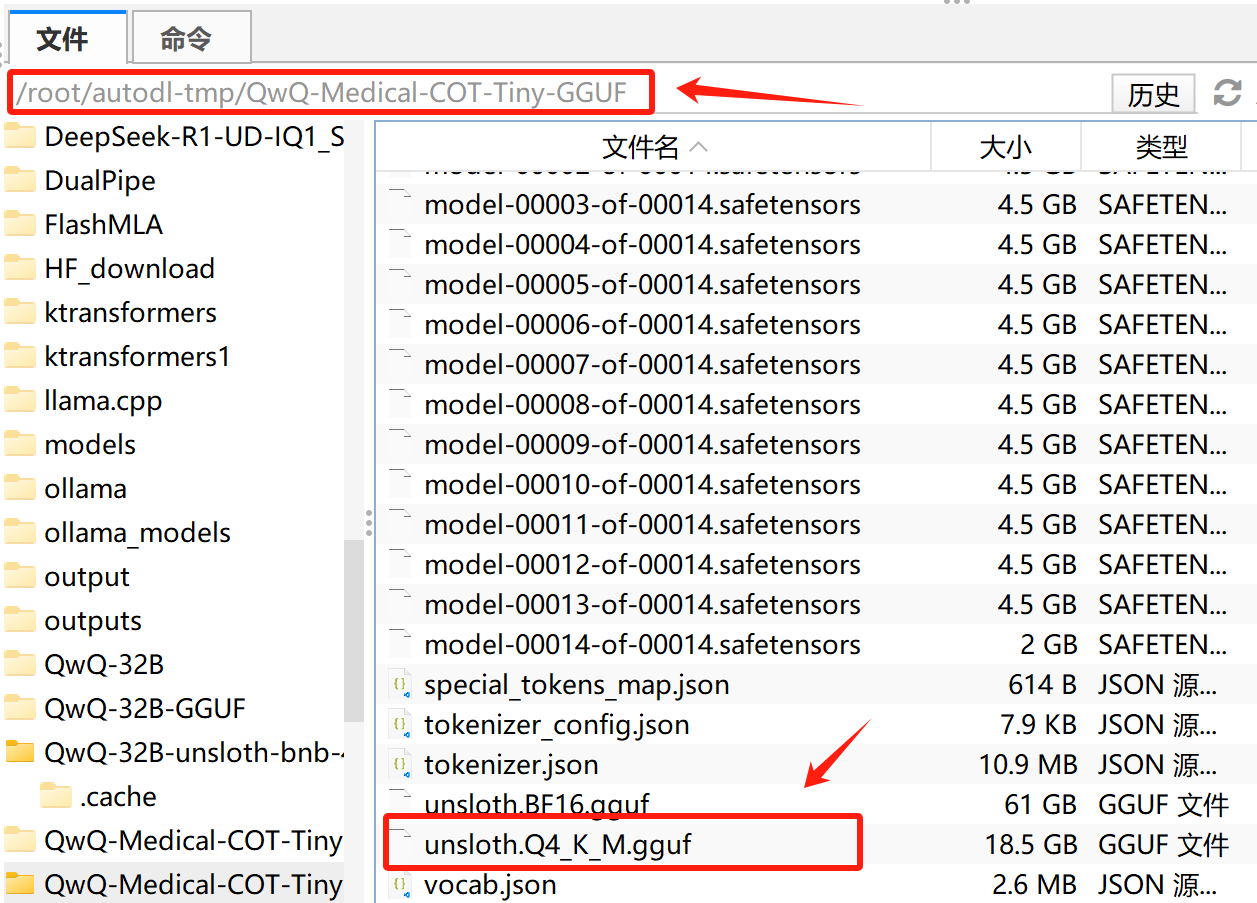
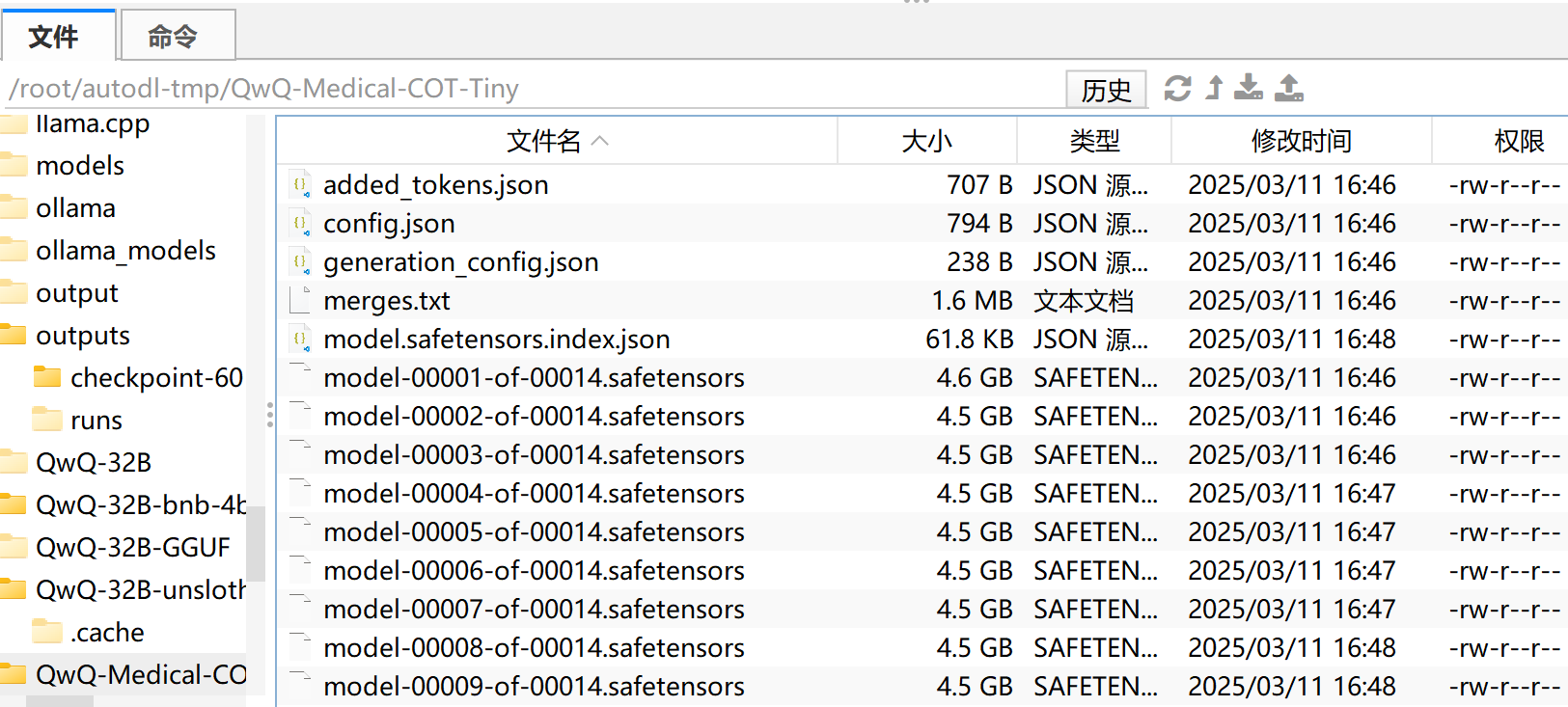
此外,也可以使用如下代码将其保存为GGUF格式,方便使用ollama进行推理。本部分导出与合并需要较长时间(约20分钟左右),请耐心等待。
model.save_pretrained_gguf("QwQ-Medical-COT-Tiny-GGUF", tokenizer, quantization_method = "q4_k_m")
#model.save_pretrained_gguf("dir", tokenizer, quantization_method = "q8_0")
#model.save_pretrained_gguf("dir", tokenizer, quantization_method = "f16")
创建完GGUF文件后如下图所示:
- 微调后模型推理
为避免变量名称冲突,这里需要先重启Jupyter Kernel,然后微调模型保存和推理。
from unsloth import FastLanguageModel
max_seq_length = 2048
dtype = None
load_in_4bit = True
model, tokenizer = FastLanguageModel.from_pretrained(
    model_name = "/root/autodl-tmp/QwQ-Medical-COT-Tiny",
    max_seq_length = max_seq_length,
    dtype = dtype,
    load_in_4bit = load_in_4bit,
)
此时model就是读取进来模型就是微调后模型。
model
tokenizer
然后设置为推理模式:
FastLanguageModel.for_inference(model)
并设置提示词模板:
prompt_style_chat = """请写出一个恰当的回答来完成当前对话任务。

### Instruction:
你是一名助人为乐的助手。

### Question:
{}

### Response:
<think>{}"""
然后即可开始进行对话:
question = "你好,好久不见!"
[prompt_style_chat.format(question, "")]
inputs = tokenizer([prompt_style_chat.format(question, "")], return_tensors="pt").to("cuda")
outputs = model.generate(
    input_ids=inputs.input_ids,
    max_new_tokens=2048,
    use_cache=True,
)
response = tokenizer.batch_decode(outputs)
response
print(response[0].split("### Response:")[1])
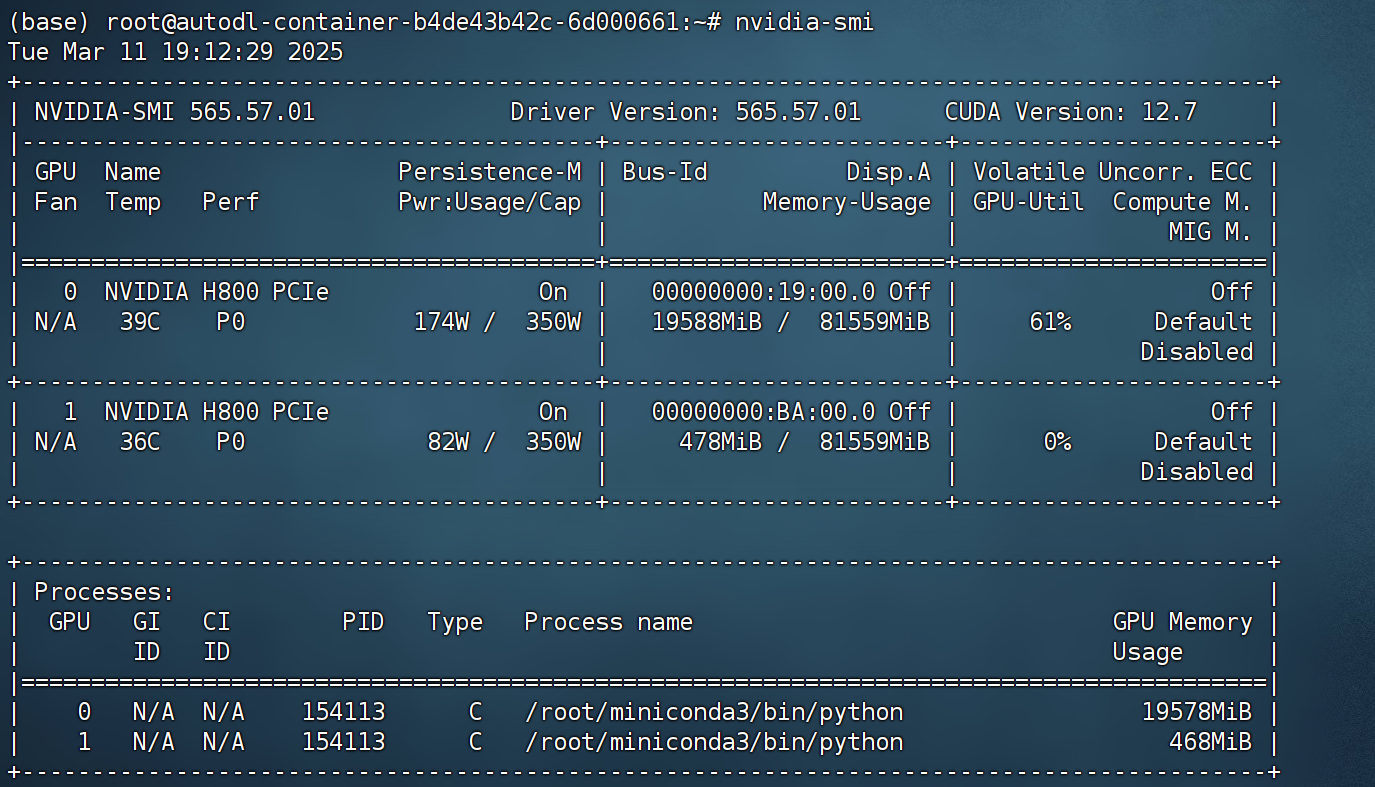
此时显存约20G左右:
- transformers推理
为了避免重复读取占用显存,这里也可以先重启kernel,再执行以下代码:
from modelscope import AutoModelForCausalLM, AutoTokenizer

model_name = "/root/autodl-tmp/QwQ-Medical-COT-Tiny"
model = AutoModelForCausalLM.from_pretrained(
    model_name,
    torch_dtype="auto",
    device_map="auto"
)
tokenizer = AutoTokenizer.from_pretrained(model_name)

prompt = "你好,好久不见!"
messages = [
    {"role": "user", "content": prompt}
]

text = tokenizer.apply_chat_template(
    messages,
    tokenize=False,
    add_generation_prompt=True
)

model_inputs = tokenizer([text], return_tensors="pt").to(model.device)
generated_ids = model.generate(
    **model_inputs,
    max_new_tokens=32768
)

generated_ids = [
    output_ids[len(input_ids):] for input_ids, output_ids in zip(model_inputs.input_ids, generated_ids)
]

response = tokenizer.batch_decode(generated_ids, skip_special_tokens=True)[0]
print(response)
能够看出对话正常。
- ollama推理
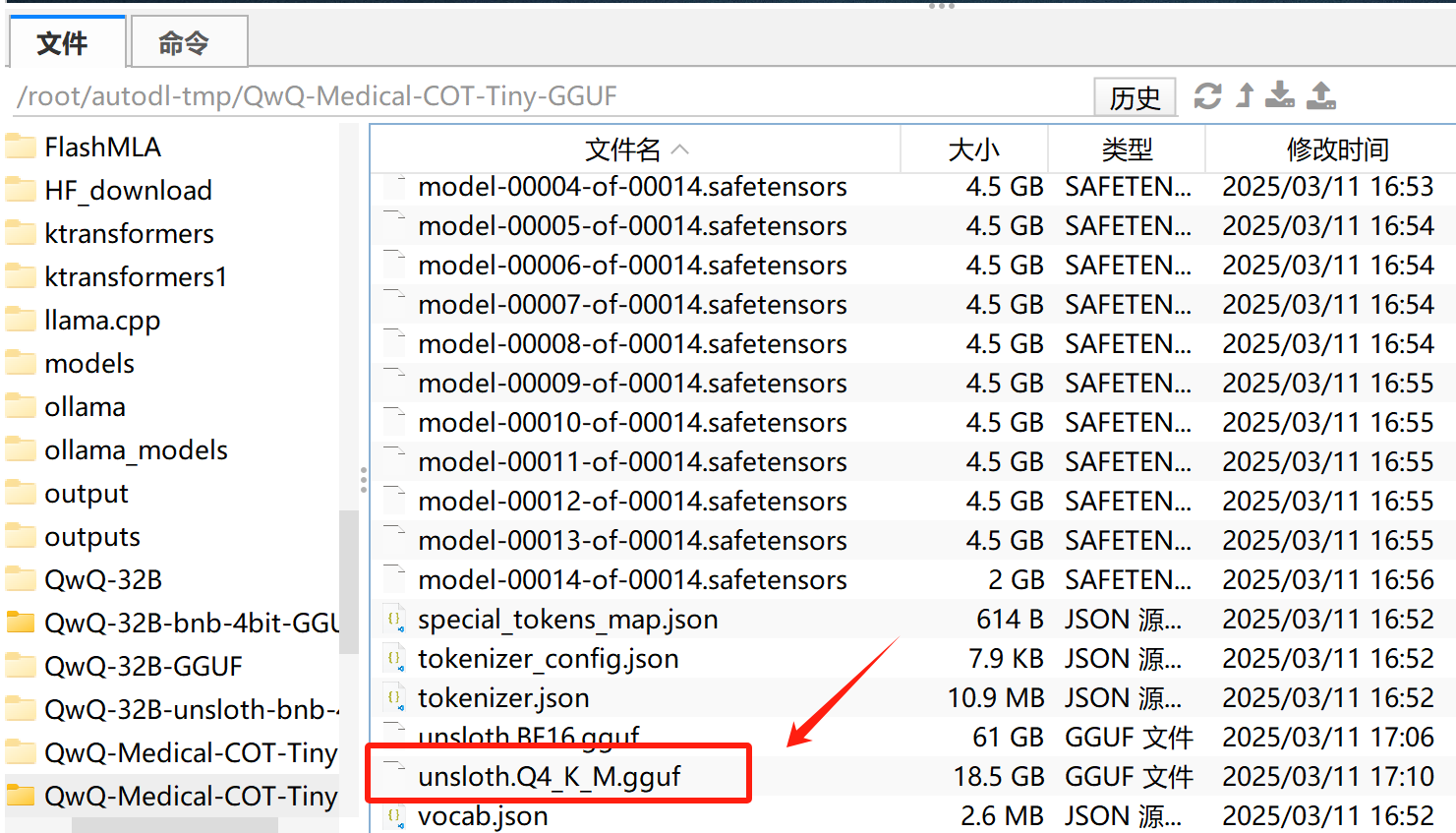
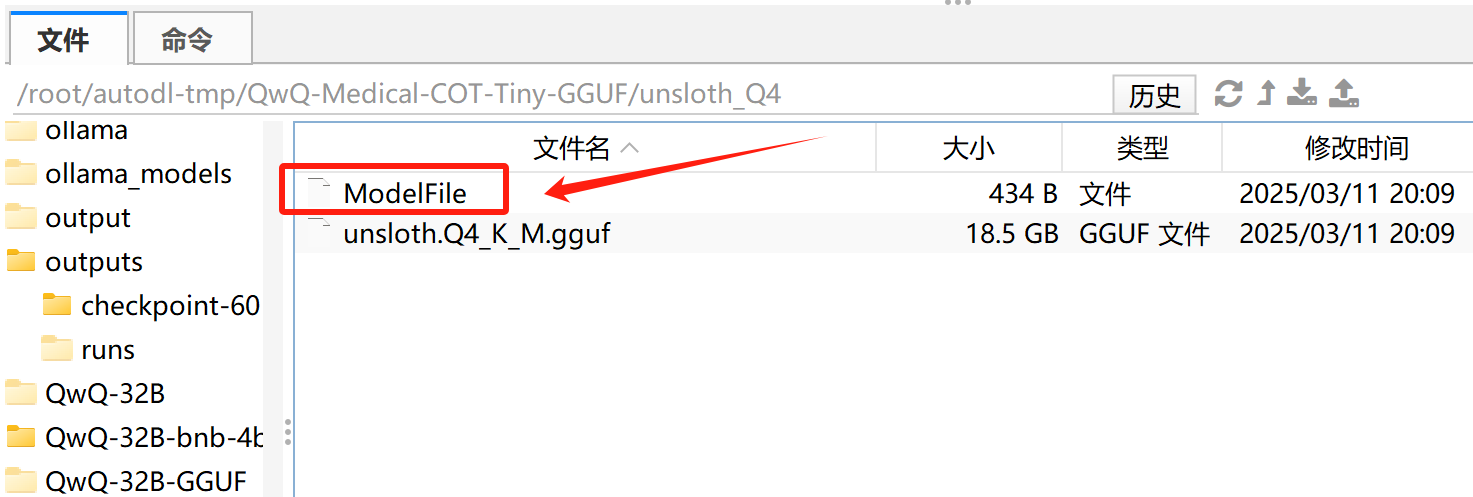
这里我们需要将创建的Q4_K_M模型权重单独拷贝一份,然后再编写ModelFile文件,便于ollama调用。
FENCE0
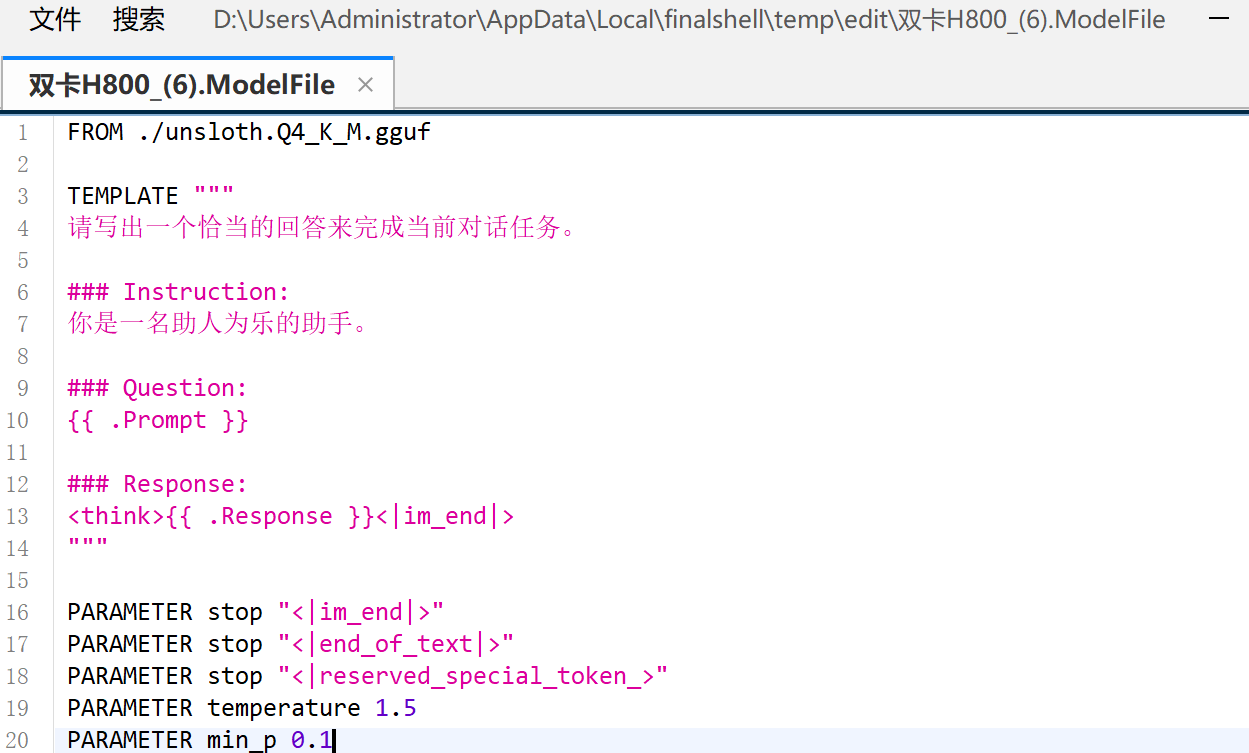
然后创建ModelFile:
并输入如下内容:
FENCE0
保存并退出,然后进行模型注册:
FENCE0


然后即可开始调用了:
from openai import OpenAI
client = OpenAI(
    base_url='http://localhost:11434/v1/',
    api_key='ollama',  # required but ignored
)
prompt = "你好,好久不见!"
messages = [
    {"role": "user", "content": prompt}
]
response = client.chat.completions.create(
    messages=messages,
    model='unsloth_model',
)

print(response.choices[0].message.content)
- vLLM推理
相比之下,vLLM的调用过程就简单多了,只需要在后台开启服务即可:
FENCE0
from openai import OpenAI
openai_api_key = "EMPTY"
openai_api_base = "http://localhost:8000/v1"

client = OpenAI(
    api_key=openai_api_key,
    base_url=openai_api_base,
)

prompt = "你好,好久不见!"
messages = [
    {"role": "user", "content": prompt}
]

response = client.chat.completions.create(
    model="/root/autodl-tmp/QwQ-Medical-COT-Tiny",
    messages=messages,
)

print(response.choices[0].message.content)
三、完整高效微调实验
最后,我们尝试带入全部数据进行高效微调,以提升模型微调效果。
train_prompt_style = """Below is an instruction that describes a task, paired with an input that provides further context.
Write a response that appropriately completes the request.
Before answering, think carefully about the question and create a step-by-step chain of thoughts to ensure a logical and accurate response.

### Instruction:
You are a medical expert with advanced knowledge in clinical reasoning, diagnostics, and treatment planning.
Please answer the following medical question.

### Question:
{}

### Response:
<think>
{}
</think>
{}"""
EOS_TOKEN = tokenizer.eos_token  # Must add EOS_TOKEN


def formatting_prompts_func(examples):
    inputs = examples["Question"]
    cots = examples["Complex_CoT"]
    outputs = examples["Response"]
    texts = []
    for input, cot, output in zip(inputs, cots, outputs):
        text = train_prompt_style.format(input, cot, output) + EOS_TOKEN
        texts.append(text)
    return {
        "text": texts,
    }
此时读取全部数据
dataset = load_dataset("FreedomIntelligence/medical-o1-reasoning-SFT","en", split = "train",trust_remote_code=True)
dataset = dataset.map(formatting_prompts_func, batched = True,)
dataset["text"][0]
model = FastLanguageModel.get_peft_model(
    model,
    r=16,
    target_modules=[
        "q_proj",
        "k_proj",
        "v_proj",
        "o_proj",
        "gate_proj",
        "up_proj",
        "down_proj",
    ],
    lora_alpha=16,
    lora_dropout=0,
    bias="none",
    use_gradient_checkpointing="unsloth",  # True or "unsloth" for very long context
    random_state=3407,
    use_rslora=False,
    loftq_config=None,
)
这里设置epoch为3,遍历3次数据集:
from trl import SFTTrainer
from transformers import TrainingArguments
from unsloth import is_bfloat16_supported

trainer = SFTTrainer(
    model=model,
    tokenizer=tokenizer,
    train_dataset=dataset,
    dataset_text_field="text",
    max_seq_length=max_seq_length,
    dataset_num_proc=2,
    args=TrainingArguments(
        per_device_train_batch_size=2,
        gradient_accumulation_steps=4,
        num_train_epochs = 3,
        warmup_steps=5,
        # max_steps=60,
        learning_rate=2e-4,
        fp16=not is_bfloat16_supported(),
        bf16=is_bfloat16_supported(),
        logging_steps=10,
        optim="adamw_8bit",
        weight_decay=0.01,
        lr_scheduler_type="linear",
        seed=3407,
        output_dir="outputs",
    ),
)
trainer_stats = trainer.train()
这里总共训练约15个小时。
trainer_stats
带入两个问题进行测试,均有较好的回答效果:
question = "A 61-year-old woman with a long history of involuntary urine loss during activities like coughing or sneezing but no leakage at night undergoes a gynecological exam and Q-tip test. Based on these findings, what would cystometry most likely reveal about her residual volume and detrusor contractions?"


FastLanguageModel.for_inference(model)  # Unsloth has 2x faster inference!
inputs = tokenizer([prompt_style.format(question, "")], return_tensors="pt").to("cuda")

outputs = model.generate(
    input_ids=inputs.input_ids,
    attention_mask=inputs.attention_mask,
    max_new_tokens=1200,
    use_cache=True,
)
response = tokenizer.batch_decode(outputs)
print(response[0].split("### Response:")[1])
question = "Given a patient who experiences sudden-onset chest pain radiating to the neck and left arm, with a past medical history of hypercholesterolemia and coronary artery disease, elevated troponin I levels, and tachycardia, what is the most likely coronary artery involved based on this presentation?"


FastLanguageModel.for_inference(model)  # Unsloth has 2x faster inference!
inputs = tokenizer([prompt_style.format(question, "")], return_tensors="pt").to("cuda")

outputs = model.generate(
    input_ids=inputs.input_ids,
    attention_mask=inputs.attention_mask,
    max_new_tokens=1200,
    use_cache=True,
)
response = tokenizer.batch_decode(outputs)
print(response[0].split("### Response:")[1])